

AI tools can be really helpful in WooCommerce. They can answer questions fast, guide buyers, and make the shopping experience feel smoother. However, once wholesale pricing comes into play, things get more sensitive. This is where AI system integration needs to be handled carefully. If the AI gives the wrong price to the wrong user, that is not just a small mistake. It can create confusion, expose restricted pricing, and weaken trust. (And yes, that can get awkward very fast.)
The AI system integration between Wholesale Suite and StoreAgent now works in a more controlled way. Instead of treating pricing as a single open data source, it respects role conditions before responding. That means admins and shop managers can still access full pricing data, while wholesale buyers only see the prices tied to their own role.
In this article, I will walk you through what this feature does, how it works in practice, and why that extra layer of access control makes a real difference.
What Wholesale Suite AI System Integration With StoreAgent Actually Does
StoreAgent connects with pricing data from Wholesale Suite, so it can answer questions about products with more context. That means if someone asks about pricing, the AI can look at what is available and respond based on that product data.
However, this is where things get more important in a wholesale setup. Wholesale pricing is not the same for everyone. Some buyers have special rates based on their role. Some users can see all pricing data because they manage the store. Others should not see wholesale pricing at all. So the AI system integration needs to do more than just “read the price.” It has to read the price through the correct access rules.
What changed in this update
Now, the AI system integration respects those role conditions. In simple terms, that means:
- Admins and shop managers can still access the full pricing picture
- Wholesale buyers only see prices connected to their own wholesale role
- Regular users and guests do not see restricted wholesale pricing
How The Integration Works In Practice
This update does not look like one of those features where you turn on a brand-new setting and call it a day. It works more like a behind-the-scenes improvement to how StoreAgent reads and responds to Wholesale Suite pricing. So the easiest way to look at it is this. If your wholesale pricing rules are already in place, the AI system integration is there to follow those rules when people ask pricing-related questions.
Step 1: Activate StoreAgent in your store
First, make sure Wholesale Prices is enabled and up to date in WooCommerce. That includes having your wholesale pricing rules in place on the products you want StoreAgent to read. Secondly, make sure you have StoreAgent AI installed. If you have not installed it yet, here’s how you can do it: Getting Started with StoreAgent.
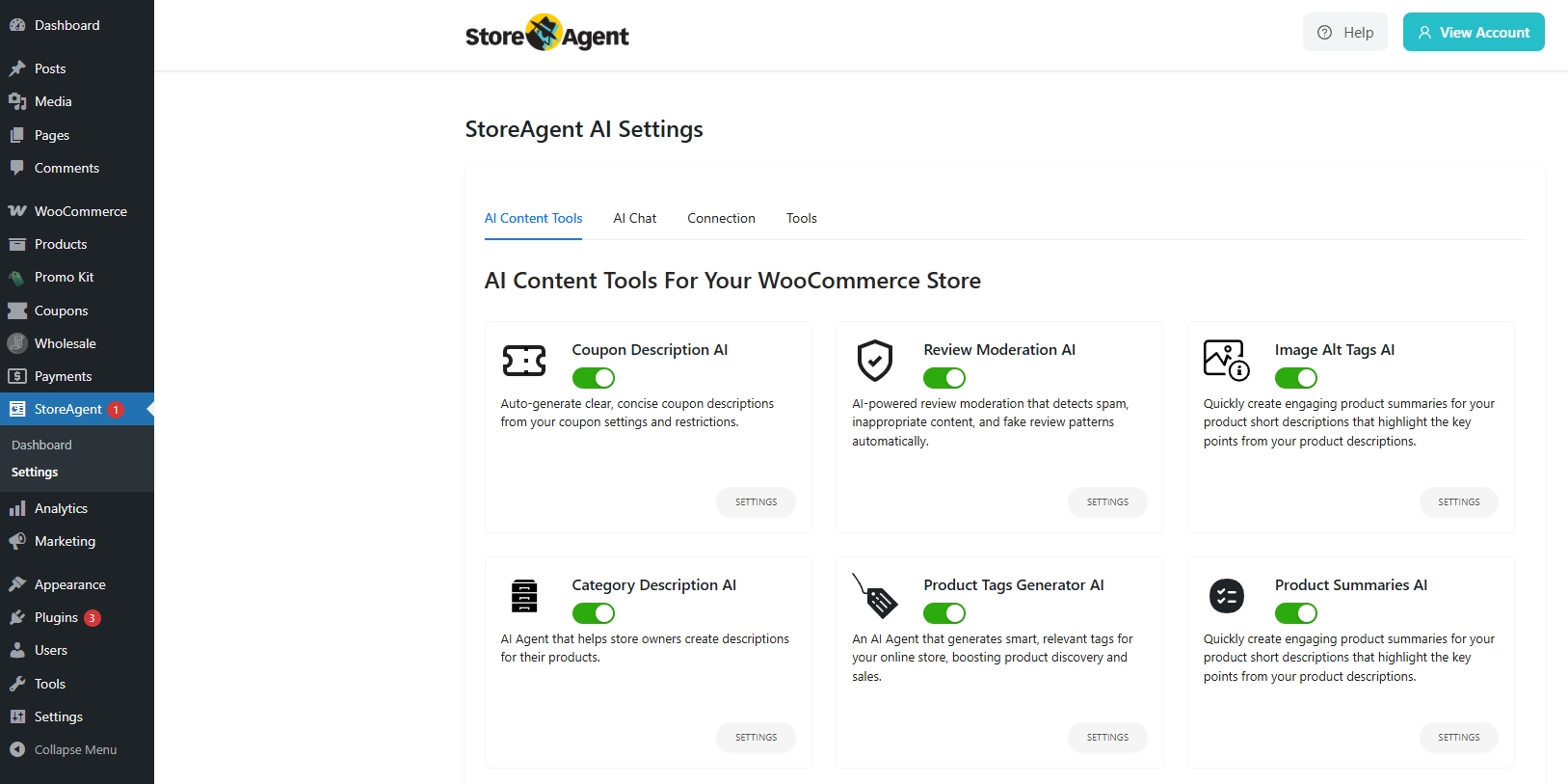
This matters because AI system integration depends on the pricing and role data already set up in your store. If StoreAgent is not present, the integration has nothing useful to pull in.
Step 2: Go to StoreAgent product settings
In your WordPress admin, go to: StoreAgent > Settings > Chat Widget > Post Types.
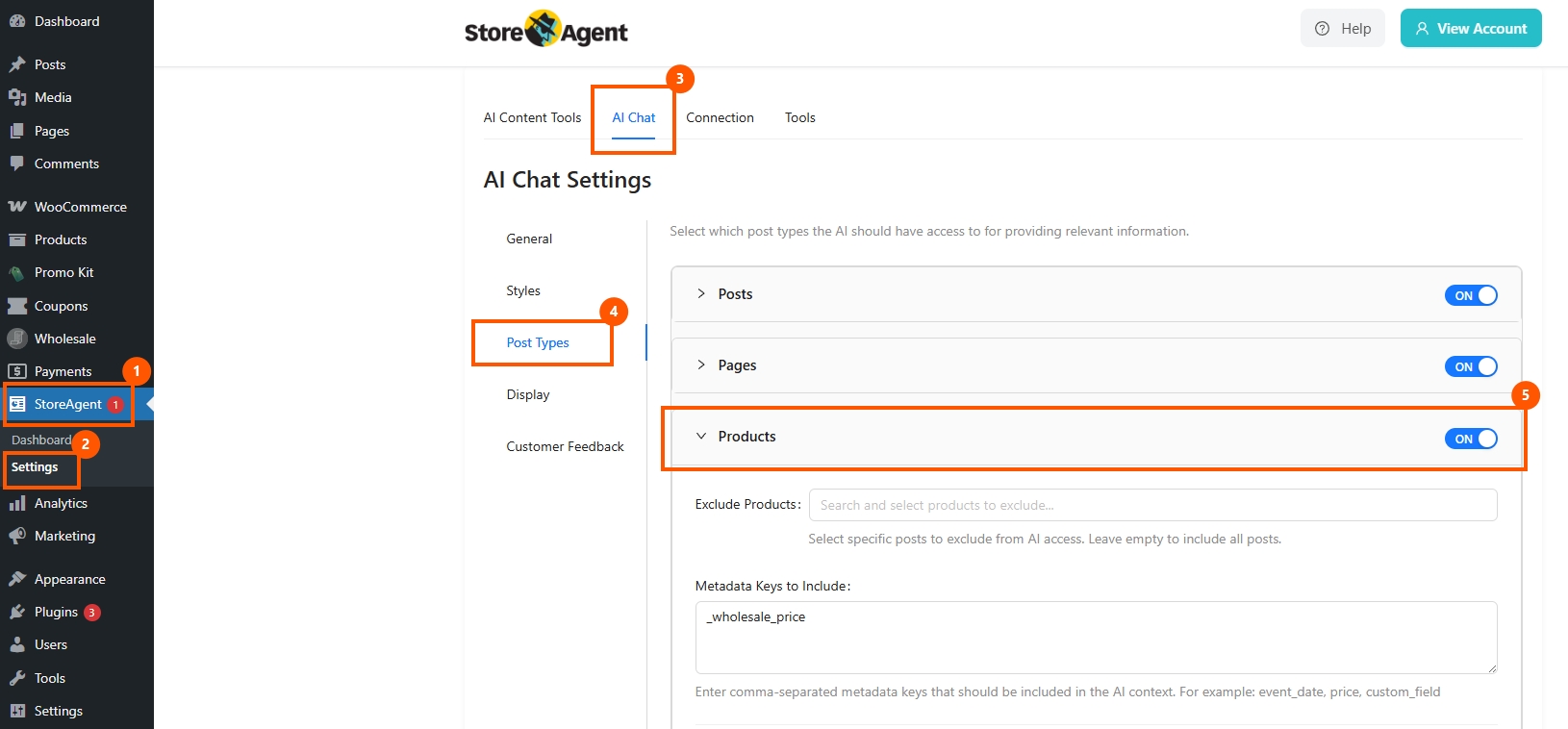
From there, open the Products section. This is where StoreAgent controls what product-related data gets included in the AI system.
Step 3: Turn on “Include All Wholesale Suite Data”
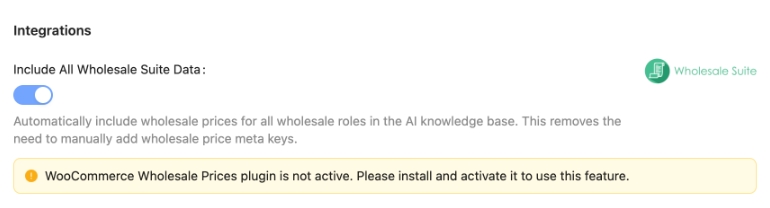
Inside the product settings, look for the toggle labeled: Include All Wholesale Suite Data
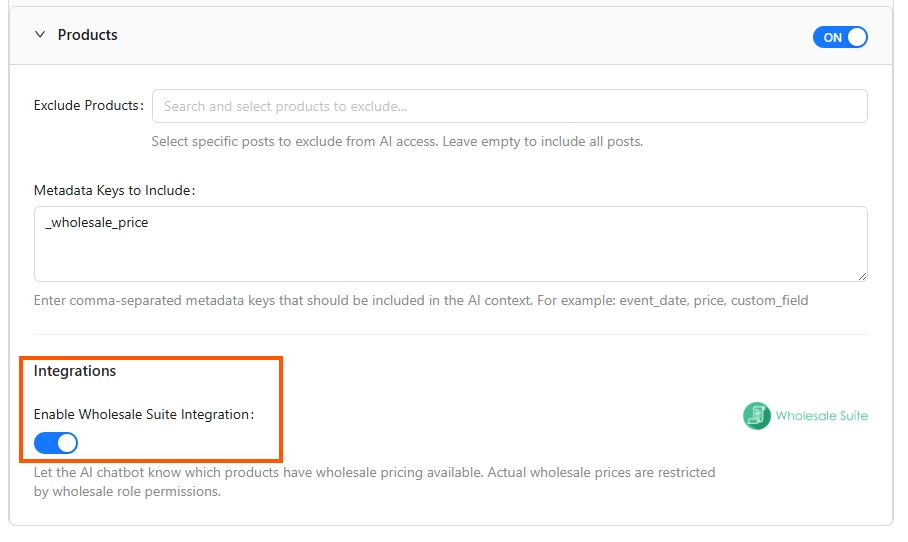
Once you switch that on, StoreAgent can include wholesale-related pricing and metadata from Wholesale Suite inside its AI product context. That means the chatbot has access to wholesale pricing information when responding to product-related questions.
If WooCommerce Wholesale Prices is not active, the setting will not work the same way, and the screen shows a notice telling you to install and activate the plugin first.
Step 4: Save the settings and upload product data
After enabling the toggle, save your settings. Then trigger a product data upload, or edit a product so StoreAgent refreshes its AI memory with the updated wholesale data.
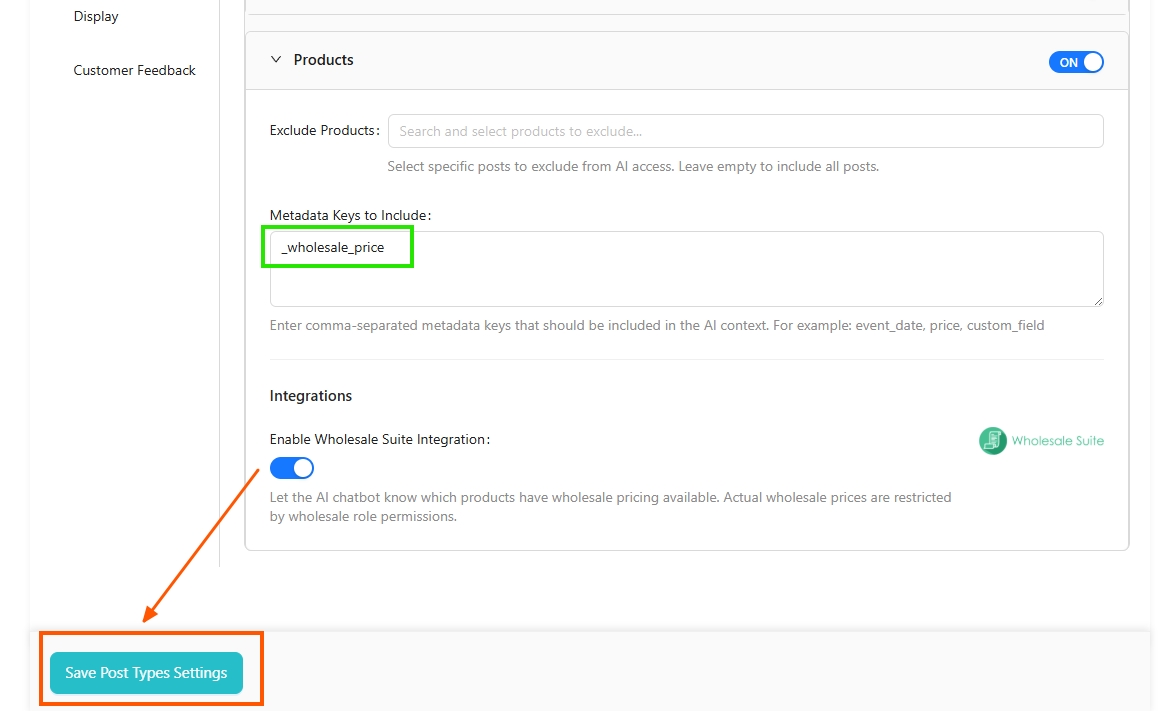
This is the step that actually pushes the wholesale information into the AI system integration, so the chatbot can work with that data in future responses.
Step 5: Confirm pricing follows role conditions
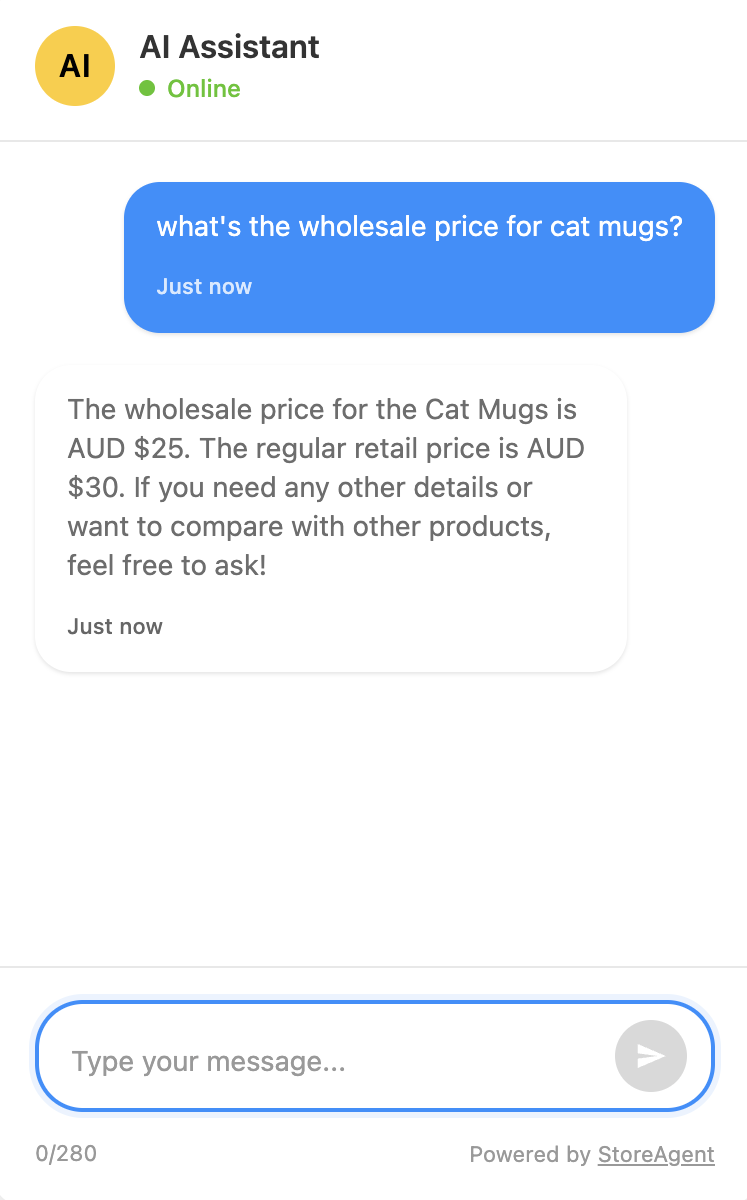
Now check if the AI response matches the user’s actual access level.
That means:
- Admins and shop managers should still be able to view the full pricing picture
- Wholesale users should only see pricing for their own role
- Regular customers and guests should not see wholesale-only pricing
Takeaways
If you are running a wholesale store, pricing is not something you can afford to treat casually. That is why this AI system integration matters more than it might at first seem.
Here’s how you can integrate StoreAgent to your wholesale store:
- Activate StoreAgent in your store
- Go to StoreAgent product settings
- Turn on include all Wholesale Suite data
- Save the setting and upload product data
- Confirm pricing follows role conditions
What I like about this update is that it solves the problem in a practical way. It does not ask you to rebuild your pricing setup. It works with the rules you already set in Wholesale Suite and helps StoreAgent follow those same rules when responding. So instead of AI acting like a loose extra layer on top of your store, it becomes a more reliable part of the buying experience.
And honestly, that is what makes this AI system integration worth paying attention to. If AI is going to help with wholesale selling, it has to respect how wholesale selling really works. This update pushes things in that direction.
Frequently Asked Questions
Do I need to set up wholesale pricing first?
Yes. Your wholesale roles and pricing rules should already be set in Wholesale Suite before this feature can work properly. The AI system integration follows the pricing logic already active in your store.
What is metadata in this setup?
Metadata is the extra product information stored behind the scenes. In this case, it can include wholesale prices, role-based pricing details, and other custom wholesale-related fields associated with the product.
Does this feature change my wholesale pricing setup?
No. It does not replace your pricing rules. It helps the AI system integration follow the same pricing rules you already set in Wholesale Suite, which makes StoreAgent responses more accurate for each user.
Will guests or regular shoppers see wholesale-only pricing?
They should not. This AI system integration is designed to respect role conditions, so regular shoppers and guests should not get access to restricted wholesale pricing.



