
When someone who is already logged in opens your Wholesale Registration Page, Wholesale Lead Capture sends them to My Account instead. That stops existing customers registering a second account by mistake. If you need the form to stay visible, there are two ways to do it: a setting for administrators and shop managers, and a code snippet for everyone else.
Requirements
- WooCommerce Wholesale Lead Capture installed and activated, with a page set as your Wholesale Registration Page.
- An administrator account. The code option also needs somewhere safe to add PHP, such as a child theme or a code snippets plugin.
Option 1: let administrators and shop managers see the form
This is the usual reason for asking. You want to check the registration form yourself while logged in as an admin. There is a setting for it, so no code is needed.
- Go to Wholesale > Settings in your WordPress admin.
- Open the Wholesale Lead Capture tab, then the General sub-tab.
- Under Wholesale Registration, tick Allow logged-in admin and shop managers to view registration page.
- Click Save Changes.
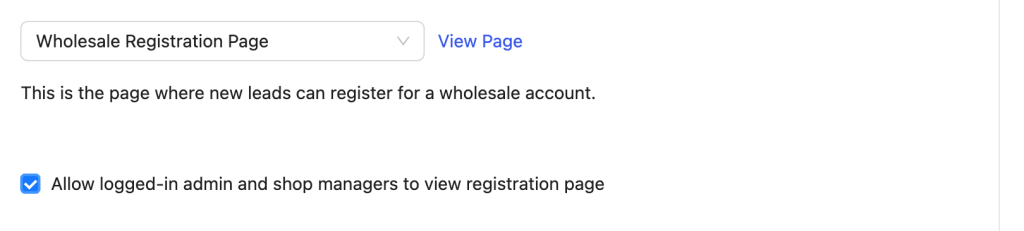
The setting applies to accounts that can manage options or manage WooCommerce, which means administrators and shop managers. Every other logged-in customer still goes to My Account. For those, use the snippet below.
Option 2: remove the redirect for all logged-in users
To stop the redirect for every logged-in visitor, remove the action that performs it. Add this to a child theme, a site-specific plugin, or a code snippets plugin.
add_action(
    'init',
    function () {
        if ( ! class_exists( 'WWLC_User_Account' ) ) {
            return;
        }

        $wwlc_user_account = WWLC_User_Account::instance();

        remove_action( 'wp', array( $wwlc_user_account, 'registration_page_redirect_logged_in_user' ) );
    }
);
The init wrapper matters. Wholesale Lead Capture loads on after_setup_theme, which runs after your theme’s functions.php. Call WWLC_User_Account::instance() straight from functions.php and the class does not exist yet, so you get a fatal error or a removal that quietly does nothing.
Removing the redirect does not show the registration fields to someone who is already logged in. They see their name and a log out link. To register a second account they still have to log out first.
Frequently asked questions
Which option should I use?
Use the setting if you only want to preview the form as an admin or shop manager. Use the snippet if ordinary logged-in customers need to reach the page, for example when a colleague registers from a shared computer.
I added the snippet and nothing changed. Why?
Check where you put it. If it runs at the top level of functions.php it fires before the plugin loads, so there is nothing to remove yet. Wrap it in an init callback as shown above.
Why does the form still not appear after I remove the redirect?
That is expected. The redirect and the form output are separate. A logged-in visitor sees their name and a log out link instead of the fields. They need to log out to register another account.
Does the setting work for wholesale customers?
No. It covers accounts that can manage options or manage WooCommerce, so administrators and shop managers. Everyone else follows the snippet path.
Need help?
If you have a question or run into any issues, we’re here to help.
- Premium users: Open a support ticket
- Free users: Visit our community forum

