If you build your store with Elementor, your wholesale customers often check their cart in the Elementor Pro Menu Cart widget, the cart icon that opens a side panel. That panel must show wholesale prices, not retail prices. This article explains how WooCommerce Wholesale Prices Premium works with the Menu Cart, what you need, and how to check it on your store.
What you need
- WooCommerce Wholesale Prices and WooCommerce Wholesale Prices Premium. Use Premium 2.1.5 or later.
- Elementor and Elementor Pro, with the Menu Cart widget on your site, for example in your header.
- At least one wholesale customer to test with.
How the Menu Cart shows wholesale prices
The Menu Cart widget uses its own mini cart template. That template skips the step where Wholesale Prices normally applies wholesale pricing to the mini cart. Without help, a wholesale customer could see retail prices for each item in the side panel.
Wholesale Prices Premium fixes this for you. When a wholesale customer’s Menu Cart loads, Premium recalculates the cart first, so the side panel shows wholesale prices for each item and in the subtotal. Each item shows its regular price crossed out, with a Wholesale Price: line under it. From Premium 2.1.5, the subtotal on the Menu Cart button is also correct when the page first loads.
This works automatically. There is no setting to turn on. Retail customers and guests are not affected, because the recalculation only runs for logged-in wholesale customers.
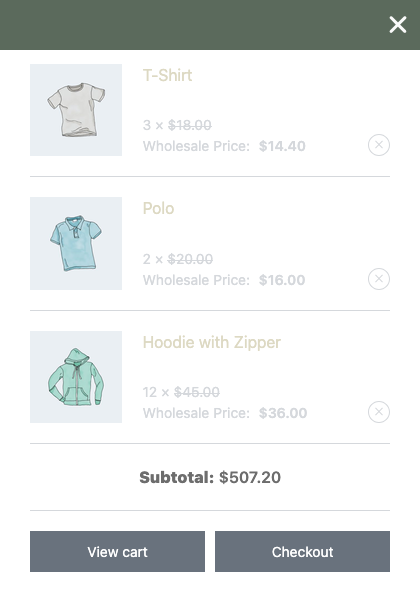
When the integration runs
The fix applies when Elementor Pro uses its own mini cart template. You control this in Elementor → Settings → Integrations, in the WooCommerce section, with the Mini Cart Template setting.

If Mini Cart Template is Enable, Premium recalculates the Menu Cart as described above. If it is Disable, your theme’s or WooCommerce’s mini cart is used instead, and Wholesale Prices already shows wholesale prices there.
Check the Menu Cart on your store
- Log in to your store as a wholesale customer.
- Add a product that has a wholesale price to the cart.
- Open a page that has the Menu Cart widget.
- Click the Menu Cart icon to open the side panel.
- Compare the item prices and the subtotal with the wholesale prices you set.
Then log out and repeat the steps as a retail customer. The side panel should show retail prices.
Wholesale Suite shortcodes on Elementor pages
You can also place the wholesale order form and the wholesale registration form on pages you build with Elementor. Add the shortcode with Elementor’s Shortcode widget. If the order form does not load on an Elementor page, see Troubleshooting the Wholesale Order Form Shortcode. For registration page shortcodes, see How To Create Multiple Wholesale Registration Pages (Registration Form Shortcode Options).
Troubleshooting
The Menu Cart shows retail prices to a wholesale customer. Check that the cart meets your wholesale minimum order requirements. Until it does, the cart uses retail prices. See How to Set Minimum Order Requirements for Wholesale Customers. If the minimum is met, update WooCommerce Wholesale Prices Premium to 2.1.5 or later. Then check that the customer is logged in and has a wholesale role. If you use a caching plugin, clear its cache and reload the page.
The Menu Cart button shows a different subtotal from the side panel. Update WooCommerce Wholesale Prices Premium to 2.1.5 or later. Earlier versions only recalculate when the side panel loads, so the button subtotal can show the retail total on the first page load.
Frequently asked questions
Do I need to turn anything on in Wholesale Suite?
No. The Elementor integration runs automatically when Wholesale Prices Premium and Elementor Pro are both active and Mini Cart Template is set to Enable.
Does this change prices for retail customers?
No. The recalculation only runs for logged-in wholesale customers.
Do I need Elementor Pro?
The Menu Cart widget is part of Elementor Pro. Without it, there is no Elementor mini cart to fix, and your theme’s or WooCommerce’s mini cart shows wholesale prices.
What’s next
- Getting started with WooCommerce Wholesale Prices Premium
- How to use Wholesale Suite with WooCommerce blocks
- Troubleshooting the Wholesale Order Form Shortcode
Need help?
If you have a question or run into any issues, we’re here to help.
- Premium users: Open a support ticket
- Free users: Visit our community forum