

Offering payment plans to wholesale customers is a great way to win larger orders and build long-term relationships. But what happens when a customer falls behind on their existing invoices and tries to open a new payment plan? Without any safeguards, you’re essentially extending more credit to someone who hasn’t paid what they already owe. That’s exactly the problem our new payment plan availability restriction feature solves.
Now, Wholesale Payments lets you automatically restrict payment plan availability for customers with overdue invoices. This ensures that new credit is only extended to customers who are current on their obligations.
Problem Overview
Before this feature, payment plan availability was unconditional. Any wholesale customer could select a payment plan at checkout regardless of their payment history. A customer with three overdue invoices from previous orders could still open a fourth, fifth, or sixth payment plan without any friction.
For store owners, this created a compounding risk. Not only were you chasing unpaid invoices, but the total exposure kept growing with every new order. The lack of controls around payment plan availability meant your accounts receivable could spiral out of control before you even noticed.
How Payment Plan Availability Restriction Works
The new feature introduces an overdue balance check that runs automatically at checkout. Here’s the logic:
- The system checks whether the current customer has any invoices that are past their due date by more than a configurable threshold (measured in days).
- It examines both invoice storage paths, non-auto-charge orders (tracked via WooCommerce order meta) and auto-charge orders (tracked in the plugin’s dedicated database table), to ensure complete coverage.
- If overdue invoices exceed the threshold, the system restricts the availability of payment plans based on your chosen enforcement action.
This means payment plan availability is now directly tied to a customer’s payment behavior. Customers who pay on time continue to enjoy full access. Customers who don’t are automatically flagged and restricted.
Configuring Payment Plan Availability Restrictions
Setting up the restriction is straightforward. Navigate to WP Admin → Wholesale Settings → Wholesale Payments → Checkout and look for the new Overdue Restrictions section.
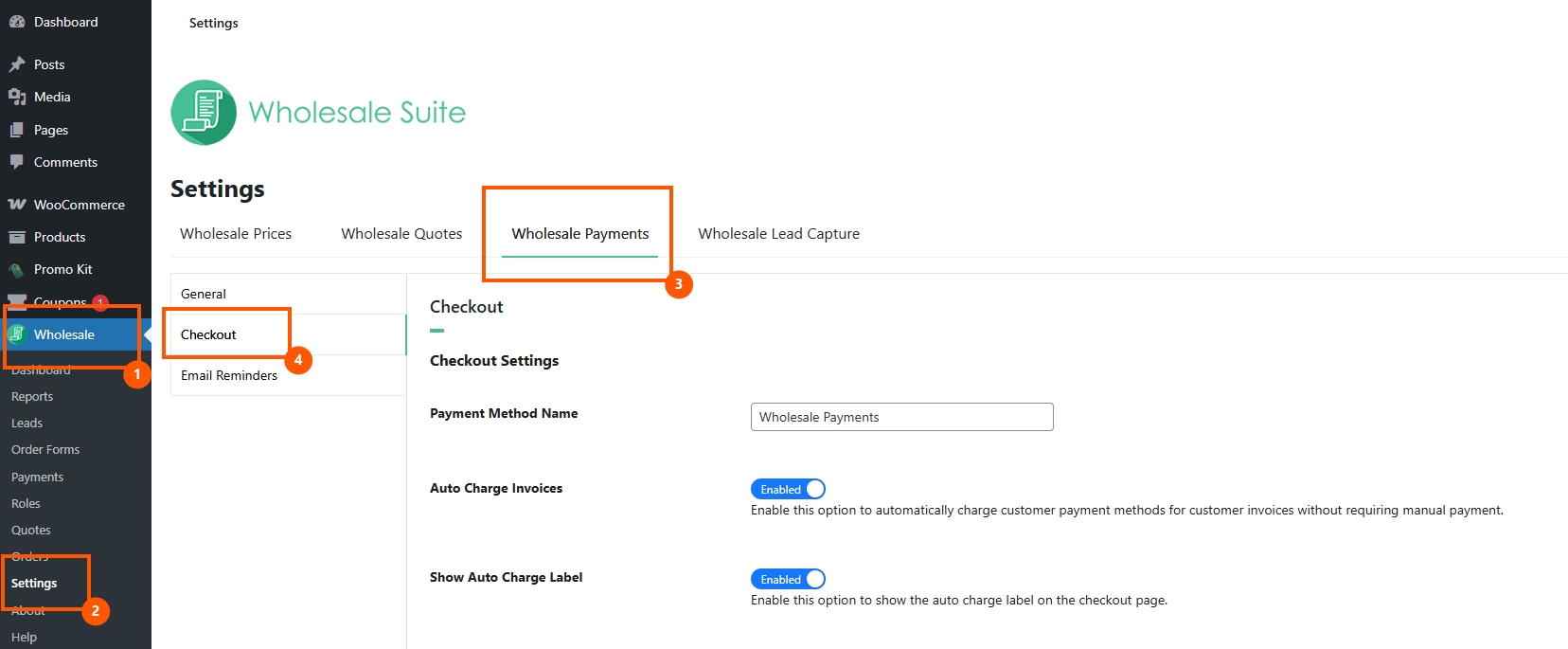

You’ll find three settings:
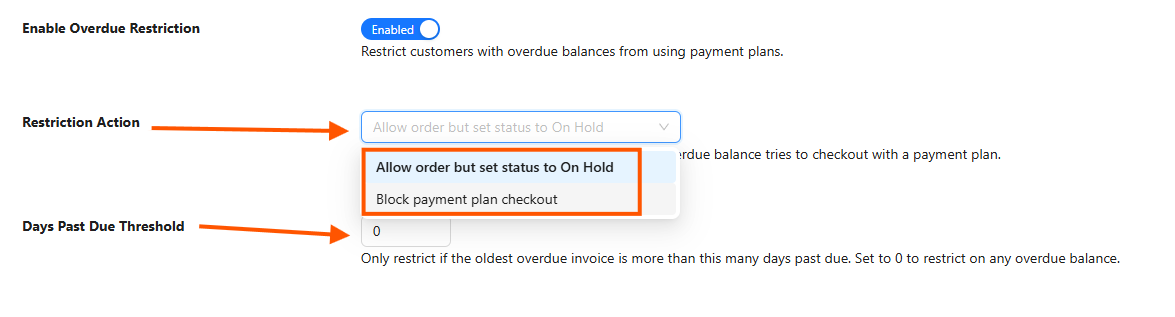
1. Enable Overdue Restriction
This toggle activates or deactivates the payment plan availability restriction. When disabled, all customers have unrestricted access to payment plans regardless of their overdue status.
2. Restriction Action
Choose how you want to restrict payment plan availability when a customer is overdue:
- Block payment plan checkout (hide payment method) — This is the strictest option. The Wholesale Payments payment method is completely hidden from the customer at checkout. They can’t see it, select it, or place a new payment plan order. Other payment methods remain available, so the customer can still pay in full using alternative methods. This approach makes the availability of payment plans conditional on a clean payment record.
- Allow order but set status to On Hold — This is the softer approach. The Wholesale Payments method remains visible, but the customer sees a warning notice explaining that they have an outstanding overdue balance. If they proceed with the order, it’s created with an “On Hold” status rather than processing normally. This preserves payment plan availability in a limited form while giving you the chance to review the order before fulfillment.
3. Days Past Due Threshold
This setting defines how many days past the due date an invoice must be before it triggers the restriction. The comparison uses a strictly greater-than logic:
- The threshold set to 0 means any overdue invoice (even one day late) restricts payment plan availability.
- Setting it to 7 means invoices must be overdue by 8 or more days before the restriction kicks in.
- Setting it to 30 gives customers a full month of grace before their payment plan availability is affected.
This threshold gives you fine-grained control over how aggressively you want to enforce the restriction.
What Your Customers Experience
Block behavior
When payment plan availability is restricted via the block action and a customer has overdue invoices that exceed the threshold, they reach the checkout page and don’t see the Wholesale Payments option. The other payment gateways (bank transfer, check payments, cash on delivery, etc.) remain visible. The customer may need to pay their overdue invoices before the Wholesale Payments option reappears.
On hold behavior
When payment plan availability is restricted via the on-hold action, the customer can still proceed, but the resulting order is flagged for your review. An order note has been added, documenting that the order was placed on hold due to the customer’s overdue balance.
My Account notice
In addition to checkout restrictions, the feature adds an overdue balance notice on the customer’s My Account → Orders page when the restriction applies.
This ensures customers are aware of their overdue status even when they’re not actively checking out, and reinforces that payment plan availability depends on keeping their invoices current.
Payment Plan Availability & Other Restrictions
The payment plan availability restriction based on overdue balance operates independently from the credit limit restriction feature. Both features evaluate different criteria:
- Payment plan availability (overdue) checks whether a customer has invoices past their due date.
- Credit limit restriction checks whether a customer’s total outstanding balance exceeds a defined dollar amount.
A customer could trigger one restriction, both, or neither. The features do not conflict; they complement each other. If both are active and a customer violates both conditions, the most restrictive behavior applies (for example, if the overdue restriction is set to “block” and the credit limit is set to “on hold,” the “block” takes precedence because the payment method is hidden entirely).
Start Protecting Your Store Today
Restricting payment plan availability based on an overdue balance is one of the most requested features among wholesale store owners, and it’s now available in the latest version of Wholesale Payments.
Here’s what to look out for:
- How payment plan availability restriction works
- How to configure payment plan availability restrictions
- What your customers experience
- Other restrictions
Stop extending new credit to customers who haven’t paid what they owe. Enable the overdue restriction under Wholesale Settings → Wholesale Payments → Checkout, configure your preferred enforcement behavior and days threshold, and let the system manage payment plan availability automatically.
Your accounts receivable will thank you!
Frequently Asked Questions
Does restricting payment plan availability affect orders that are already placed?
No. The restriction applies only at checkout. Existing orders and their associated payment plans continue to function normally regardless of the customer’s overdue status. Payment plan availability is evaluated fresh each time a customer visits the checkout page.
What if a customer pays their overdue invoices?
Once the overdue invoices are paid and no remaining invoices exceed the days threshold, payment plan availability is automatically restored. The customer will see the Wholesale Payments option at checkout again without any manual intervention from the store admin.
Does this work with WooCommerce Blocks checkout?
Yes. Payment plan availability restrictions work identically across both the classic WooCommerce checkout and the Blocks-based checkout. Warning notices are rendered appropriately in both environments.
Can I test the restriction without affecting real customers?
Yes. You can enable the feature, set it to the on-hold behavior, and test with a specific customer account. The on-hold action is non-destructive — orders are still created, just flagged for review. This lets you verify that payment plan availability is being restricted correctly before switching to the block action.
What order statuses are checked for overdue invoices?
The system checks orders with statuses of processing, on-hold, and pending. Completed, cancelled, and refunded orders are excluded from the overdue check and therefore don’t affect payment plan availability.



