

Most store owners think wishlists are just a “save for later” feature. I used to think that too. (Like, okay, customers save stuff, then they forget it, the end.) But once you look more closely, a wishlist can tell you what people want and what they might buy when the timing is right. That is why we released SaveTo Wishlist Pro.
In this guide, I’ll walk you through what SaveTo Wishlist Pro does, why it is useful, and how to use its main features without overcomplicating your workflow.
Let’s begin!
Why SaveTo Wishlist Pro?
If you are using wishlists right now, you already know the basic value. People save items because they are interested, but they are not ready yet. The problem is this: most stores stop there. They let saved items sit, and they hope the shopper comes back. (And yes, hope is not a strategy!)
That is exactly why SaveTo Wishlist Pro exists. It helps you do something with wishlist intent, instead of letting it collect dust.
SaveTo Wishlist Lite helps shoppers save. SaveTo Wishlist Pro helps you sell.
The free version is great for the customer experience. It lets shoppers save products without friction, and that is a solid start. So if you are using SaveTo Wishlist Lite, you already have these helpful basics:
- Multiple lists so shoppers can group items
- Guest access so people can save without an account
- Custom styling so the wishlist button fits your theme
- Account pages where logged-in users can view saved items
However, if you are the store owner, the bigger question is, “What do I do with all that saving?”
This is where SaveTo Wishlist Pro shifts the wishlist from a “nice feature” into a tool you can actually use.
It fits how buyers really act, especially in wholesale
Wholesale buyers often do not buy on the first visit. They compare items, plan future orders, and check stock. They might even build a list for a team purchase. So wishlist behavior matters more in wholesale than most people realize. A saved list can be a draft order in disguise.
SaveTo Wishlist Pro helps you spot those signals earlier. It shows what products get saved, what items are heating up, and what buyers keep coming back to. That way, you can support the buying cycle instead of guessing what is going to sell next.
It gives you data and follow-ups, not just saved lists
A wishlist is useful, but only if you can see what is happening. SaveTo Wishlist Pro gives you clearer visibility into product interest. It also gives you tools to follow up when it makes sense.
For example, if an item goes on sale, you can notify people who saved it. If a popular product comes back in stock, you can reach out at the right moment. That is a big deal because it turns saved items into a path back to your store.
So if you want wishlists to do more than sit there, SaveTo Wishlist Pro is built for that exact job!
Introducing SaveTo Wishlist Pro’s Core Features
Moving from a basic tool to the premium version opens up a whole new world of possibilities for your shop. We made sure these features work together to help you understand your customers and boost your bottom line.
1. Advanced Analytics: Turning numbers into sales
We understand that to run a successful store, you need to know what your customers are thinking. This is why we built the Advanced Analytics feature to take the guessing out of your business. It gives you clear reports so you can see exactly which items are catching people’s eyes.
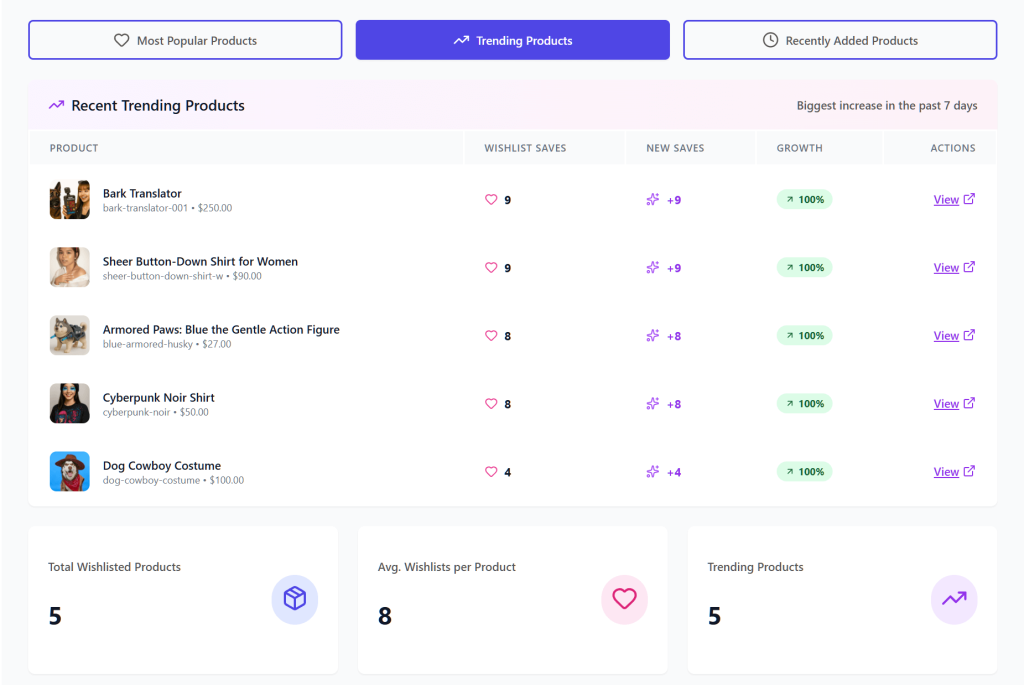
With Advanced Analytics, expect to gain:
- Product insights: See which items are the most popular right now. You can even track “Trending Products” to see what has been hot over the last 7 or 30 days.
- Category and brand insights: Find out which parts of your store are winning. This helps you see which brands people keep coming back to and which categories are growing.
- Engagement tracking: This shows you how people interact with their lists. You can see how often items are added or moved, which tells you how excited shoppers really are.
- Time-based trends: This displays shopping and saving patterns over time. Thus, you can discover seasonal patterns, allowing you to prepare for busy holidays before they even arrive.
- Customer behavior: Get a clear look at how different people use their wishlists. You can use this to group similar shoppers together and understand their habits.
Using these numbers helps you understand exactly what your customers want. Thus, you can make better choices about what to stock and what to put on sale based on real data.
2. Automations: Putting your sales and workflows on autopilot
Managing a store involves many daily tasks that can quickly become overwhelming. With the Automations feature, you can handle many of these repetitive jobs automatically so you can focus on other parts of your business.
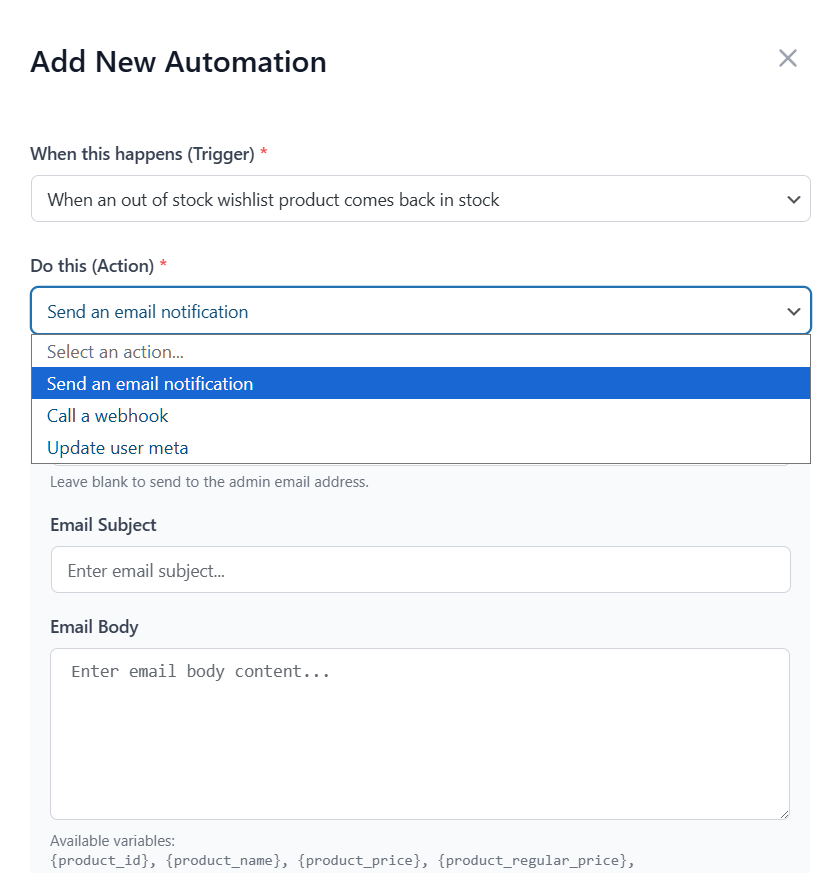
Here’s what to expect from Automations:
- Smart triggers: The system reacts the moment a customer interacts with your store. This could be when a customer creates a wishlist, adds a new item, or even when a product goes on sale or is updated.
- Automatic actions: You decide what happens next. For instance, you can tell the software to send an automatic email to the customer to remind them about an item. It can also send you an email (the admin) so you stay informed.
- Customer tags: The tool can automatically add notes to a customer’s profile (User Meta). This helps you group shoppers by what they like.
- Advanced workflow management: You aren’t stuck with “one size fits all.” You can build your own rules, set special conditions, and turn different automations on or off whenever you want.
- Bridge to other apps: Using webhooks, you can send data to other apps you use, like a mailing list or a spreadsheet. This happens the second a customer makes a change.
These tools take the busy work off your plate so you can focus on the big picture. As a result, your store stays active and follows up with customers even when you’re away from your desk.
3. Webhooks: Connecting your store to other apps
Sending data between different apps can be a chore if they don’t talk to each other. For this reason, we created the Webhooks feature to act like a universal messenger for your store data. Basically, the Pro version extends your store’s capabilities by bridging the data from both the Lite and Pro features directly to your external apps
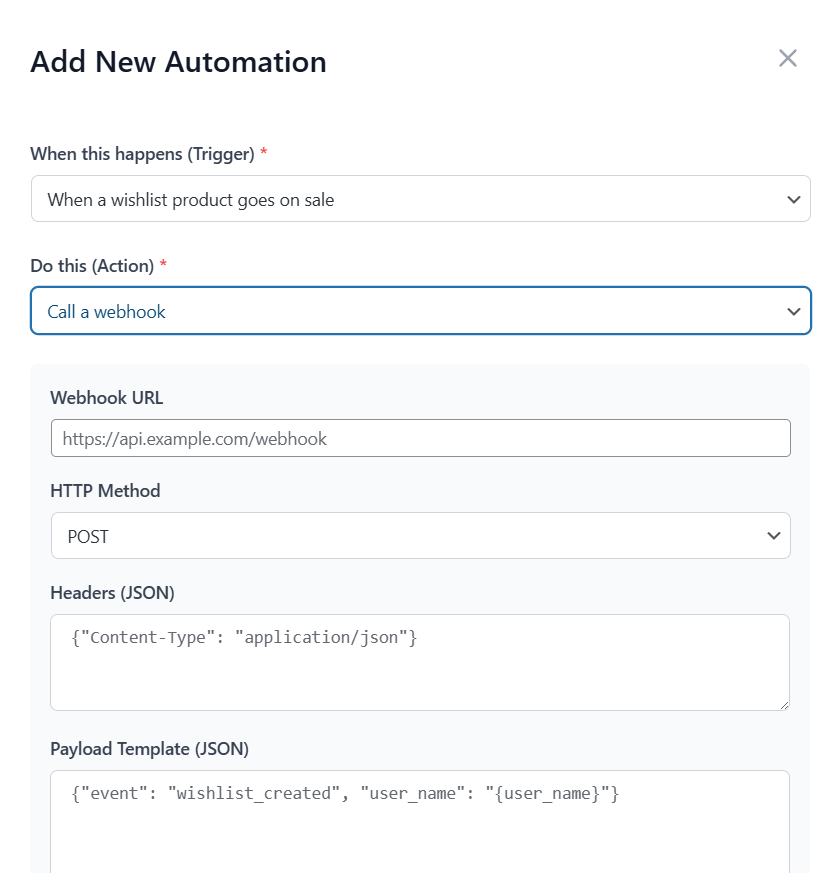
With Webhooks, you can control:
- Event triggers: You can set the system to send out information the moment a wishlist is created or when items within it are added, removed, or updated.
- Custom endpoints: You choose exactly where the data goes, so it lands in the right spot every time.
- JSON payloads: The information is sent in a clean, industry-standard format that other modern apps can read without any trouble.
- Real-time delivery: There’s no waiting around because the data moves as soon as the action happens.
This keeps all your different business platforms connected. Because Wishlist Pro uses standard JSON webhooks, you have the flexibility to stream your wishlist data to thousands of external services, such as:
- Marketing & CRM platforms: You can send data to tools like Mailchimp, Klaviyo, HubSpot, or Salesforce. While these aren’t “one-click” native integrations, our webhooks provide the bridge needed to sync customer activity into your marketing records.
- Automation hubs: For the easiest setup, you can use webhooks to connect your store to Zapier, Make, or Pabbly Connect. These “middleman” tools can then automatically route your wishlist events to over 5,000+ different apps without you needing to write a single line of code.
When you use these connections, you ensure your records stay updated across your entire business without having to manually type in any information.
4. Wishlist Sharing & Permissions: Building a shopping community
Shopping is more fun when friends and family can join in. Most wishlists are private, but the Wishlist Sharing & Permission feature lets your customers turn their lists into a social experience. Whether they are planning a wedding or a group gift, these tools help people work together.

Here is how you can manage Wishlist Sharing & Permissions:
- Advanced sharing: Customers can send their wishlists to specific people via email. They can also create a private link with a unique code. This makes it easy to share ideas without making them public.
- Permission control: Not everyone needs the same level of control over wishlists. A customer can allow a friend to view a list or grant them edit permissions to add and remove items. The system also sends an email the moment someone is granted permission to help.
- Public wishlist directory: As the store owner, you can enable a special area on your site where people can browse public lists. This is a great way for shoppers to discover trending items. It’s completely optional—you decide if this directory is active and which settings apply to public visibility.
- Custom email styles: You can customize how sharing emails appear. This ensures that every invitation sent from your store matches your brand’s personality.
- Activity tracking: The system tracks when shared wishlists are opened. This helps you understand how often people are sharing your products with their friends.
These sharing tools turn a simple wishlist into a way to find new customers. After all, when shoppers share their lists with friends or family, they’re basically doing the marketing for you. As a result, your store becomes a go-to spot for group gifts, helping more people discover your products through word-of-mouth.
Upgrading To SaveTo Wishlist Pro
If you are already using the free version, upgrading is pretty straightforward. You are basically unlocking the Pro features on top of what you already have. (So you are not starting from scratch, which is nice.)
Here’s the simple flow:
- Get the Pro plugin: Purchase and download SaveTo Wishlist Pro from the official product page.
- Install the Pro plugin: Upload it to your WooCommerce dashboard, then activate it. Keep the Lite plugin active as well.
- Activate your license: Go to SaveTo Wishlist → License in your WordPress admin. Paste your license key, then activate it.
- Check for updates: Once your license is active, updates will be available in your dashboard so you can keep features running smoothly.
After that, you can start setting up analytics, automations, sharing rules, and any webhook connections you want.
Power Tips For Success
These tips are meant to keep things practical. You do not need to use every feature on day one. Start with what gives you the fastest wins, then build from there.
Pro tip 1: Watch the trends weekly
In my experience, one of the best signals is not only what people bought. It is what they saved and kept coming back to. Please check your trending products report weekly.
When an item is trending, it usually means people want it, but they are waiting for a reason to buy. That reason can be a small discount, a back-in-stock moment, or even a reminder.
Example: If 50 people saved the same mug in one week, that is a clear signal. If you run a short 10% sale on that product, you are responding to real interest rather than guessing.
Pro tip 2: Set up sale alerts for saved items
Newsletters are fine, but sale alerts are more personal because the shopper already showed interest.
If someone saved an item and you later drop the price, that alert feels relevant. It also brings them back faster, because they already liked the product.
Example: A customer saves $100 boots but does not buy. Two weeks later, you drop it to $80. The system sends an alert immediately, and that price change may be enough to secure the purchase.
Pro tip 3: Test your webhooks before you depend on them
If you connect wishlist events to your email platform or CRM, test the setup first.
Run a quick check:
- Create a wishlist
- Add an item
- Trigger an event like a sale
- Confirm the data lands in the right place
This sounds small, but it saves headaches later.
Conclusion
Wishlists are not just “nice to have.” They are a signal. When people save items, they are telling you what they want, even if they are not ready to buy today. The difference is whether your store acts on that signal or ignores it.
Here’s what we’ve discussed about this new release:
- Why SaveTo Wishlist Pro
- Introducing SaveTo Wishlist Pro’s core features
- Upgrading to SaveTo Wishlist Pro
- Power tips for success
If you want a smarter way to turn saved items into real orders, the goal is simple: turn saved items into real orders. Track what people save, follow up at the right time, and make it easy for shoppers to share lists when planning with others. That is how you move from passive wishlists to active buying behavior. (And you spend less time guessing.)
Start small. Pick one report to check each week. Set up a single automation to bring people back. Then improve from there. That way, you build a system that keeps working even when your day gets busy.
Do you have any questions? Let me know your thoughts in the comments!
Frequently Asked Questions
What is the purpose of SaveTo Wishlist Pro in a business context?
SaveTo Wishlist Pro helps store owners leverage wishlists not just as a ‘save for later’ feature but as a tool to understand customer preferences, spot sales opportunities early, and actively convert saved items into purchases.
How does SaveTo Wishlist Pro differ from the free SaveTo Wishlist Lite version?
While the Lite version offers basic features like multiple lists and guest access for a good customer experience, SaveTo Wishlist Pro enhances this by providing advanced analytics, automations, webhook integrations, and sharing permissions to turn wishlists into active sales tools.
What are the main benefits of using Advanced Analytics in SaveTo Wishlist Pro?
Advanced Analytics provides clear insights into trending products, category performance, customer engagement, seasonal patterns, and shopper behavior, allowing store owners to make data-driven decisions to increase sales and optimize stock.
How can Automations improve my store’s efficiency with SaveTo Wishlist Pro?
Automations allow you to set smart triggers for customer interactions, automate follow-up actions like sending reminder emails or alerts about sales, and manage workflows automatically, freeing up your time and ensuring timely customer engagement without manual effort.
What role do Webhooks play in SaveTo Wishlist Pro and how can they benefit my external apps?
Webhooks in SaveTo Wishlist Pro act as connectors that automatically send real-time wishlist data in JSON format to external applications like marketing platforms, CRMs, or automation tools, ensuring seamless data integration and reducing manual data entry.



