

Online shoppers do not read everything right away. Most of the time, they scan first. They look at the product image, the price, and anything that stands out visually. That is why WooCommerce sale badges and product labels can matter more than people think. A small label can be the thing that makes someone stop, notice a deal, and pay closer attention to a product they might have skipped.
I have seen this happen a lot in ecommerce. A product might have a good discount or a useful promo, but if that offer is not easy to spot, shoppers can miss it completely. (And yes, that is frustrating when you already put the work into setting up the promo.) Clear visual cues help fix that. They make it easier for buyers to understand what is special about a product without needing to read a long description first.
That is where Advanced Promo Kit comes in. It is designed to help store owners create and manage WooCommerce sale badges and product labels more flexibly.
In this article, I’ll walk you through what Advanced Promo Kit can do, how its main features work, and why it can be useful if you want your promotions to stand out more clearly. If you have been looking for a better way to use WooCommerce sale badges and product labels, this will give you a good starting point.
How Advanced Promo Kit Helps You Highlight Promotions Better
If you have ever wanted more control over how promos look in your store, this is where Advanced Promo Kit starts to make sense. At its core, it is a visual promo tool for WooCommerce. It helps you create and manage WooCommerce sale badges and product labels without having to hard-code changes or settle for a single default style that doesn’t really fit your store.
1. Set labels storewide or for single products
One of the most useful things here is that you are not locked into one setup. You can create global labels that apply across many products, or you can build labels for one product at a time.
Global labels are helpful when you are running the same promotion across a group of items. For example, if you want to highlight a seasonal sale, a “limited stock” message, or a category-wide offer, you can apply a single label rule and let it automatically cover the right products. That saves time, especially when the campaign repeats or when you manage a larger catalog.
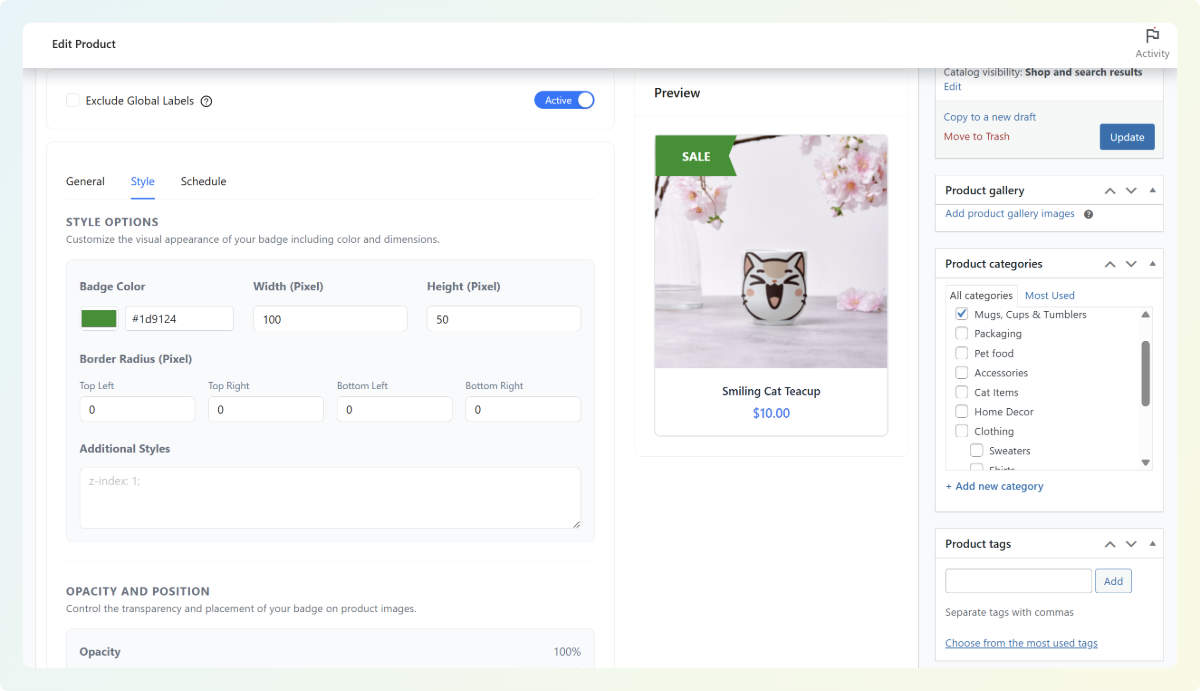
At the same time, you can also create product-specific labels right from the WooCommerce product edit screen. This is useful when you want to call extra attention to a bestseller, a featured item, or a special product that deserves its own messaging.
That mix of storewide and single-product control makes WooCommerce sale badges and product labels much easier to manage. You do not have to choose between flexibility and scale, because the plugin gives you both.
2. Match your badges to your brand style
Promotional labels should look like they belong in your store. If the badge feels out of place, it can make the product page look messy instead of helpful. Advanced Promo Kit gives you a lot more styling control, so you can build labels that feel consistent with your brand.
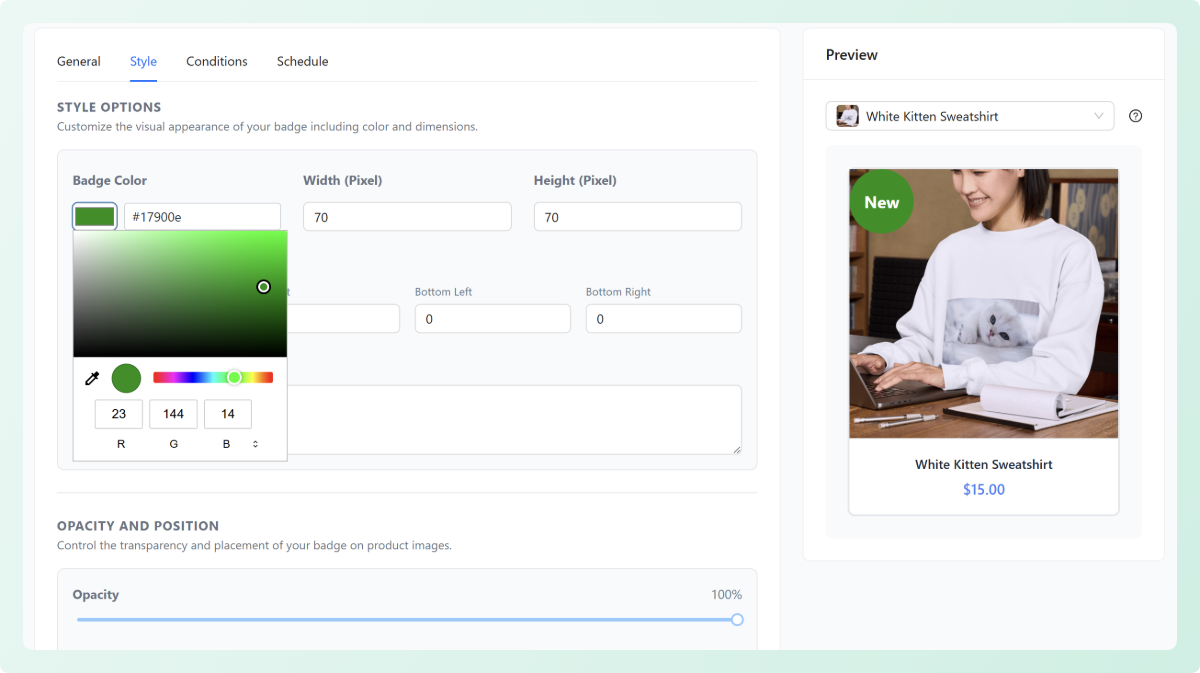
You can change the shape, colors, spacing, background, borders, and overall layout of the badge. You can also add small visual touches, like animations, or make a label clickable to send shoppers to another page, collection, or offer.
That matters because WooCommerce sale badges and product labels work best when they look intentional. If your store has a clean design, your labels should match that. If your store has a more playful look, your labels can reflect that too. The point is that you are not stuck with one generic style that looks like it came from a different store.
3. See your labels on real products before you publish
This is one of those features that saves a lot of second-guessing. Advanced Promo Kit includes a live preview mode, so you can see how a label looks on an actual product before it goes live.
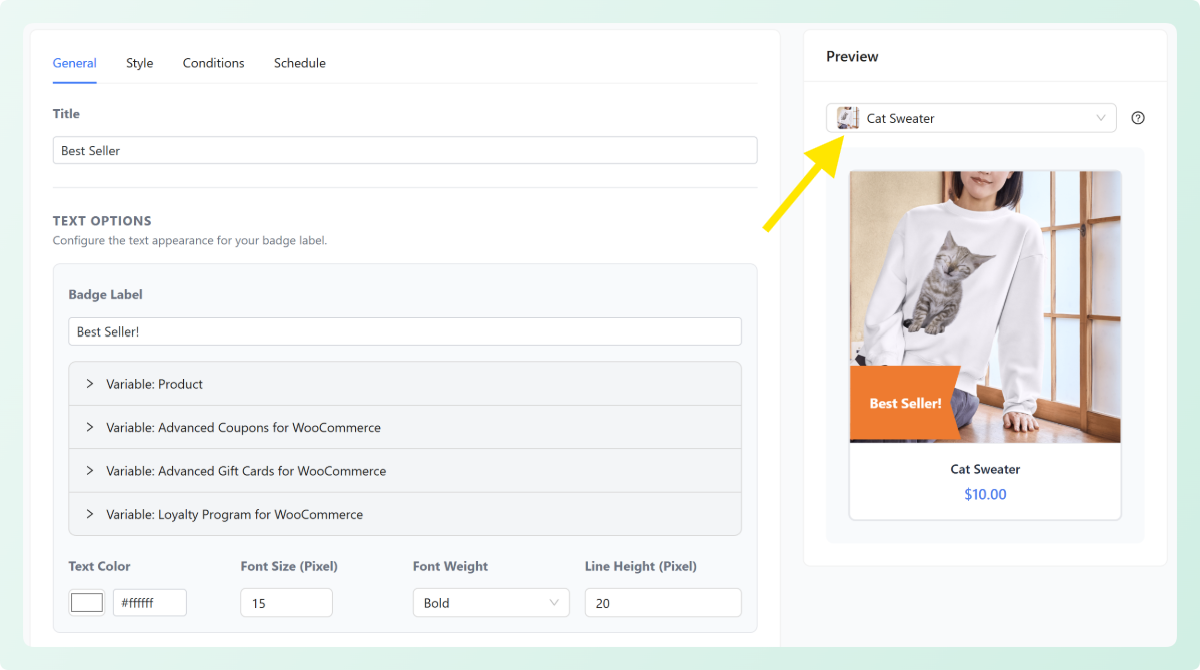
That means you can test the color, wording, size, and placement on a real product card or product page. You can even switch the product being previewed, which makes it easier to check how the label looks across different item types.
I like this because it reduces trial and error. You do not have to publish a label first, then go back and fix it because it looks too big, too loud, or too hard to read. For stores that often use WooCommerce sale badges and product labels, that kind of preview makes the setup feel a lot less risky.
4. Show labels only when the right conditions are met
Not every label should appear on every product. A discount badge should only show on discounted products. A low-stock message should only show when stock is actually low. That is why the rule-based targeting in Advanced Promo Kit matters.
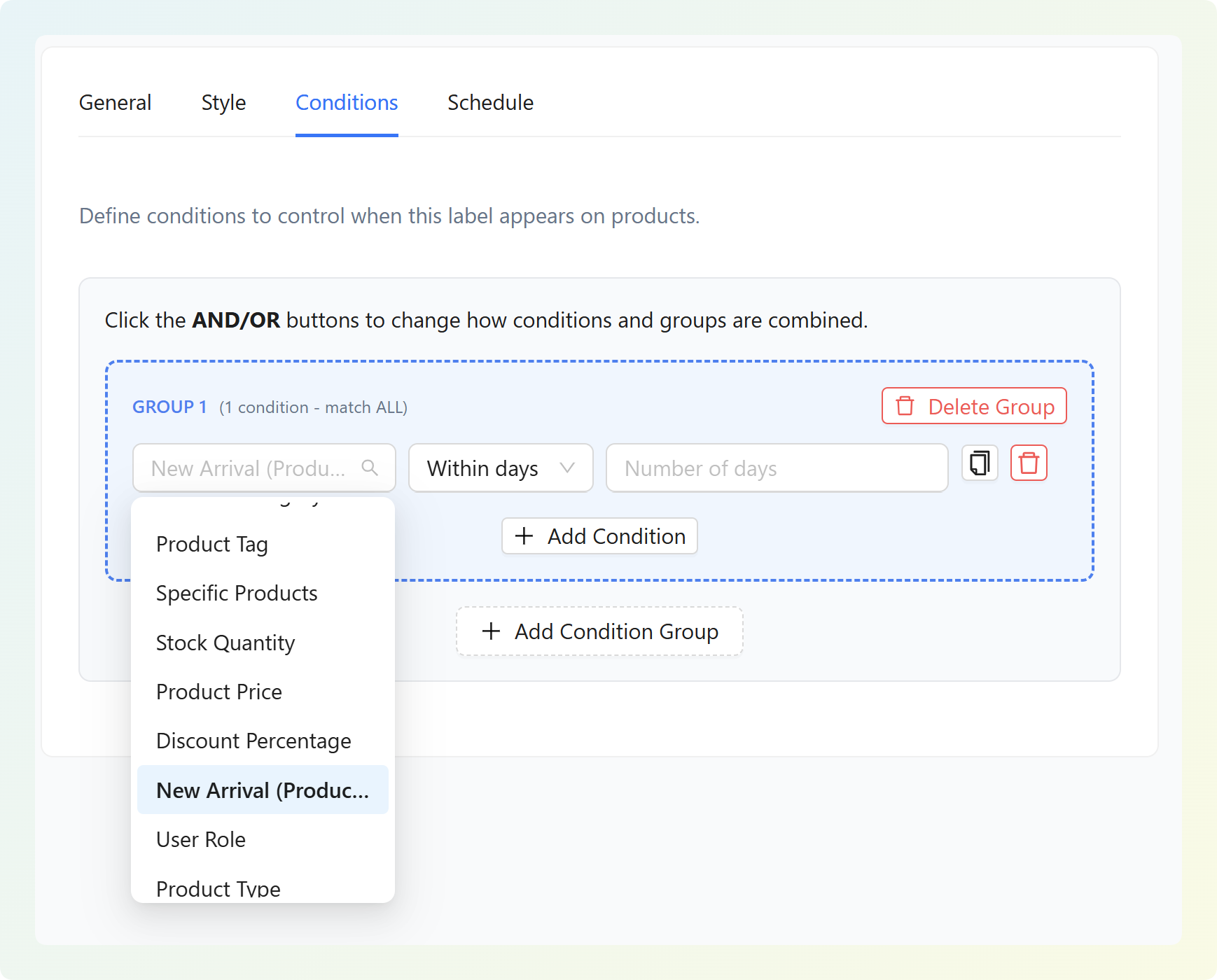
You can create label rules based on product tags, specific products, stock quantity, price, discount percentage, product type, user role, and more. You can also combine rules using AND/OR logic, which gives you much more control over where the label appears.
This is one of the biggest reasons WooCommerce sale badges and product labels become more useful with this plugin. You do not have to add labels manually one by one. Instead, you can let rules decide what appears where, which keeps the process more consistent and easier to scale.
5. Plan labels ahead for timed campaigns
If you run promotions on a schedule, this feature makes life easier. Advanced Promo Kit lets you set start and end dates for labels, so they appear only during the campaign window you choose.
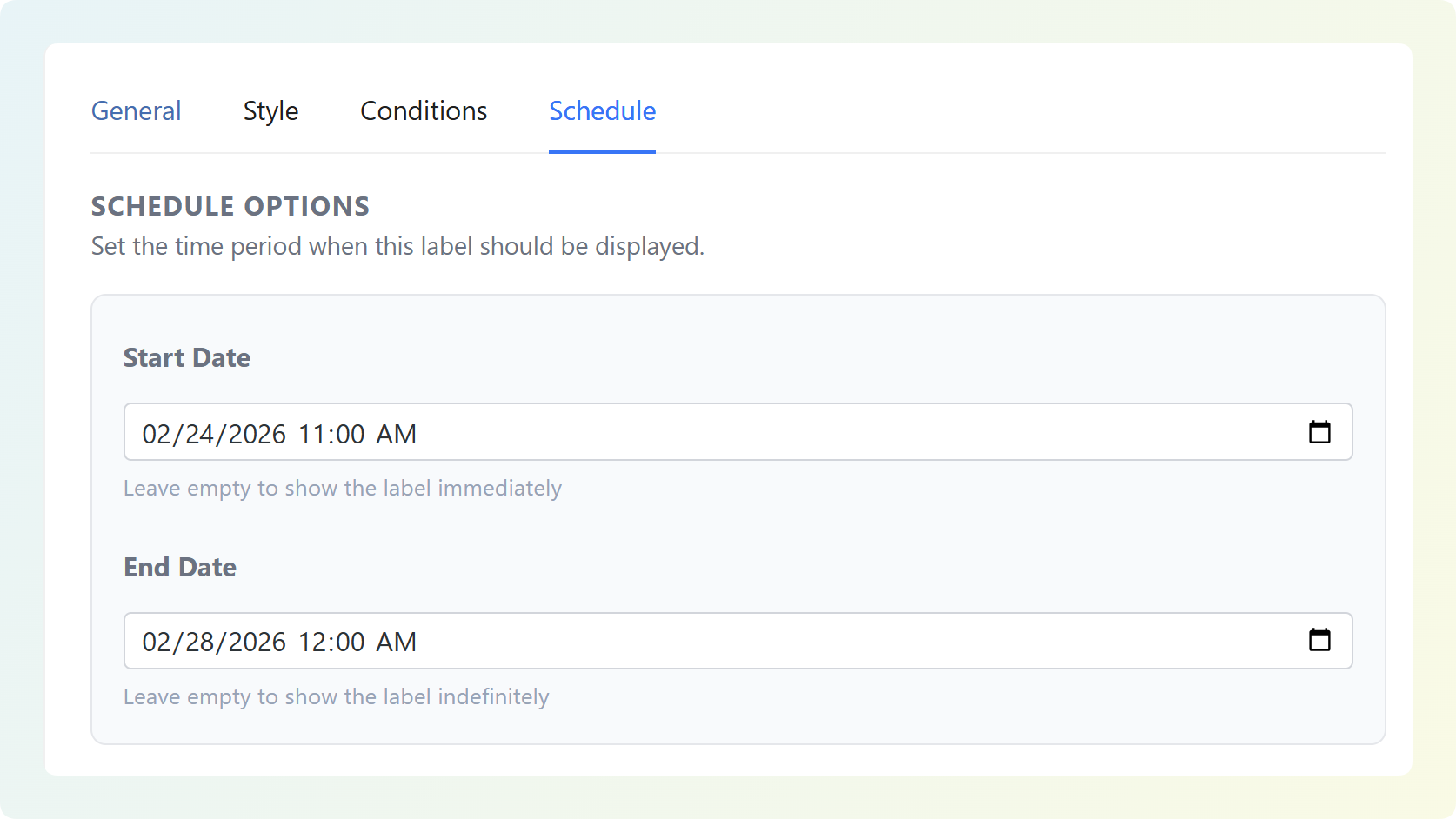
This is helpful for flash sales, holiday promos, weekend deals, or limited-time launches. You can set everything up early, then let the label go live at the right time without needing to remember it on the day itself.
That kind of scheduling makes WooCommerce sale badges and product labels more practical for real campaigns. You can plan them in advance, align them with your promo calendar, and keep the store looking current without manual switching each time.
6. Pull live product data into your labels
Advanced Promo Kit also supports dynamic placeholders, which means your labels can pull in live product values instead of using static text.
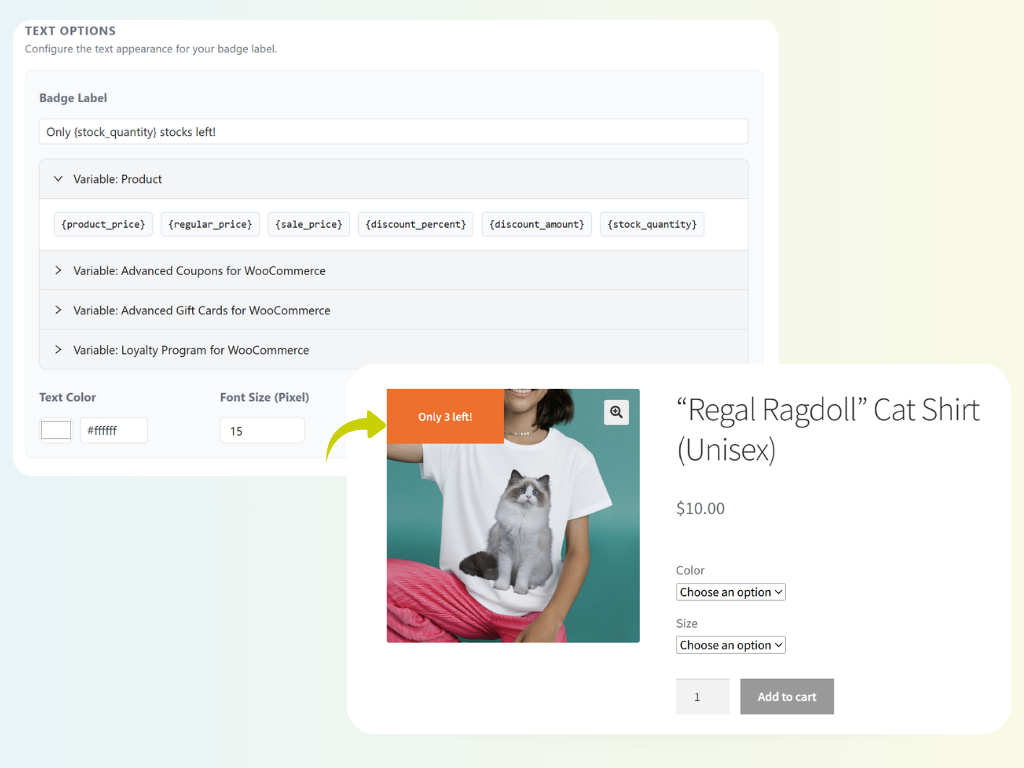
For example, you can show values like:
- current price
- sale price
- discount percent
- discount amount
- stock quantity
So instead of writing a fixed label like “Save Big,” you can show something more specific like “Save 20%” or “Only 3 left.” That gives the shopper clearer information right away.
This matters because accurate messaging usually works better than vague messaging. When WooCommerce sale badges and product labels reflect real product data, the labels feel more useful and believable.
7. Layer more than one label and control display order
Stores often run more than one offer at a time. A product might be on sale, low in stock, and part of a loyalty campaign all at once. Advanced Promo Kit makes it possible to show more than one label on the same product, then control which label appears first.
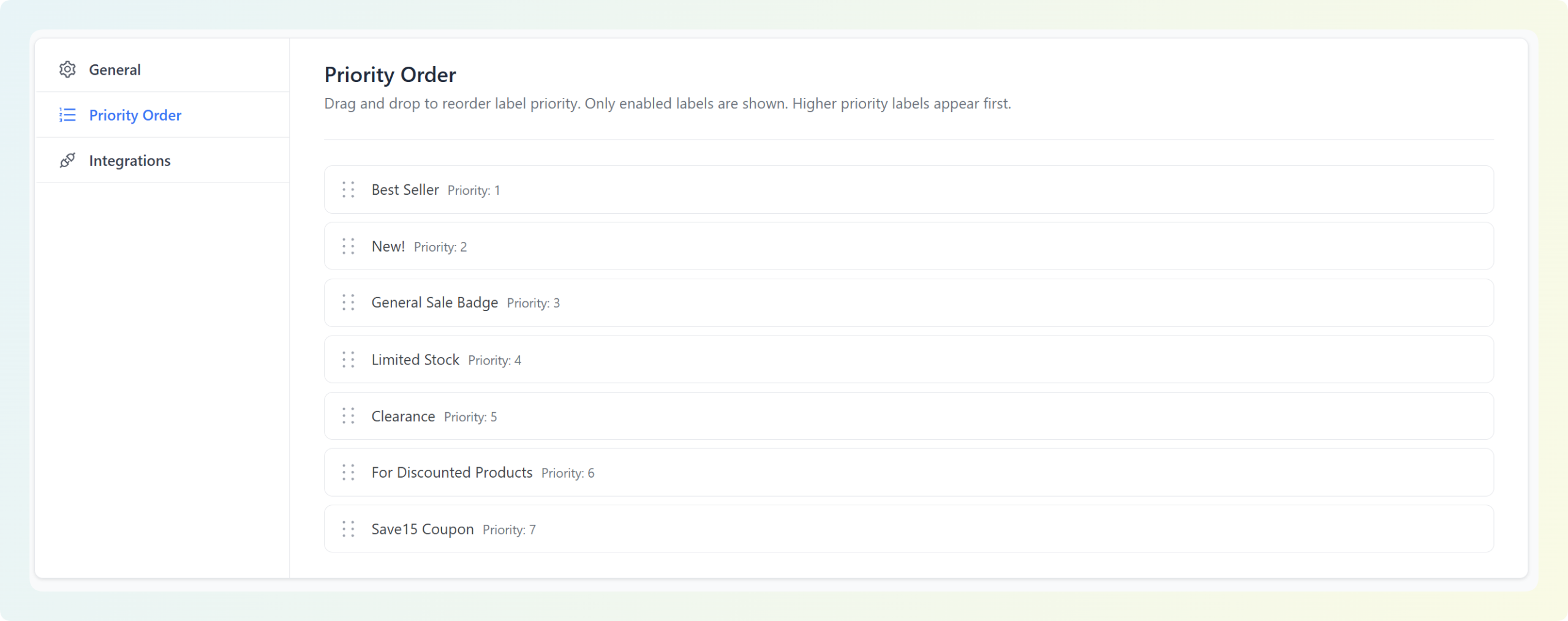
You can enable label stacking, choose how many labels to show per product, and set the display order using drag-and-drop priority settings. That helps keep things organized when multiple promotions overlap.
This is helpful because WooCommerce sale badges and product labels can become cluttered if not managed carefully. With stacking and priority order, you keep the most important message visible while still allowing extra promo details to appear.
8. Surface coupons, points, and gift card value in labels
Another useful part of Advanced Promo Kit is how it works with the rest of the Advanced Coupons product line. If you use Advanced Coupons, Loyalty Program, or Gift Cards, you can pull those promo values into your labels, too.
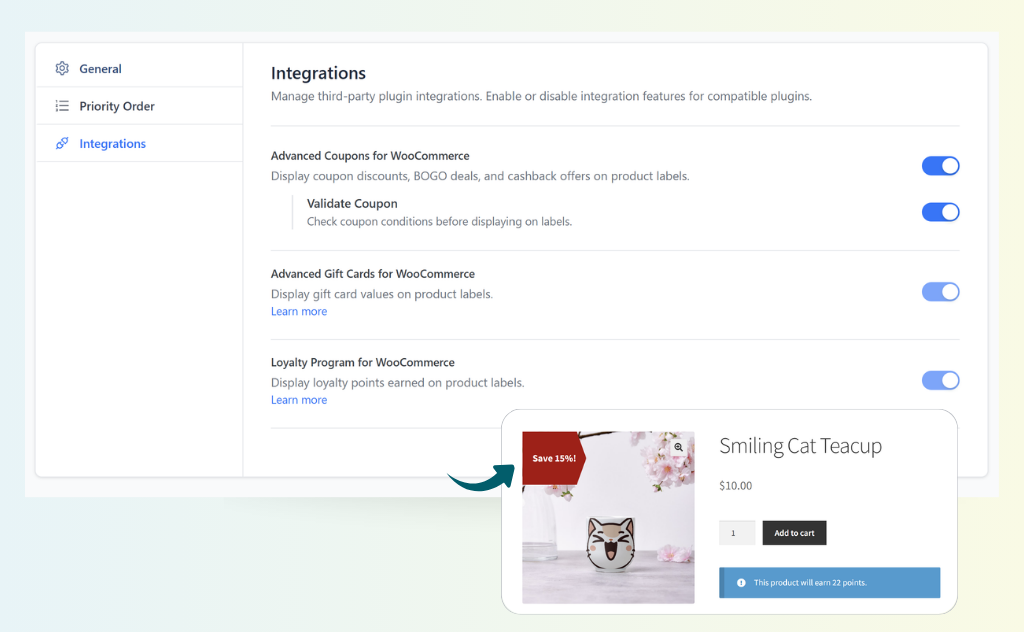
That means you can show things like:
- coupon-based discounts
- BOGO offers
- cashback-style promos
- gift card values
- loyalty points earned on purchase
This gives shoppers more reasons to pay attention to the product before they even click through. It also makes WooCommerce sale badges and product labels feel more connected to the actual incentives in your store, rather than just looking like mere decoration.
How Advanced Promo Kit Can Help More Shoppers Notice Your Offers
A good promotion can still underperform if people do not notice it. That is really the problem Advanced Promo Kit is trying to solve. It gives store owners better ways to present offers so shoppers can understand them faster and act on them sooner.
When you use WooCommerce sale badges and product labels well, you are not just decorating the page. You are guiding attention.
Help the right products get noticed sooner
Online shoppers tend to skim first and read later. So if you want a product to stand out, visual cues matter. Product labels can help push attention toward low-stock items, featured products, bestsellers, and current promos.
That means people are less likely to miss the items you actually want them to see. And when your priority products get noticed sooner, you create more chances for clicks and conversions.
Give promos and featured collections a better chance to get clicked
Product labels are also useful for click-through, especially when you want to push people toward a sale, a featured bundle, or a seasonal collection.
For example, a shopper is more likely to notice a product if it has a clear visual cue for:
- a limited-time sale
- a featured collection
- a price drop
- a loyalty reward
- a gift-related offer
That is one of the practical strengths of WooCommerce sale badges and product labels. They can make the offer easier to see before the shopper even opens the product page.
Make buying decisions easier with clearer visual cues
Sometimes the issue is not that the offer is weak. Sometimes it is just not explained quickly enough. A badge that says “Save 15%,” “Only 3 Left,” or “Earn Points” can remove a lot of guesswork.
That kind of clarity helps shoppers compare products more quickly and feel more confident about taking action. Instead of making them dig through descriptions, the label surfaces the key value right away. And when the decision feels easier, the path to checkout usually feels smoother too.
Final Thoughts
Advanced Promo Kit gives store owners more control over how promotions look and how shoppers notice them. With the plugin, you can create, customize, target, and schedule WooCommerce sale badges and product labels in a way that feels much more intentional than the default WooCommerce setup.
In this guide, we covered the main ways it can help, including:
- Storewide and product-level labels
- Full styling controls
- Live previews before publishing
- Rule-based targeting
- Scheduled campaign labels
- Dynamic placeholders
- Stacked labels with priority order
- Coupon, loyalty, and gift card visibility
If you want your promotions to feel easier to spot and easier to understand, Advanced Promo Kit gives you a much better way to do that. Good visual labels do more than make a product page look busy. They help shoppers understand the value more quickly, which can make a real difference when someone is deciding whether to click or buy.
Frequently Asked Questions
What’s the difference between global labels and product-specific labels?
Global labels are created once and automatically applied to multiple products based on the conditions you set. They’re perfect for storewide discounts, seasonal campaigns, or recurring promotions. Product-specific labels, on the other hand, are added directly from the WooCommerce product edit page and apply only to that individual item. You can use this option to highlight specific offers for certain items, limited editions, or special product-level offers.
How many labels can I show on a single product, and how are they prioritized?
You can choose the exact number of labels to display and enable label stacking in the plugin’s General settings. While you can allow up to 10 labels per product, we recommend keeping it minimal for the best visual experience. Each label follows a priority order that you control using a drag-and-drop list in the settings. This ensures your most important messages—such as urgency, discounts, or special offers—always appear first.
Is Advanced Promo Kit included in the All Access Bundle?
Yes! Advanced Promo Kit is included in the All Access Bundle, which gives you access to all plugins in the suite—coupons, loyalty points, gift cards, and now powerful sale badges and product labels for WooCommerce. It’s the easiest way to unlock the full promotional toolkit for your store.



