
Many WooCommerce store owners have asked an important question: Is it possible to remove the regular retail price from products while still displaying the wholesale price to wholesale customers only?
At first glance, this might seem like a simple request, especially if you’re managing a B2B online store and want to streamline the pricing display. However, once you dive into the mechanics of WooCommerce, things become a bit more complex.
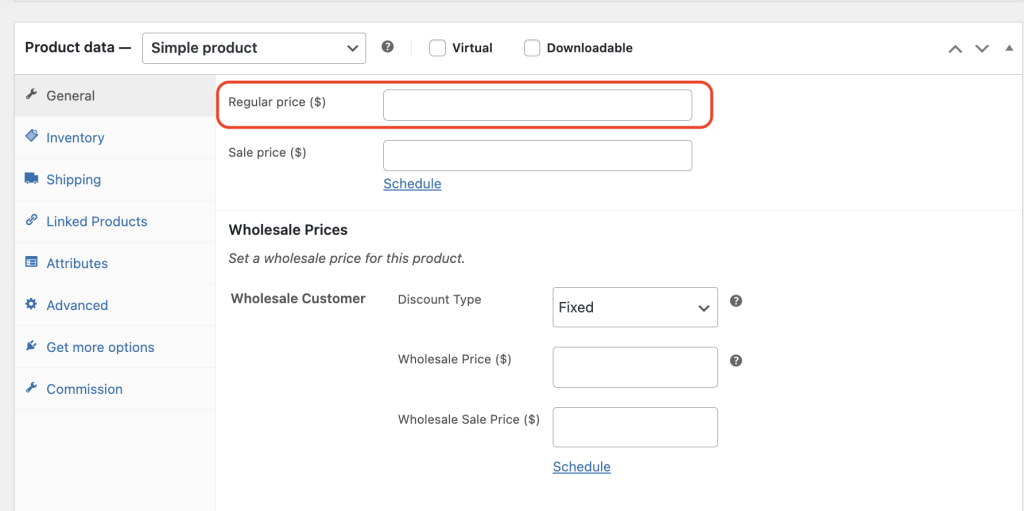
Why Removing the Regular Price Hides the Add to Cart Button
To clarify, when you remove the regular retail price from a WooCommerce product, the Add to Cart button will no longer appear on the product page. This isn’t due to a theme issue or plugin conflict—this is actually core functionality built deep into the WooCommerce platform itself.
In WooCommerce, a product must have a regular price (or sale price) defined for the Add to Cart button to be enabled. Without it, the product is considered incomplete and therefore not available for purchase through the default WooCommerce workflow.
How Wholesale Pricing Works with WooCommerce Wholesale Plugins
Now, you may be using a plugin like WooCommerce Wholesale Prices or Wholesale Prices Premium to offer exclusive discounts to your wholesale customers. These plugins introduce an additional pricing field, commonly known as the wholesale price field.
This wholesale pricing field is a custom addition and is not tied directly to WooCommerce’s core pricing structure. Instead, it works by overriding the front-end price display, showing wholesale prices only to users with the appropriate roles or permissions. However, it does not influence the display logic for the Add to Cart button. So even if a wholesale price is set, if the regular price is left blank, the product won’t be purchasable.
Still Want to Hide Products from Retail Customers?
So, what if your goal is to hide certain products from retail users, but still make them available for your wholesale buyers? Fortunately, there is a solution.
This is where the WooCommerce Wholesale Prices Premium plugin becomes incredibly valuable. It includes advanced features such as product visibility restrictions, which allow you to control which customer groups can see specific products.
How to Enable Wholesale-Only Products with Product Visibility Rules
Using the Product Visibility Settings within the Wholesale Prices Premium plugin, you can configure products to be visible only to wholesale customers. This means that retail customers won’t see the product at all—neither in the catalog nor on the product page.
Here’s the best part: since the product is hidden from retail users, you are free to fill in the regular price field with any value. This satisfies WooCommerce’s requirement and ensures the Add to Cart button will appear. Meanwhile, your wholesale customers will see the correct wholesale pricing and be able to make purchases without issue.
In summary, while WooCommerce requires a regular price for the Add to Cart functionality to work, you can still run a wholesale-only store using the right tools. With the WooCommerce Wholesale Prices Premium plugin, you can maintain full product functionality, ensure a seamless buying experience for your wholesale clients, and restrict product visibility from retail shoppers.
Looking to scale your WooCommerce B2B store? Implementing these visibility controls and pricing strategies is a key step toward building a professional, user-friendly wholesale experience.
Frequently Asked Questions
How do I restrict visibility to wholesale customers only?
First, open the Product Visibility Settings in WooCommerce Wholesale Prices Premium. Then, set it to display products for wholesale roles only. As a result, retail visitors won’t see the listing, so any value you enter will work.
Does blanking the regular price affect variable product listings?
Yes, it does. The same rule applies to variable products. Each variation must include a value in the regular price field. Otherwise, the checkout button will not appear for that specific option.
What regular price should I use when restricting retail access?
In general, any number will work. The system simply requires a value in that field. Since retail users can’t view the product, the exact amount doesn’t matter. Meanwhile, wholesale customers will see the correct pricing.
Can wholesale prices be shown to guests or non-members?
Typically, wholesale pricing is limited to logged-in users with the correct role. However, if needed, you can enable a setting in the plugin’s display options to show prices to guests or non-members.
Why is Add to Cart missing even with wholesale price set?
If the regular price field is left empty, the checkout option will be disabled. Even with a wholesale price set, this requirement must still be met. To fix the issue, simply enter any value in the regular price field.
Need Help?
If you have a question or run into any issues, we’re here to help.
- Premium users: Open a support ticket
- Free users: Visit our community forum

