

Allowing a guest quote request in WooCommerce lets someone ask for a price without registering first. The objection is always the same: spam. The answer is a rate limiter that watches two signals rather than one, and it ships switched off, so most stores never find it.
Every guest quote request had been landing while the protection sat unopened, one tab away in the settings. Here is what that protection actually does, and how to configure it deliberately.
What Changes When You Enable Guest Quote Requests
Guests can build and submit a quote without registering. Alongside the quote area, you can show a login or create-account link for buyers who would rather have an account, so you add a path rather than replace one.
A default wholesale role then handles pricing on every guest quote request. That setting matters more than it sounds. Wholesale pricing attaches to roles rather than to products alone, so without a default role there is no tier to price a guest’s quote against.
Everything after submission behaves like any other quote. Same admin screen, same messaging thread, same conversion to an order. Guest submissions appear in Wholesale > Quotes alongside quotes from registered customers, identified by the guest email address instead of a linked account.
How The Guest Quote Request Rate Limiter Works
The protection is part of the guest feature rather than a separate plugin, and it watches two signals independently.
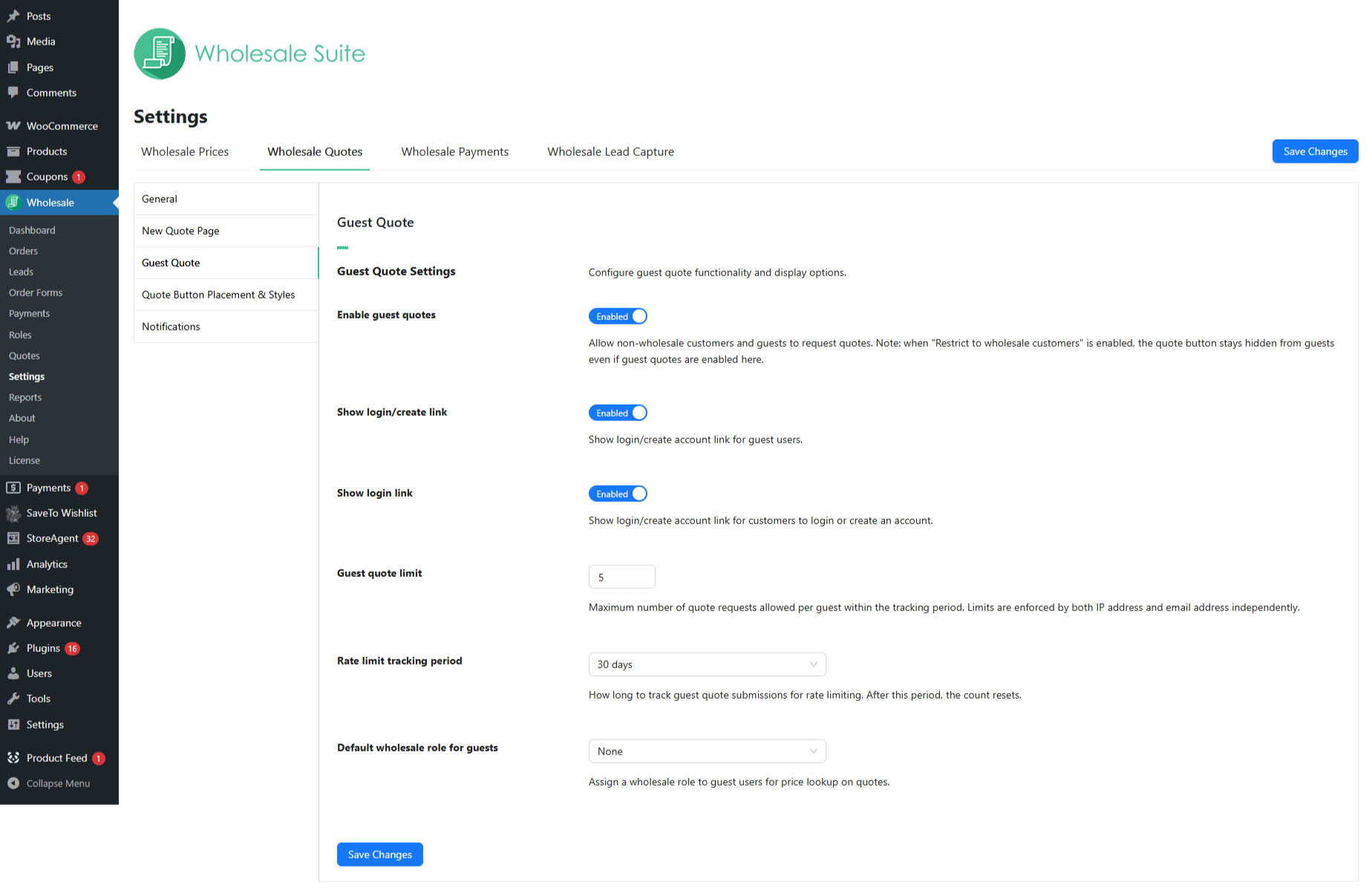
IP address and email are tracked separately. A guest quote request is blocked as soon as either counter reaches the limit, whichever gets there first. Dual tracking is what makes the limit awkward to sidestep: a fresh email address does not help if the IP has already hit the maximum, and switching networks does not help if the email has.
The email is captured before anything is built. The first time a visitor clicks Add to Quote, a modal asks for an email address, and that address anchors both the quote itself and the email half of the limit. The limiter has no anonymous submissions to miss.
IP detection has a documented fallback. Where a valid IP address cannot be determined, which happens on some proxy and server configurations, the plugin falls back to email-only tracking. In that case, only the IP check is skipped, and the email limit still applies, so a guest quote request is never left entirely unprotected.
It applies to guests only. Logged-in customers and wholesale-role users are never rate-limited. Most people miss this when they worry the feature will annoy their real buyers. It cannot annoy them, because it does not apply to them.
Expired records clear themselves. Cleanup runs in the background once records pass the tracking period plus a 30-day grace period, and the scheduled job can take up to 24 hours to fire. The plugin also hooks into WordPress personal data export and erasure and automatically adds suggested privacy policy content, so tracking doesn’t become a compliance problem later.
The full setting-by-setting breakdown lives in the guide to allowing guest users to request wholesale quotes, and every other quote setting is documented in the Wholesale Quotes settings reference.
The Email Step Behind Every Guest Quote Request
The email modal is the part store owners tend to overlook, and it does more work than its size suggests. It identifies the quote, it feeds the rate limiter, and it gives you a way to reach a buyer who has no account.
Once a visitor enters a valid address, the plugin saves it in their browser’s local storage and stops prompting on that device and browser. From then on, they add products normally. If they later try to view or manage a quote on a browser with no saved address, the modal returns.
Logging in afterward does not silently merge everything. Quotes submitted as a guest stay linked to the original guest email, and a customer who registers with that same address has to prove they own it before the quote attaches to their account. Verification runs through the standard password-reset flow, which is deliberate: it stops someone claiming a stranger’s quote by registering with a known address. Buyers who would rather not reset anything can keep using the tokenized link from their confirmation email, which works whether they are logged in or not.
Choosing Your Guest Quote Request Limit And Period
Two settings do the work here. Both ship with sensible defaults, and both are worth setting deliberately rather than inheriting.
The guest quote limit defaults to 5 and accepts any value from 1 to 100. Your rate limit tracking period determines when that count resets: never reset, 7 days, 30 days, 60 days, or 90 days, with 30 days as the default.
Start lenient and tighten from there. Reducing a limit is easy; loosening one after you have already frustrated legitimate buyers is not.
| Store type | Suggested limit | Suggested period |
|---|---|---|
| High-touch B2B | 3 to 5 | 30 days |
| Retail and wholesale hybrid | 5 to 10 | 30 days |
| High-volume catalog | 10 to 20 | 30 days |
| Strict policy | 1 to 3 | Never reset |
Treat those as our starting points rather than rules. The plugin publishes defaults but not recommended values per store type, so watch your blocked-submission rate for the first month and adjust from what you actually see.
If you would rather require registration than manage a guest quote request limit at all, that is a legitimate choice too. Our guide to wholesale registration in WooCommerce covers that path, including approval workflows that collect business documentation up front.
Natural Wellness Products run the full B2B workflow from first inquiry through to payment terms, and we covered their growth as a case study if you want to see where guest quoting fits into a wider setup.
Why Getting Guest Quote Requests Right Pays Off
A guest quote request sits at the front of a very large channel. According to the U.S. Census Bureau’s Annual Wholesale Trade Survey, U.S. merchant wholesalers recorded sales of $11,382.3 billion in 2022, up 17.4% from $9,693.4 billion the year before.
Buying behavior inside that channel keeps shifting online. Digital Commerce 360 reports total U.S. manufacturing and wholesale distribution sales of $15.12 trillion in 2025, drawing on U.S. Department of Commerce data, with overall growth close to flat at 0.4% while B2B ecommerce grew 13% to $2.93 trillion. The volume is not moving much. Where it gets transacted is.
Margins on that volume are thin enough that every lost inquiry counts. NYU Stern’s margins by sector dataset puts the average net margin at 1.17% for food wholesalers and 6.05% for retail distributors as of January 2026. Turning away qualified buyers to avoid spam you could have configured against is an expensive trade at those numbers.
Turning Guest Quote Requests On Safely
Five submissions per 30 days, tracked by IP and email, applied to guests only and cleaned up automatically afterward, is a starting configuration rather than a final answer. Decide what a realistic volume looks like for your catalog, set the limit and the period to match, then watch what actually gets blocked over your first month.
Adjust from evidence rather than from the fear of spam, and remember throughout that none of it ever touches the logged-in buyers you already have. A guest quote request is the cheapest way to find out whether a stranger is worth quoting, and the protection to make that safe is already sitting in the plugin.
Here’s what we covered in this article:
- What changes when you enable guest quote requests
- How the guest quote request rate limiter works
- The email step behind every guest quote request
- Choosing your guest quote request limit and period
- Why getting guest quote requests right pays off
If you want to accept a guest quote request in WooCommerce without opening yourself to abuse, Wholesale Quotes ships the protection alongside the feature rather than leaving it to you. Our walkthrough covers the wider setup in how to add request a quote to WooCommerce, and Wholesale Lead Capture handles the registration path for the buyers who would rather have an account.
Frequently Asked Questions
Does rate limiting affect my logged-in customers?
No. Rate limits apply to guests only. Registered customers and users in a wholesale role can submit as many quotes as they like, with no limit applied to them at any point.
Can a guest get around the limit by changing their email address?
Not while they stay on the same connection. The limit is enforced by IP address and email address independently, so a new email address submitted from an IP that has already hit the maximum is still blocked.
What pricing do guests see on a quote?
Whatever the default wholesale role for guests is set to. That setting exists specifically so a guest quote request can be priced at all, since wholesale pricing is attached to roles rather than to products alone.
What happens when someone hits the limit?
The submission is blocked with a message explaining how many requests are allowed and pointing them to your store’s admin email address, rather than failing silently. Only submissions inside the tracking period count, so older ones drop off as the window moves.
Can I still require accounts for some products?
Yes. Guest quoting is a store-level setting, but where the quote button appears is entirely your choice, so you can keep quoting switched off for specific products or categories.
Does this include a captcha?
The rate limiter is the built-in protection in Wholesale Quotes, and a captcha is a separate addition. Wholesale Lead Capture, which handles wholesale registration, ships with honeypot anti-spam protection turned on and is compatible with Google reCAPTCHA if the registration form needs more.