
When you share WooCommerce quote links, customers open them with no account and no password. Each one is a unique URL for a single quote, and anyone holding it can view that quote. It is the difference between a quote your buyer reads today and a quote sitting behind a login they never complete.
In this guide, we will cover how the public quote link actually works, why it beats attaching a document, the one thing almost everyone gets wrong about expiry, when to lean on a link instead of an account, and exactly what a recipient can and cannot do once they have it.
What A Public Quote Link Is
Every quote created in Wholesale Quotes gets its own address, usually in the form /view-quote/{quote-number}/{token}/. The exact path depends on which page you assign as the view quote page in the plugin settings, so check yours rather than assuming the slug.
The token is what matters. It is a cryptographically secure string generated for that specific quote. Anyone with the full URL can view it; anyone without it cannot, and an invalid token returns a 404 rather than an error that would confirm the quote exists.
Two useful properties follow from that:
- No account required. The recipient does not need to be registered, logged in, or previously known to your store.
- Not guessable. Because the token is random rather than sequential, nobody can walk through your quote numbers reading other customers’ pricing.
Both are worth understanding before you share WooCommerce quote links with anyone outside your own team. The design goal is exactly what it sounds like: let buyers forward a quote internally without handing anyone edit access.
How Customers Receive The Link
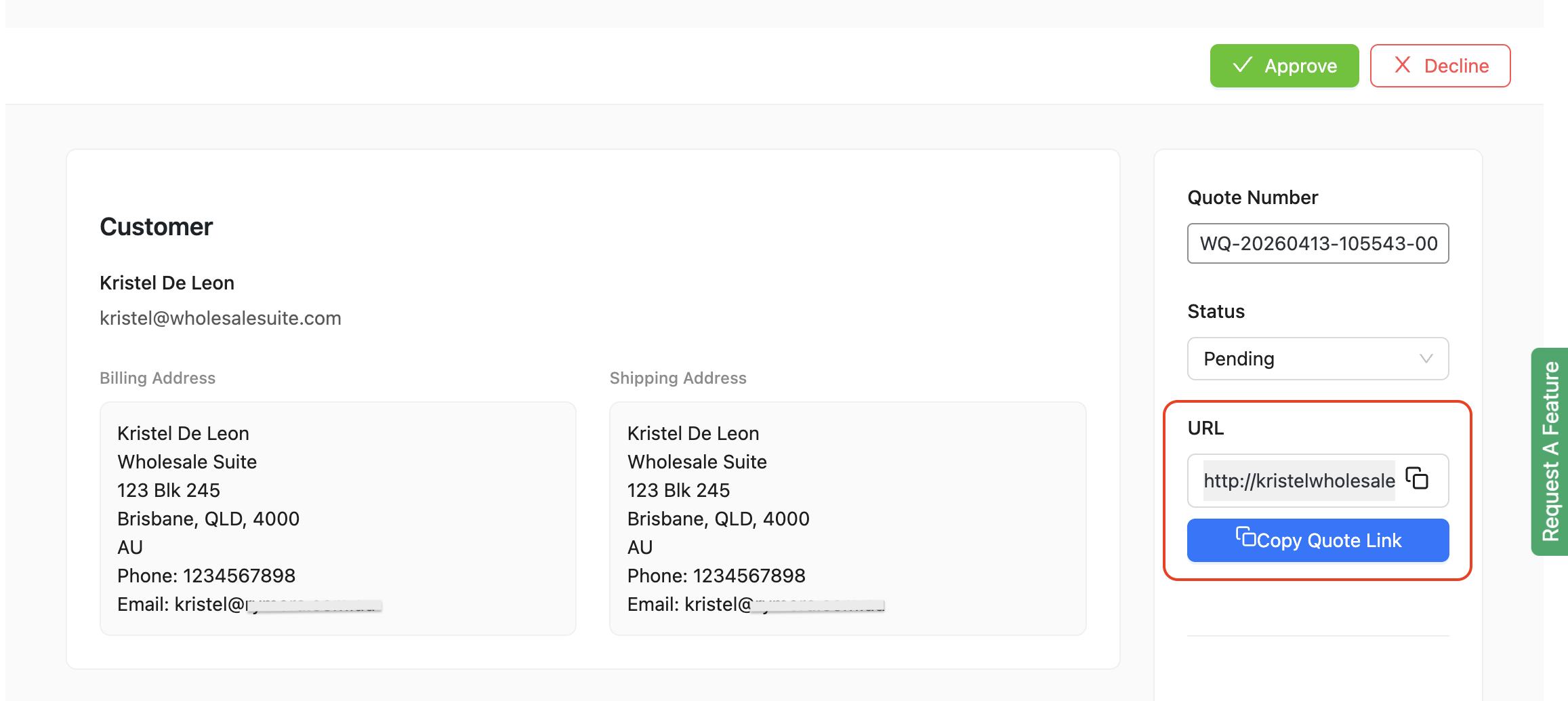
The link is included in the notification emails the plugin sends, so in most cases you never have to explain it. They get an email, click it, and see the quote. Nothing changes hands manually when you share WooCommerce quote links this way, which also means no stray copy is circulating with a different number on it.
Guest buyers are covered as well. With guest quote requests enabled, someone who has never registered can submit a request and reach a dedicated view quote page for it, so you can share WooCommerce quote links with prospects who are not customers yet. Guest requests have their own rate limiting, configurable by IP address and email, which keeps that door open without inviting spam.
Why A Link Beats An Attachment
Attaching a document freezes the price at the moment you attached it, and that matters more than it sounds when margins are thin. NYU Stern’s margins-by-sector dataset puts the average net margin at 1.17% for food wholesalers and 6.05% for retail distributors, so using a superseded figure can erase profit on an order. If you revise anything afterward, the buyer reads a stale file while you are looking at an updated record. A link always shows the current state, which is the plainest reason to share WooCommerce quote links instead of attaching a file.
What we’ve seen: Store owners who share WooCommerce quote links often ask whether they should also attach a copy for the customer’s records. It is a fair instinct. The problem is that the moment two versions exist, somebody quotes the wrong one back at you, usually in good faith and usually to their finance team. Pointing at one live page avoids it entirely.
If a customer does want something for their files, they can print or save the quote page from their browser. Worth being precise: there is no built-in PDF generator, so what they get is a browser print rather than a generated document. Several third-party quote plugins do produce PDFs, so if a formal document is contractually required on your side, settle that question before you build the workflow around a link.
The Thing Everyone Gets Wrong About Expiry
The public link does not expire when the quote does. This catches nearly everyone the first time.
Quote expiry governs how long the offer stands. Link validity is separate, and the link stays live until you delete the quote. Expect a surprise if you share WooCommerce quote links assuming they go dark the moment the offer lapses.
That is usually the behavior you want. A buyer returning a month later can still see what was discussed, which makes the follow-up conversation far easier than sending them to a dead page. Expired quotes also stay editable for the customer, so they can adjust quantities and resubmit instead of starting over.
Two related limits are worth knowing before you need them:
- You can’t switch links off per quote. Every quote receives a token automatically.
- Regenerating a token is not an admin action. The interface has no button for it.
Neither matters for normal quoting. Both matter if you sent a link to the wrong person; in that case, deleting the quote removes access. Quote settings have been expanding release by release, so confirm this behavior against your installed version before you share WooCommerce quote links with a wider group.
Our guide to setting up request a quote workflows covers the expiration settings themselves in more detail.
When To Share WooCommerce Quote Links Instead Of An Account
Accounts and public links are not competing options. Most stores use both, and the question is which one fits the buyer in front of you.
Share WooCommerce quote links when the recipient is new and unqualified, when several people at the buyer’s company need to see the same quote, or when a purchasing manager who will never log in has to approve it. Procurement teams forward quotes internally, and a link survives forwarding while a login does not.
Lean on accounts when the buyer already logs in to reorder, or when you want the quote visible in their My Account area alongside their history. Regulars who order monthly through the Wholesale Order Form, or who pay on NET terms through Wholesale Payments, are better served by an account than by a one-off link.
Either way the friction is worth removing. Digital Commerce 360 reports U.S. manufacturing and wholesale distribution sales of $15.12 trillion in 2025, drawing on U.S. Department of Commerce data, and every one of those orders began with somebody managing to read a price.
What The Recipient Can And Cannot Do
The permissions are deliberately asymmetric, and it is worth knowing where the line sits before you share WooCommerce quote links with a group rather than a person.
Someone holding the link who does not own the quote gets read-only access. They can see it. They cannot change it.
The customer who owns the quote can do more. On eligible quotes, which in practice means Pending and Expired ones, the owner can add items, remove items, and adjust quantities without asking you. That removes a round trip: instead of emailing to request two more units, they make the change, and you see it. Approved, Declined, and Converted quotes are locked to editing, which is what you want once a number has been agreed.
Each quote also carries its own messaging thread, and you can set a per-hour message limit for customers, so the negotiation stays in one place rather than scattering across inboxes.
Kalamazoo Industries is a useful picture of the kind of store this suits. They build machines to customer specification, where the configuration drives the price, so their buyers rarely start from a number on a shelf. Their case study covers the pricing and tax side of that setup rather than quoting specifically, though the problem shape is the same one a quote is built to solve.
Getting Quotes In Front Of Buyers Faster
The pattern worth internalizing is that every step between sending a quote and the buyer reading it costs deals, and a login is the step most often left in by accident. A token-based URL removes that step without giving anything away, because the person holding the link can read the quote and nothing more. Everything that would worry you about a public page- editing, price changes, one buyer seeing another buyer’s terms- is handled by the split between owner permissions and read-only access.
The rest is about matching the tool to the buyer. Established accounts belong in My Account, where history and reordering live. New buyers, approval chains, and anyone who will read the quote exactly once belong on a link, because asking them to create a password is asking them to do work that has nothing to do with buying from you. Expiry is the one place that intuition misleads people, and it is worth saying again that the offer lapsing and the page going dark are two different events.
If you want to share WooCommerce quote links without a login, Wholesale Quotes generates one for every quote and automatically includes it in the customer’s email. Our launch write-up covers what else shipped with it in Wholesale Quotes for WooCommerce.
Here’s what we covered in this article:
- What a public quote link actually is
- How customers receive the link
- Why a link beats an attachment
- The thing everyone gets wrong about expiry
- When to share WooCommerce quote links instead of an account
- What the recipient can and cannot do
Frequently Asked Questions
Can anyone with the link see the quote?
Yes, so treat the link as semi-confidential before you share WooCommerce quote links externally. The token is unguessable, so the risk is not someone finding it, it is someone forwarding it. That is usually a feature, because forwarding within a buying team is how B2B decisions actually get made.
Does the link stop working when the quote expires?
No. Expiry ends the offer, not access to the page. The link stays valid until the quote is deleted.
Can I turn the public link off for a specific quote?
Not through a per-quote switch. Every quote receives a token automatically, so deleting the quote is what removes access to it.
Can the customer edit the quote through the link?
The quote’s owner can add items, remove items, and change quantities on eligible quotes, typically those with Pending or Expired status. Anyone else holding the link has read-only access.
Is there a PDF version?
There is no built-in PDF generator. Customers can print or save the quote page from their browser if they need a copy for their records.
Can guests request a quote without an account?
Yes. Guest quote requests can be enabled, and rate limiting by IP address and email keeps spam under control while real buyers get through.