
By default, Wholesale Lead Capture requires users to enter a State during the registration process. While this works well for many businesses, it is not always ideal. Some countries do not use states, and in other cases, businesses prefer to reduce the number of required fields to improve conversions. Making the State field optional helps create a smoother registration experience and lowers form friction.
Fortunately, Wholesale Lead Capture allows developers to customize registration fields using WordPress hooks. With a simple and safe code snippet, you can make the State field optional without editing any core plugin files.
Why Make the State Field Optional
Making the State field optional improves the overall user experience. Fewer required fields mean faster form completion, which often leads to higher registration rates. This is especially important for international customers who may not have a State to enter.
In addition, optional fields reduce frustration and form abandonment. When users are not blocked by unnecessary validation errors, they are more likely to complete the registration process. As a result, your wholesale lead capture form becomes more flexible and conversion-friendly.
Before You Start
Before applying this customization, make sure you have access to your WordPress files. The code should be added using a child theme, a custom plugin, or a code snippets plugin. This approach ensures your changes are not lost when themes or plugins are updated.
It is also recommended to back up your site before making any changes. Although this snippet is safe, having a backup provides peace of mind.
How Wholesale Lead Capture Handles Registration Fields
Wholesale Lead Capture stores its registration fields in a global array. This array controls how each field behaves, including whether it is required or optional. By modifying this array, you can adjust field settings such as labels, validation rules, and required status.
In this case, we will target the State field and change its required value. This allows the field to remain visible while no longer being mandatory during registration.
Code Snippet to Make the State Field Optional
Add the following code snippet to your child theme’s functions.php file, a custom plugin, or a code snippets plugin. This method is update-safe and recommended for long-term maintenance.
add_action( 'init' , function() {
    global $WWLC_REGISTRATION_FIELDS;
    $WWLC_REGISTRATION_FIELDS[ 'wwlc_state' ][ 'required' ] = 0;
});
What to Expect After Applying the Change
After adding the code, the State field will remain visible on the Wholesale Lead Capture registration form. However, users will no longer receive validation errors if the field is left empty. The rest of the registration form will continue to function normally.
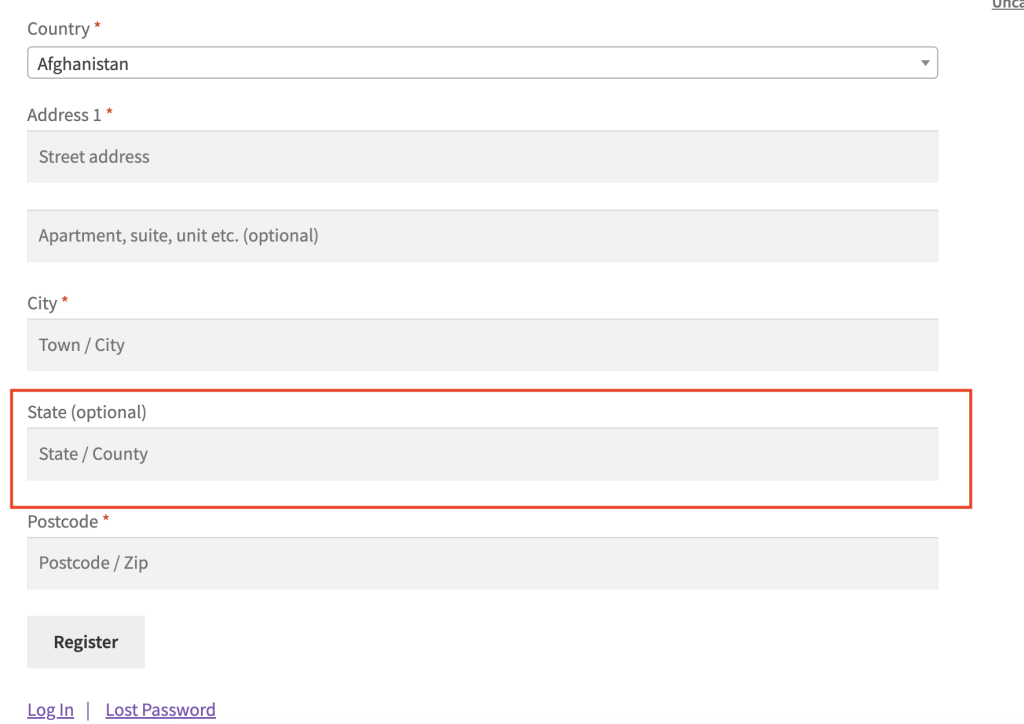
This change does not affect existing users or previously submitted data. It only applies to new registrations moving forward.
Making the State field optional in Wholesale Lead Capture is a simple yet effective customization. With just a few lines of code, you can improve user experience, support international customers, and increase registration conversions.
Frequently Asked Questions
Does this state field change affect existing wholesale registrations?
No. This snippet does not affect existing registration data. It only updates the validation rule going forward, so your database keeps previously collected location data intact and leaves all user records unchanged.
Does making the state field optional remove it from the form?
No. Making the field optional does not remove it—it still appears on the form but skips validation when left blank. To hide the field entirely, you need a separate code adjustment.
Can I make other registration fields optional using the same method?
Yes. You can apply the same approach to other registration fields in Wholesale Lead Capture. Replace wwlc_state with the correct field identifier in the global $WWLC_REGISTRATION_FIELDS array and set its required value to 0.
Why is the state field still required after I added the code?
If the change does not take effect, check that you added the snippet to an active child theme’s functions.php file or a dedicated site plugin, not a parent theme file that updates may overwrite. Also clear any caching layers that may serve outdated content.
Need Help?
If you have a question or run into any issues, we’re here to help.
- Premium users: Open a support ticket
- Free users: Visit our community forum

