
Large wholesale vendors can afford to offer tailored ordering experiences for their customers. That means dedicated sales agents, follow-ups, automated orders, and other similar perks. If you run a more modest wholesale operation, you may not be able to compete in terms of tailored services. What you can do is make it as easy and seamless as possible for customers to place online orders, and that’s where order forms for small business come in.
Learning how to make order forms for your wholesale store will enable customers to make purchases on their own time and without needing to deal back and forth with salesmen. A lot of customers prefer this modality as they get full control over when and how to place orders.
In this article, we’ll talk about the benefits of learning how to make order forms for small businesses. We’ll also guide you through the process of creating order forms using WooCommerce Wholesale Order Form. Let’s get to it!
The Benefits Of Order Forms For Small Business
Typically, customers that shop online need to go through products one by one, choosing how many they want to buy and in what variations. For a wholesale buyer, that process can take an inordinate amount of time. After all, they typically buy dozens or hundreds of products at once.
The goal of an order form is to simplify the shopping process, whether you’re buying one product or a hundred of them. With a one-page order form, both you and your customers benefit in several ways, including the following:
- Making orders takes less time, which means there’s less friction when customers try to complete a purchase
- Since the process is more streamlined, customers are more likely to make bigger orders
- The process makes it easier to review orders compared to having to add products one by one
- You can customize forms to fit your store’s needs, rather than being tied to a one-size-fits-all ordering process
- Enabling customers to manage their own orders frees up time to manage the store
If you’re not sure what a one-page order form can look like, here’s an example using Wholesale Order Form. The plugin is part of Wholesale Suite and it enables you to set up order forms tailor-made for wholesale websites:
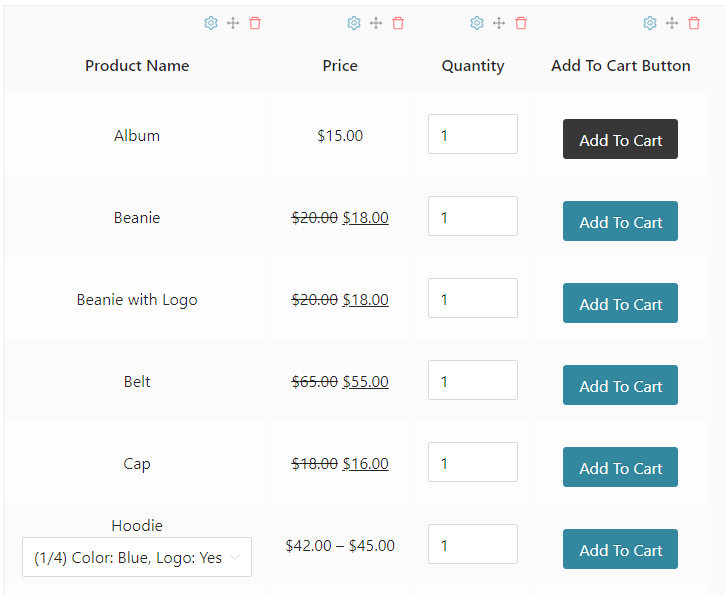
Other plugins within Wholesale Suite enable you to add critical wholesale functionality to your website, such as creating lead capture forms and creating custom user roles for wholesale customers. The suite works best if you use all the plugins together. However, you can also use individual parts of the suite alongside Wholesale Prices.
How To Make Order Forms For Small Business (3 Steps)
For this tutorial, we’re going to show you how to make order forms using Wholesale Order Form. To get started, you’ll need the Wholesale Prices plugin. Wholesale Order Form is a standalone premium plugin, so you’ll need to buy it to get a license. After you purchase the plugin, go ahead and install it.
Step 1: Use the Wholesale Order Form Setup Wizard
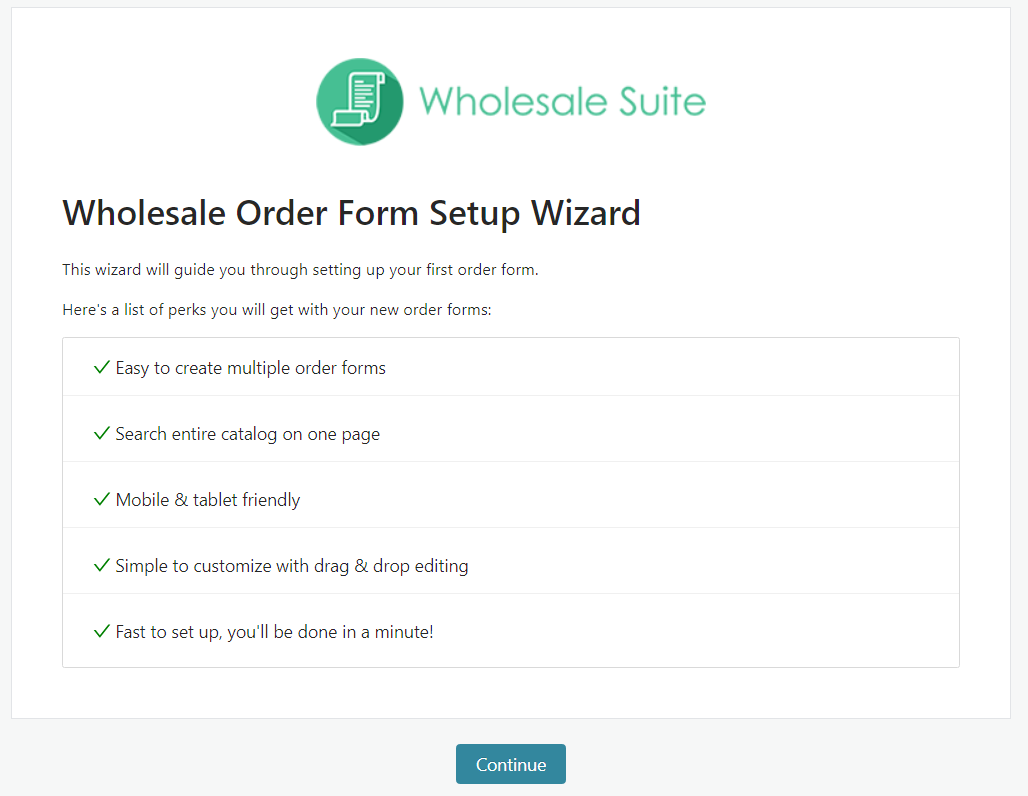
When you activate Wholesale Order Form, the plugin guides you through setting up your first order form. To get started, click on Continue once you access the setup wizard:
During the next step, Wholesale Order Form will ask you to create WooCommerce API keys. The plugin works using WooCommerce and it needs API keys to connect to it and fetch the products you want to display with an order form. To continue, click on Create WooCommerce API Keys:
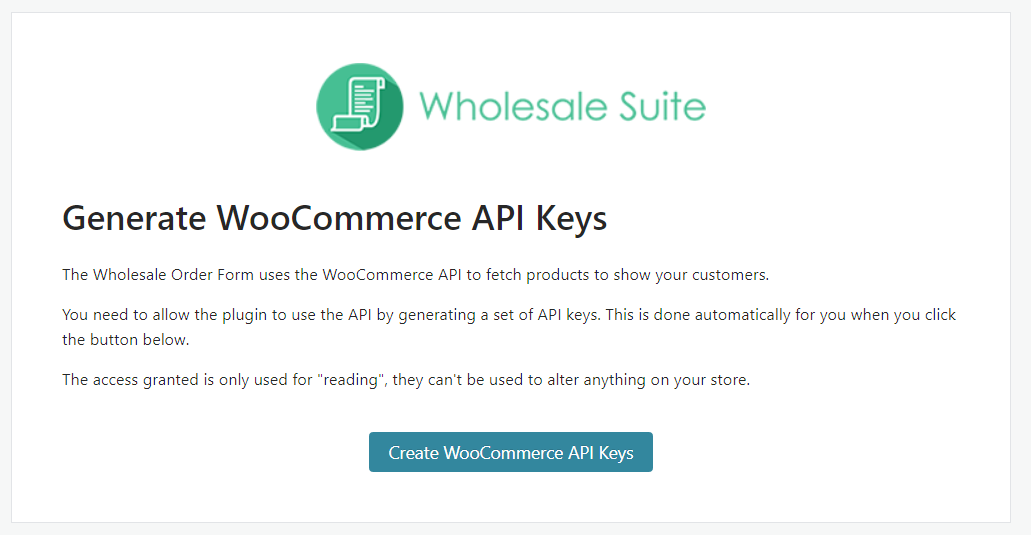
The plugin will automatically fill out the corresponding API key information, so go on ahead and move to the next step. Now Wholesale Order Form will automatically generate an order form and a corresponding shortcode for it:
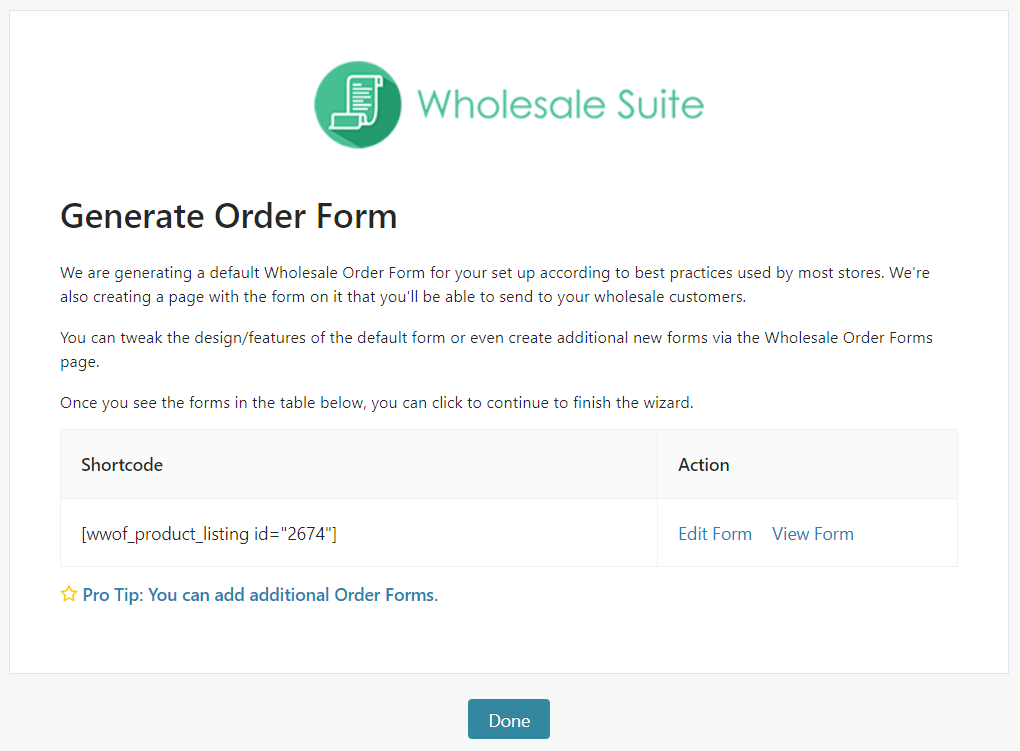
This form will automatically display your WooCommerce products and it comes with a default style. However, you can make other forms for small businesses or edit it to fit your website. We’ll go over that process in the next step.
Step 2: Configure your Order Form
If you go to Wholesale > Order Form, you’ll see a list of all the order forms you’ve made using Wholesale Order Form. To edit a form, click on the pencil icon to the right of its name and this will open a new page:
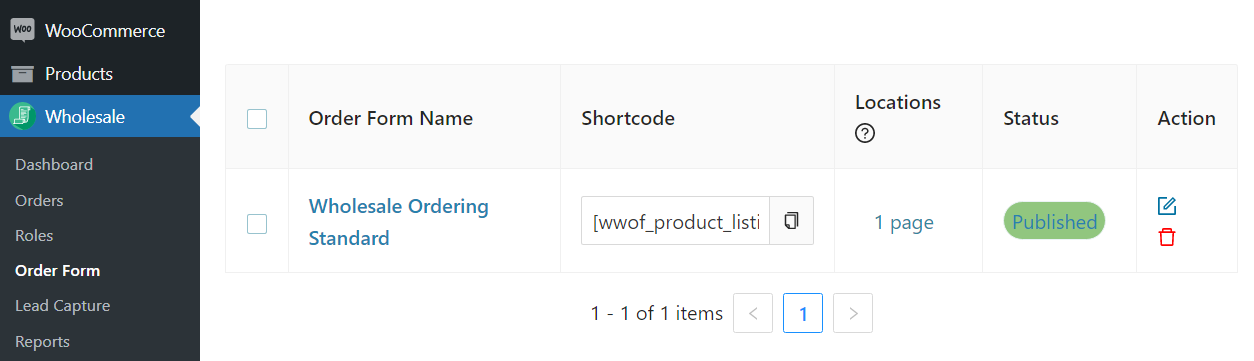
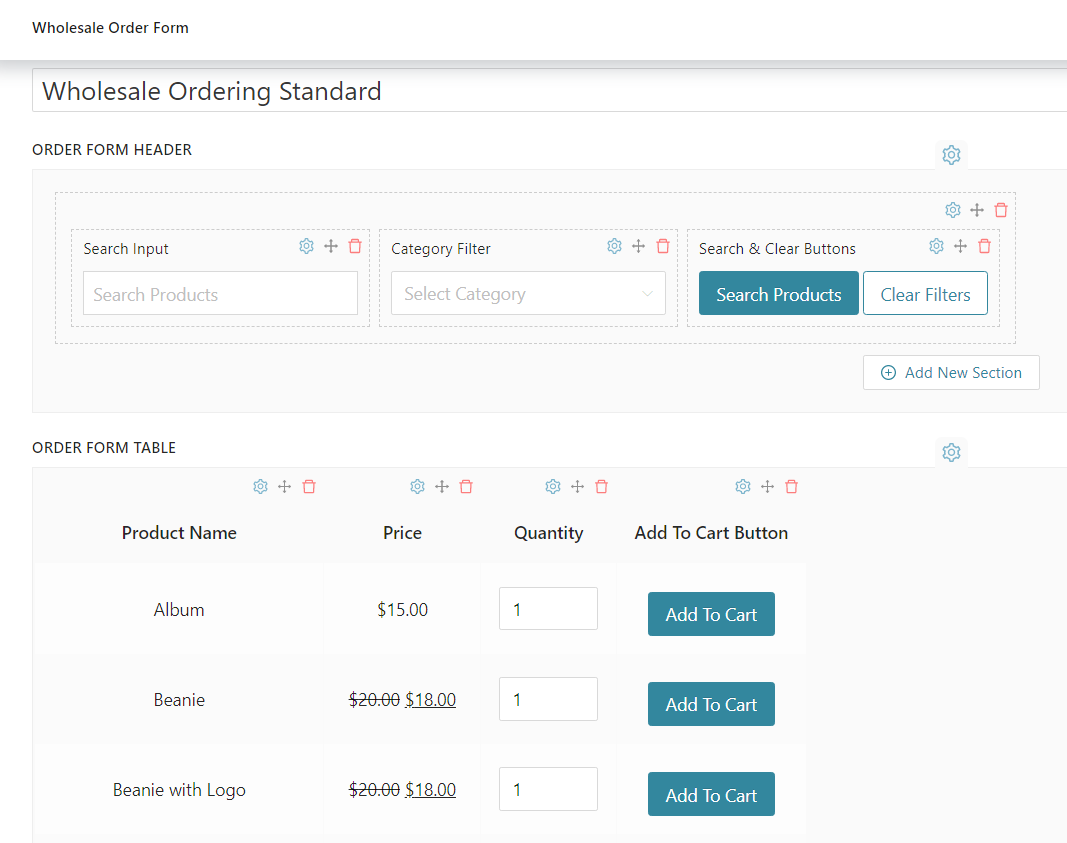
Wholesale Order Form enables you to re-order the form layout, add and remove elements, and configure the settings for the table. The whole order form is a table if you look at it closely:
The menu to the right includes elements you can add to the order form. Among these elements you have options for product images, SKUs, in-stock amounts, and product descriptions:
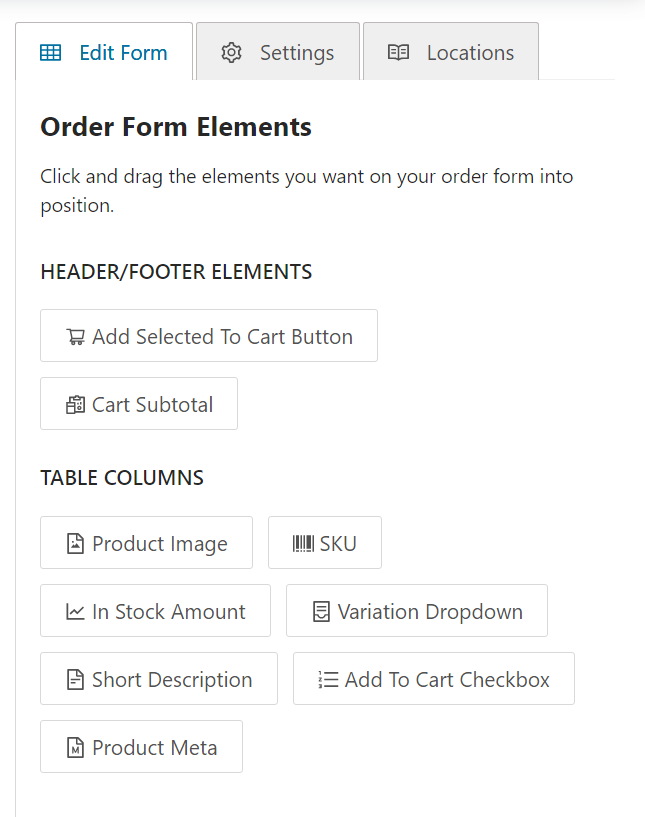
There are no written rules for what elements you should include in an order form. It comes down the kind of shopping experience you want to offer customers.
Some customers will value seeing product descriptions and SKUs. Others will simply want to make orders fast and use streamlined forms. If you’re not sure what kind of form will perform best with your customers, we recommend testing multiple variations and gathering feedback from them. When you’re done making changes to the form, click on Update.
Step 3: Place the Order Form on your website
Wholesale Order Form automatically generates new pages for every new form you make. You can access these pages by going to Wholesale > Order Form and looking under the Locations column. What’s more, you can copy the shortcodes on that page and place them anywhere you want on your website.
After you place a form shortcode on your site, Wholesale Order Form will load the corresponding element. Here’s what a fully-configured order form can look like:
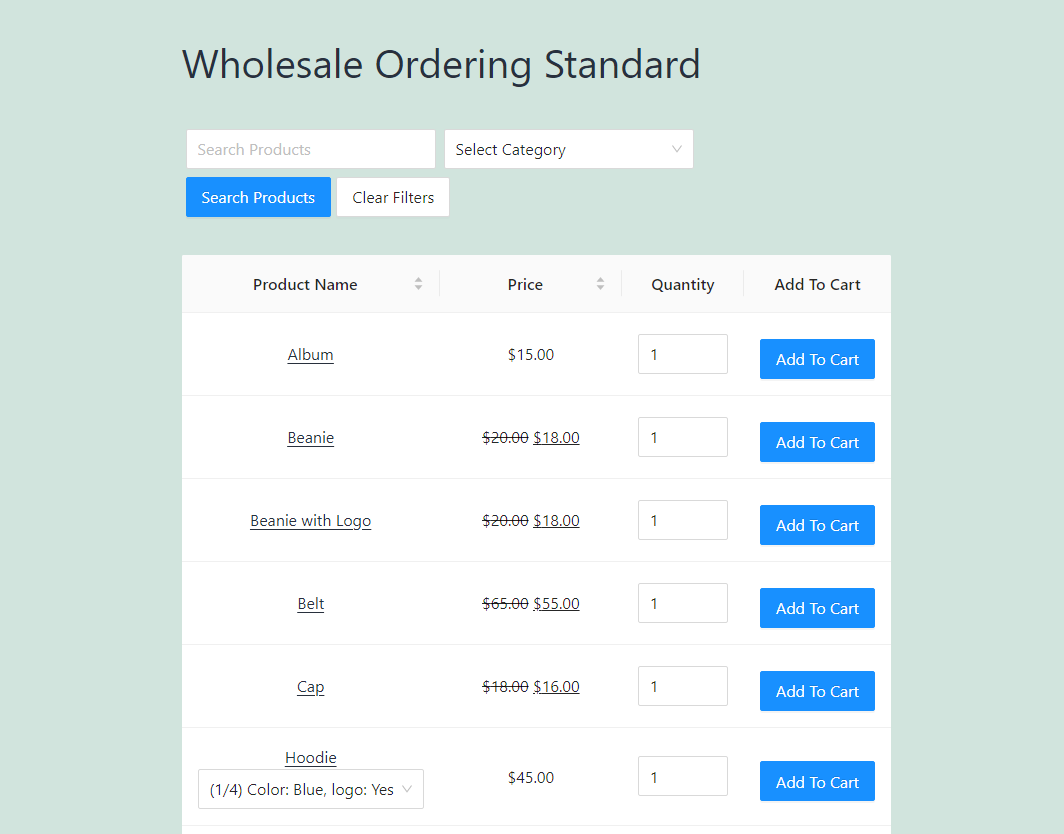
Remember that you can make multiple order forms for different pages. Wholesale Order Form enables you to customize each form separately, so you can offer different experiences for different types of customers.
Free Wholesale Order Form Template
A wholesale order form lets a buyer tell you exactly what they want, in the quantities you sell, without a back-and-forth over email. Copy the template below into a spreadsheet or download the ready-made file, then fill in your own products. Each column is there to stop a common ordering mistake.
| Section | Field | Why it’s there |
|---|---|---|
| Buyer details | Business name, contact name, email, phone | So you know who to invoice and who to call |
| Buyer details | Wholesale account number | Matches the order to the buyer’s agreed pricing |
| Shipping | Delivery address, requested delivery date | Avoids shipping to a billing address |
| Order lines | SKU | Removes ambiguity between similar products |
| Order lines | Product name and variant (size, colour, flavour) | Lets buyers check what the SKU means |
| Order lines | Case pack (units per case) | Makes clear what “1” means when they order |
| Order lines | Quantity (cases) | The buyer’s order, in your selling unit |
| Order lines | Minimum order | Stated per line, so short orders get caught before they reach you |
| Order lines | Wholesale unit price | The buyer’s price, not retail |
| Order lines | Line total | Quantity × case pack × unit price |
| Totals | Subtotal, shipping, tax, order total | What the buyer will be invoiced |
| Terms | Payment terms (for example, Net 30), signature, date | Confirms the buyer agreed to your terms |
The file has line totals and the order total already wired up, so buyers only type quantities. A spreadsheet form works for your first few accounts. Once buyers reorder every week, retyping each form into your store turns into the bottleneck, and that’s the point where an online order form pays for itself.
When a spreadsheet stops being enough
With Wholesale Order Form, the order form lives on your store. Wholesale customers see your products in a table you build yourself, with columns such as product name, SKU, image, price, stock level, a variation dropdown and an add-to-cart checkbox, plus a search box and category filter above it. They add dozens of lines from one page without page reloads and check out as normal.
You can also restrict individual columns to specific wholesale roles, so a column like stock level only shows for the buyers you choose.
Frequently Asked Questions
How do I make my own order form?
Start with what a buyer has to tell you for an order to be complete: who they are, where it ships, which products, how many, and on what payment terms. Put those fields in a spreadsheet or form builder in that order, add a line total and an order total, then test it by placing an order yourself. The template above already has every field.
What is a wholesale order?
A wholesale order is a bulk purchase by a business that plans to resell the goods, at a lower per-unit price than retail. It usually comes with conditions a retail order doesn’t have: a minimum quantity, case-pack sizes, and payment terms such as Net 30 instead of payment at checkout.
What are the different types of order forms?
The common ones are paper or PDF forms buyers fill in and send back, spreadsheet forms emailed between buyer and seller, online form-builder forms that email you each submission, and order forms built into an online store, where the order goes straight into your order system without being retyped.
How do I make a fillable order form?
Use a spreadsheet with locked formula cells for line totals, a fillable PDF, or an online form builder. If your buyers order regularly, an order form inside your online store works best, because each submission arrives as a real order with stock and pricing already applied.
Conclusion
Learning how to make order forms for a small business is simple, particularly if you’re using WordPress. With WordPress, you get access to plugins such as Wholesale Order Form, which can automatically generate order forms that you can customize. Wholesale Order Form is part of Wholesale Suite and we recommend getting its companion plugins if you run a wholesale operation.
If you use Wholesale Order Form, you can make order forms for small businesses in only three steps:
Do you have any questions about how to make order forms for your business? Let’s talk about them in the comments section below!