


A smooth WooCommerce wholesale reorder workflow can transform your B2B store. When reordering is frictionless, buyers order more often.
This guide covers four practical WooCommerce wholesale reorder approaches that make repeat ordering fast and painless, each with specific tools and configurations. Whether you are launching a new wholesale channel or refining an existing B2B store, these strategies will help you retain customers and grow revenue through smarter reorder workflows.
Why Reorder Workflows Matter For Wholesale
According to Sopro’s B2B buyer research, 75% of B2B buyers prefer a sales experience without a sales rep when it’s self-serve. For repeat orders, that preference is even stronger. Buyers want to complete routine purchases as quickly as possible, and a well-designed WooCommerce wholesale reorder system delivers exactly that.
B2B buying is inherently cyclical. A restaurant orders the same ingredients weekly. A retailer restocks the same products monthly. An office supplier replenishes the same items quarterly. The first order is about discovery. Every order after that is about efficiency.
According to McKinsey’s 2024 B2B Pulse Survey, e-commerce is now the top revenue-generating channel for B2B organizations, surpassing in-person sales. The survey also found that B2B customers use an average of ten interaction channels in their buying journey, up from five in 2016. For wholesale stores, this means every touchpoint, including WooCommerce wholesale reorder pages, must deliver a seamless experience.
What Makes A Great WooCommerce Wholesale Reorder Experience
Before diving into specific tools, it helps to understand what separates a mediocre WooCommerce wholesale reorder experience from a great one. Based on working with dozens of B2B stores, the best reorder workflows share four characteristics.
Speed over aesthetics
Wholesale buyers do not care about product photography, carousels, or animated product descriptions when reordering. They want to find their items, set quantities, and check out in as few clicks as possible. A WooCommerce wholesale reorder workflow should prioritize function over form.
Search-first navigation
Repeat buyers know what they need. They search by SKU or product name, not by browsing categories. Your reorder interface needs a prominent, fast search that returns results instantly. This is where tools like the Wholesale Order Form shine, because the entire interface is built around search-and-add rather than browse-and-click.
Accurate pricing every time
When a wholesale buyer reorders, they expect to see their current wholesale pricing. If you have adjusted pricing since their last order, the updated prices should apply automatically. Tools like Wholesale Prices Premium handle this natively by calculating wholesale prices in real time based on the buyer’s role.
No unnecessary friction
Every extra page load, pop-up, or required field between “I know what I want” and “order placed” is friction. The best WooCommerce wholesale reorder systems eliminate unnecessary steps, keeping the path from intent to checkout as short as possible. If your store enforces minimum order requirements, make the thresholds visible and easy to meet so buyers can plan accordingly.
3 WooCommerce Wholesale Reorder Workflow Approaches
Approach 1: Single-page order form (fastest for most stores)
Wholesale Order Form is the simplest and most effective WooCommerce wholesale reorder tool for most stores. It is not specifically a “reorder” feature. It is a fast ordering interface that makes every order, including repeat orders, significantly faster.
Here is why it works for reorders
Experienced wholesale buyers know their products by name or SKU. They do not need to browse categories or read product descriptions. They need to search, add quantities, and submit.
The Order Form provides exactly that: a single-page AJAX-powered product table with search by SKU or product name, category filtering, and inline quantity inputs. In my testing, a buyer who reorders the same 20 products weekly completed the entire order dramatically faster through the Order Form than through the standard WooCommerce shop.
For stores that also manage wholesale customer registration through Wholesale Lead Capture, the Order Form becomes even more powerful. New wholesale customers who register through your lead capture form can be directed immediately to the Order Form, giving them a fast WooCommerce wholesale reorder experience from their very first visit.
Approach 2: Wishlists as saved reorder lists
Some wholesale buyers have multiple recurring orders. Wishlists solve this by letting buyers create named product lists they can maintain, update, and convert to a cart with a single action. This turns any WooCommerce wholesale reorder cycle into a repeatable, personalized workflow.
The SaveTo Wishlist plugin is an excellent fit for this approach. Unlike traditional wishlist plugins that limit customers to a single list, SaveTo Wishlist lets buyers create unlimited named wishlists for free. A wholesale buyer can maintain a “Weekly Beverage Restock” list, a “Monthly Dry Goods” list, and a “Quarterly Specialty Items” list, each with different products and quantities ready to go.
What makes SaveTo Wishlist especially useful for WooCommerce wholesale reorder workflows is its “Add Cart Products to Wishlist” feature. After placing an order, a buyer can save their entire cart as a wishlist before checkout completes. The next time they need to reorder, they simply open that saved wishlist and add everything back to the cart. No browsing, no searching, no remembering what they ordered last time.
For stores that need deeper analytics on which products are being saved most frequently, SaveTo Wishlist Pro adds wishlist analytics, automated email notifications for saved items, and role-based restrictions so you can customize the wishlist experience specifically for your wholesale user roles.
Approach 3: Automated reorder reminders
Instead of waiting for buyers to remember to reorder, proactively remind them. This is one of the most overlooked WooCommerce wholesale reorder strategies.
This approach uses email automation (via your CRM, Mailchimp, or WooCommerce email marketing plugins) to send “time to restock?” emails based on purchase frequency. If a buyer typically orders every 3 weeks, send a reminder at 2.5 weeks with a direct link to the order form or a pre-filled cart.
For stores using a CRM integration, these reminders can be fully automated based on actual purchase intervals.
According to Digital Commerce 360’s analysis of B2B buyer behavior, millennials now make up 73% of all B2B buyers, and 78% of them said they would switch suppliers if a competitor offered a better digital checkout experience. Automated reorder reminders are one way to stay ahead of that expectation and keep your WooCommerce wholesale reorder workflow top of mind for buyers.
Setting Up the Order Form For Fast Reordering
Step 1: Configure search fields
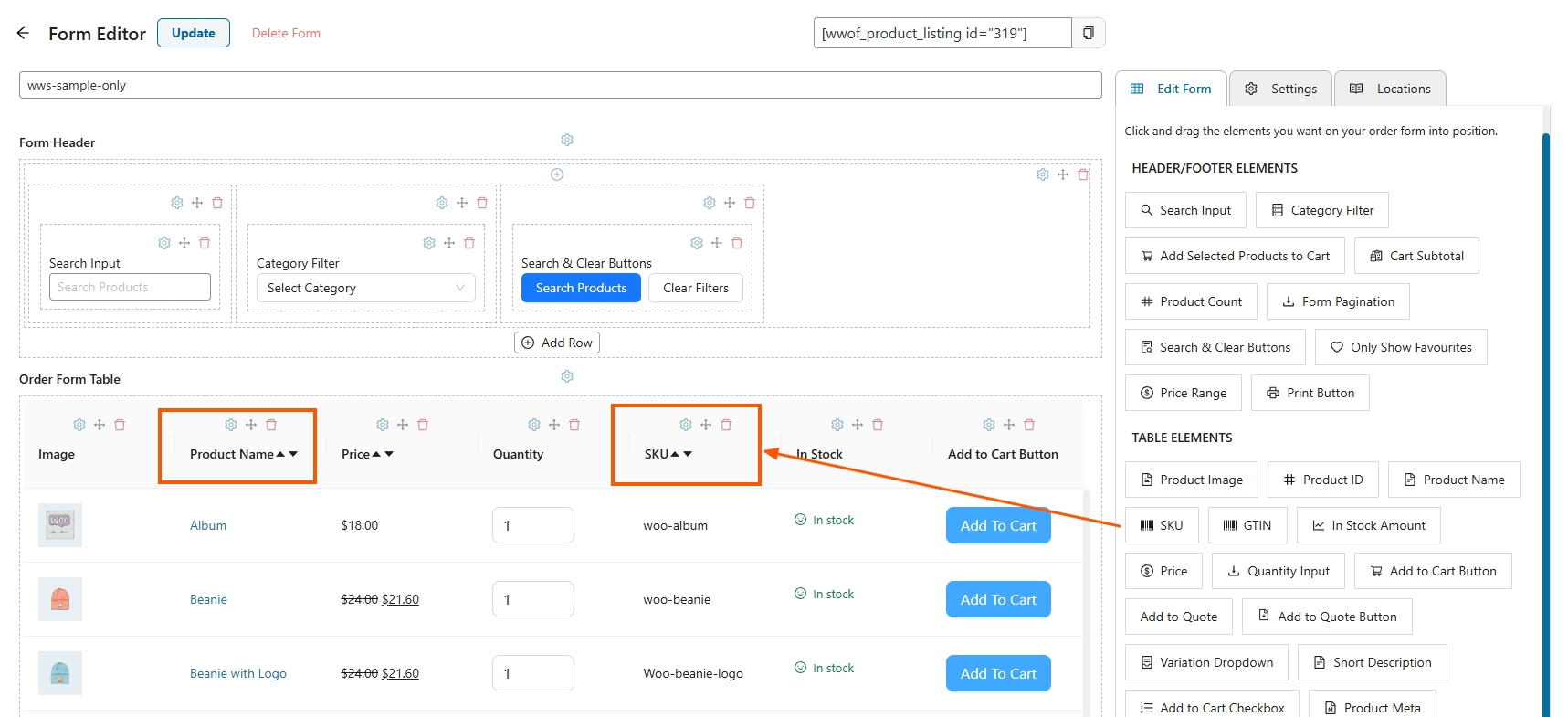
Enable search by both product name and SKU. Most repeat buyers search by SKU because it is faster and more precise. Make the search field prominent at the top of the form. This single change can significantly reduce WooCommerce wholesale reorder times.
Step 2: Add category filters
For stores with large catalogs, category dropdown filters let buyers narrow to the product group they are restocking. A buyer who only needs to reorder beverages should not scroll past 300 food items.
Step 3: Enable inline “add to cart”
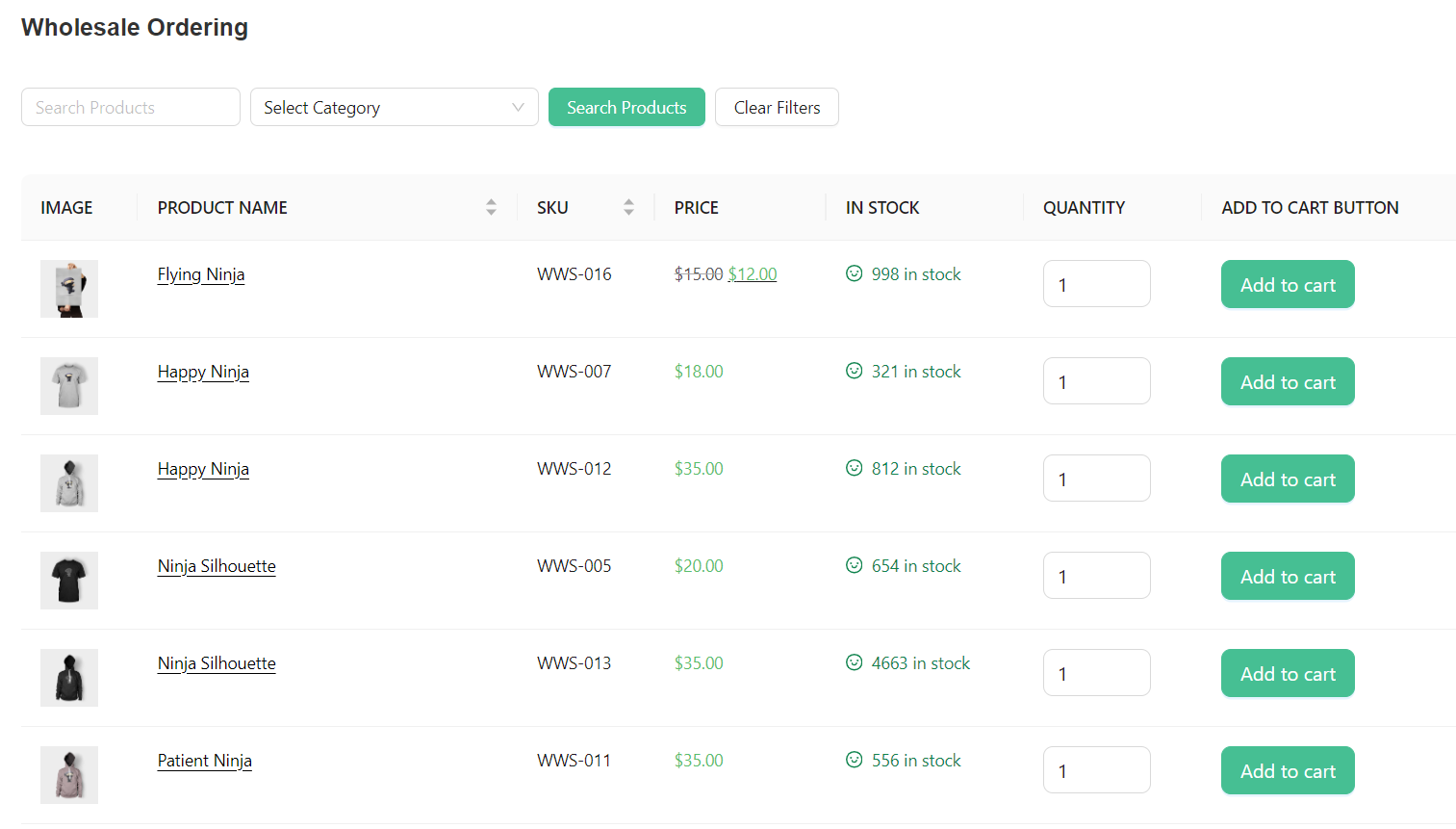
The Order Form’s inline quantity input and add-to-cart means buyers never leave the page. They can add 30 products to the cart without a single page reload.
Step 4: Set up default sorting
If possible, display products in a way that matches how your buyers think. Sort by category, then alphabetically within category. This creates a predictable layout that buyers can navigate from memory.
Step 5: Create a dedicated reorder page
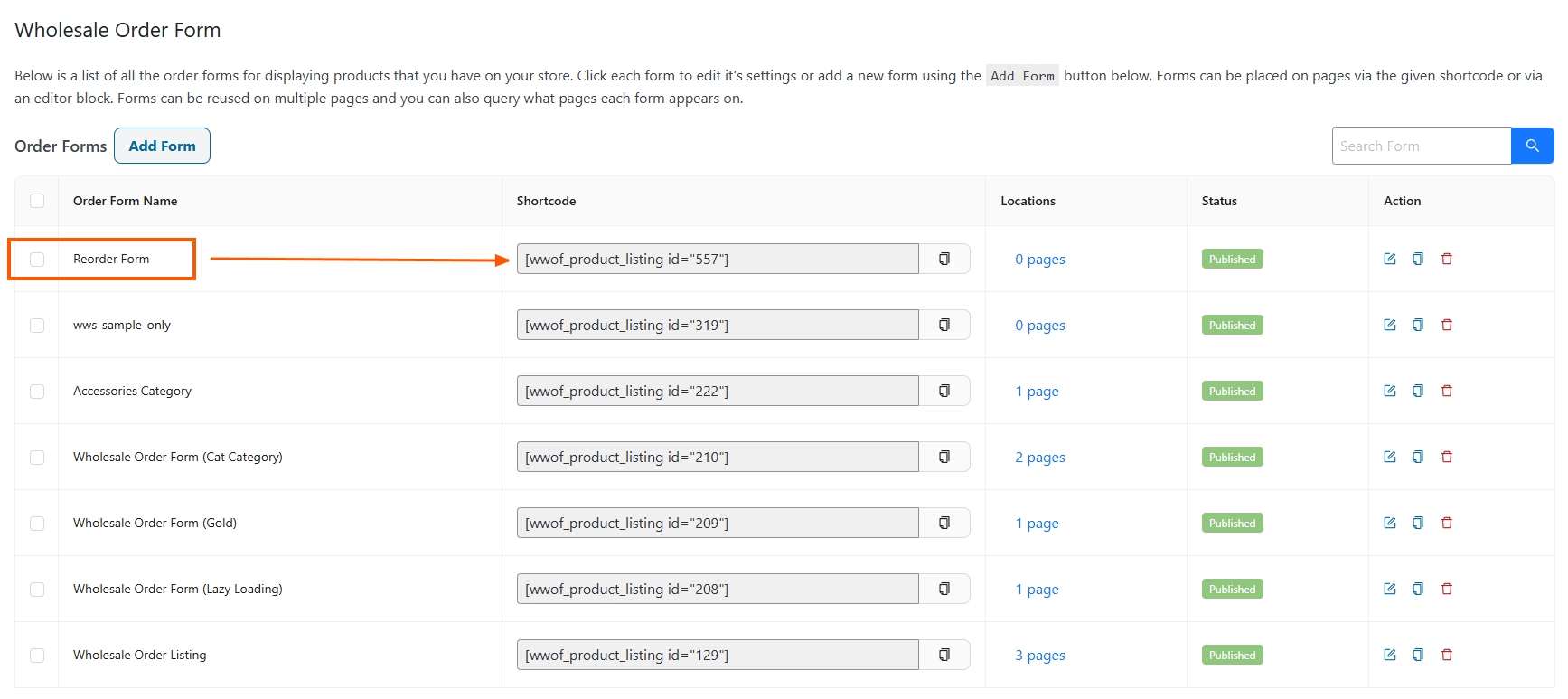
Create a WordPress page titled “Reorder” or “Quick Order” and add the Order Form shortcode. Prominently link to it from the wholesale customer’s My Account page and navigation menu.
Step 6: Integrate with your wholesale pricing tiers
Make sure your Wholesale Prices Premium settings are configured so that quantity-based discounts display directly on the Order Form. This lets buyers see tier breakpoints when reordering, encouraging them to increase their quantities to the next discount level.
Conclusion
Optimizing your WooCommerce wholesale reorder process is one of the highest-ROI improvements you can make to your B2B store. According to Spryker’s research, 95% of B2B buyers believe self-service portals improve efficiency, while Gartner reports that 61% of B2B buyers actively prefer a rep-free buying experience. Your WooCommerce wholesale reorder workflow is how you deliver on both of those expectations.
In this guide, we covered the key areas that make or break your wholesale reorder strategy:
- Why reorder workflows matter for wholesale
- What makes a great WooCommerce wholesale reorder experience
- 3 reorder workflow approaches for WooCommerce
- Setting up the order form for fast reordering
Explore the full Wholesale Suite bundle for the complete wholesale ordering experience, or check out 30 growth hacks for wholesale sales for more retention strategies. When your WooCommerce wholesale reorder process is fast, transparent, and designed around how buyers actually work, every repeat order becomes easier than the last.
Frequently Asked Questions
Does Wholesale Suite have a built-in reorder feature?
Wholesale Suite focuses on the ordering interface through its Wholesale Order Form, which is designed for fast, efficient ordering that makes every purchase, including repeat orders, significantly faster. For saved reorder lists, pair it with SaveTo Wishlist to let buyers maintain named product lists they can reload and add to cart whenever they need to reorder.
Can I track which products are most reordered?
Yes. Wholesale Suite includes wholesale sales reports that show product-level data. You can identify your most frequently reordered products and feature them prominently on the order form or in reorder reminder emails. If you are using SaveTo Wishlist Pro, you also get wishlist analytics that show which products buyers are saving most frequently, giving you another layer of insight into WooCommerce wholesale reorder patterns.
How do I set up reorder reminders without a CRM?
Use WooCommerce email marketing plugins like Mailchimp for WooCommerce or AutomateWoo. Create a segment for wholesale customers who have not ordered in X days, and set up an automated email with a link to your order form. It is not as powerful as a CRM, but it is effective for basic WooCommerce wholesale reorder reminders.
What is the fastest WooCommerce wholesale reorder method?
For buyers who reorder the same products regularly, saving a wishlist with SaveTo Wishlist and loading it to cart is the fastest method. For buyers who vary quantities or swap products between orders, the Wholesale Order Form is the best choice. Most stores benefit from offering both options.
Can I restrict the reorder page to wholesale customers only?
Yes. With Wholesale Prices Premium, you can control product visibility and page access by user role. You can make your reorder page visible only to approved wholesale customers, ensuring retail visitors do not see wholesale-exclusive content.



