

Building a wholesale portal WooCommerce store is one of the highest-impact upgrades you can make for your B2B operation. The difference between a wholesale store and a wholesale portal is the difference between a warehouse with a cash register and a professional showroom with a concierge.
This guide shows you how to build a proper wholesale portal using Wholesale Suite, with a dedicated login, a branded catalog, efficient ordering, and tier-specific experiences that make your wholesale buyers feel like they are getting a premium service.
What Makes A Wholesale Portal Different From A Private Store
A private store hides products from non-wholesale users. That is the minimum: product visibility rules that restrict access by role. Wholesale Suite handles this via Wholesale Prices Premium’s product visibility settings, so you can quickly set up a basic WooCommerce private store.
A wholesale portal is the complete, branded B2B experience built on that foundation. It includes a dedicated login page (not the default WordPress login), a custom wholesale catalog with a fast ordering interface, role-specific navigation and page access, professional payment terms and invoicing, and tier-specific product selection and pricing.
Think of it this way: a private store is a locked door. A wholesale portal is the entire VIP section behind that door, designed specifically for B2B buyers. Every element, from the login screen to the order form to the checkout options, communicates that your wholesale portal was built with their needs in mind.
Why Your Wholesale Portal Experience Matters
The data on B2B buyer expectations makes a compelling case for investing in your wholesale portal. According to Spryker’s 2025 self-service portal study (conducted by Statista+ with 100 U.S.-based B2B buyers), 86% of self-service portal users rate their buying experience positively, compared to only 32% of non-users. That gap in satisfaction directly translates to retention and revenue.
Perhaps most importantly, 88% of portal users say that portal availability influences their choice to continue purchasing from a supplier. According to McKinsey’s research, 54% of B2B buyers switch suppliers because of poor digital customer experiences.
Gartner’s 2024 survey of 632 B2B buyers adds further context: 61% of buyers prefer a rep-free buying experience, and 73% actively avoid suppliers who send irrelevant outreach. Your wholesale portal delivers the self-service experience these buyers want while keeping them connected to your brand and ordering infrastructure.
According to Forrester’s 2025 B2B predictions, more than half of large B2B transactions (US$1 million or greater) will be processed through digital self-serve channels. If enterprise buyers are comfortable self-serving seven-figure purchases, your wholesale portal needs to deliver a professional, friction-free experience for routine B2B orders.
Planning Your Wholesale Portal
Before building, map three things:
1. Your wholesale tiers and what each sees
Most portals have 2 to 3 tiers, each with different pricing, minimum orders, and sometimes different product access. A Bronze tier might see 500 products at 20% off. A Gold tier sees the full 800-product catalog at 35% off with NET 60 terms. Use Wholesale Prices Premium to create unlimited wholesale roles, each with its own pricing rules and minimum order requirements.
2. The buyer journey
Map every step: Login, catalog browsing, product search, add to cart, checkout, and account management. Each step should be optimized for B2B efficiency rather than adapted from a retail experience. Review our wholesale customer onboarding checklist to ensure no step is overlooked.
3. Branding decisions
Will the portal share your retail site’s design, or have its own styling? Most stores keep the same theme but create dedicated pages with B2B-focused layouts. Less marketing imagery, more search bars and product tables. The goal is a wholesale portal that feels like a purpose-built tool, not a repurposed retail storefront.
Building Your Wholesale Portal WooCommerce Store Step-by-Step
Step 1: Set up wholesale roles and pricing
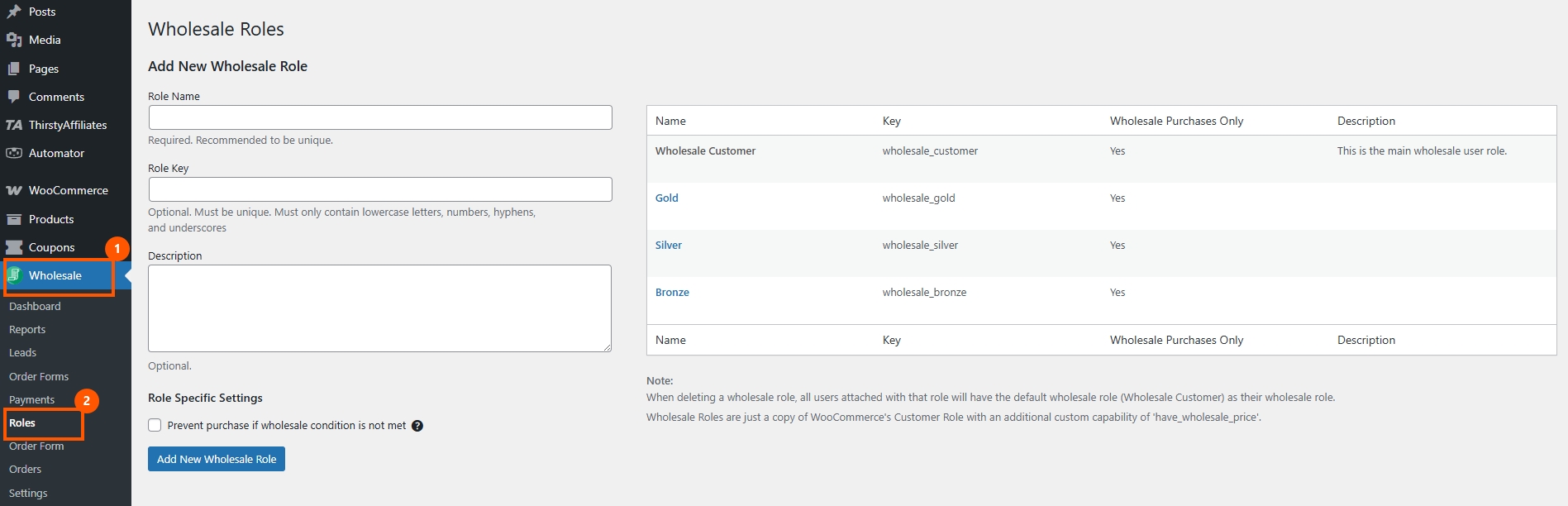
In Wholesale Prices Premium, create your wholesale roles. I typically set up three tiers: Bronze tier (20% off retail, $200 minimum order), Silver tier (30% off retail, $150 minimum order), and Gold tier (40% off retail, no minimum, NET 30 terms).
Set pricing at the global level first using a percentage discount, then override at the category or product level where needed. Configure minimum order quantities and minimum order amounts per role so each tier of your wholesale portal has clear ordering thresholds. You can also add quantity-based discount tiers within each role to encourage larger orders.
Step 2: Create a dedicated wholesale login page
Do not send wholesale buyers to /wp-login.php. Instead, Wholesale Lead Capture provides a separate login shortcode you can place on a custom page.
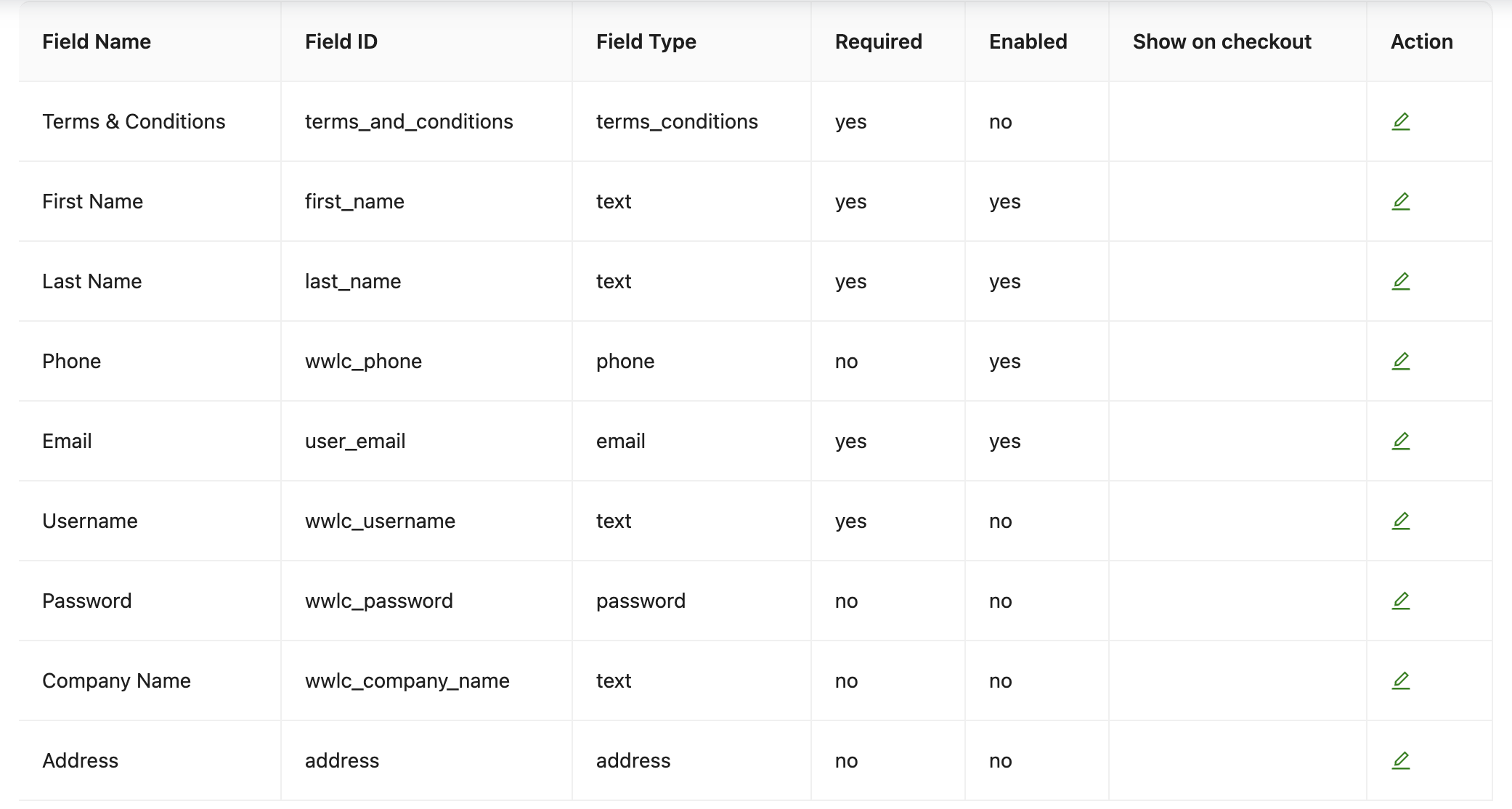
Create a new WordPress page called “Wholesale Login” (or “B2B Portal Login”). Add Lead Capture’s login shortcode and style the page to match your B2B branding. Keep it professional, clean, and minimal. Configure it so that wholesale users are redirected to your wholesale catalog page after logging in.
For tips on optimizing that registration experience, see our guide on wholesale sign up form best practices.
Step 3: Build your wholesale catalog page
This is where the Wholesale Order Form transforms the wholesale portal experience. Create a page called “Wholesale Catalog” and add the Order Form shortcode.
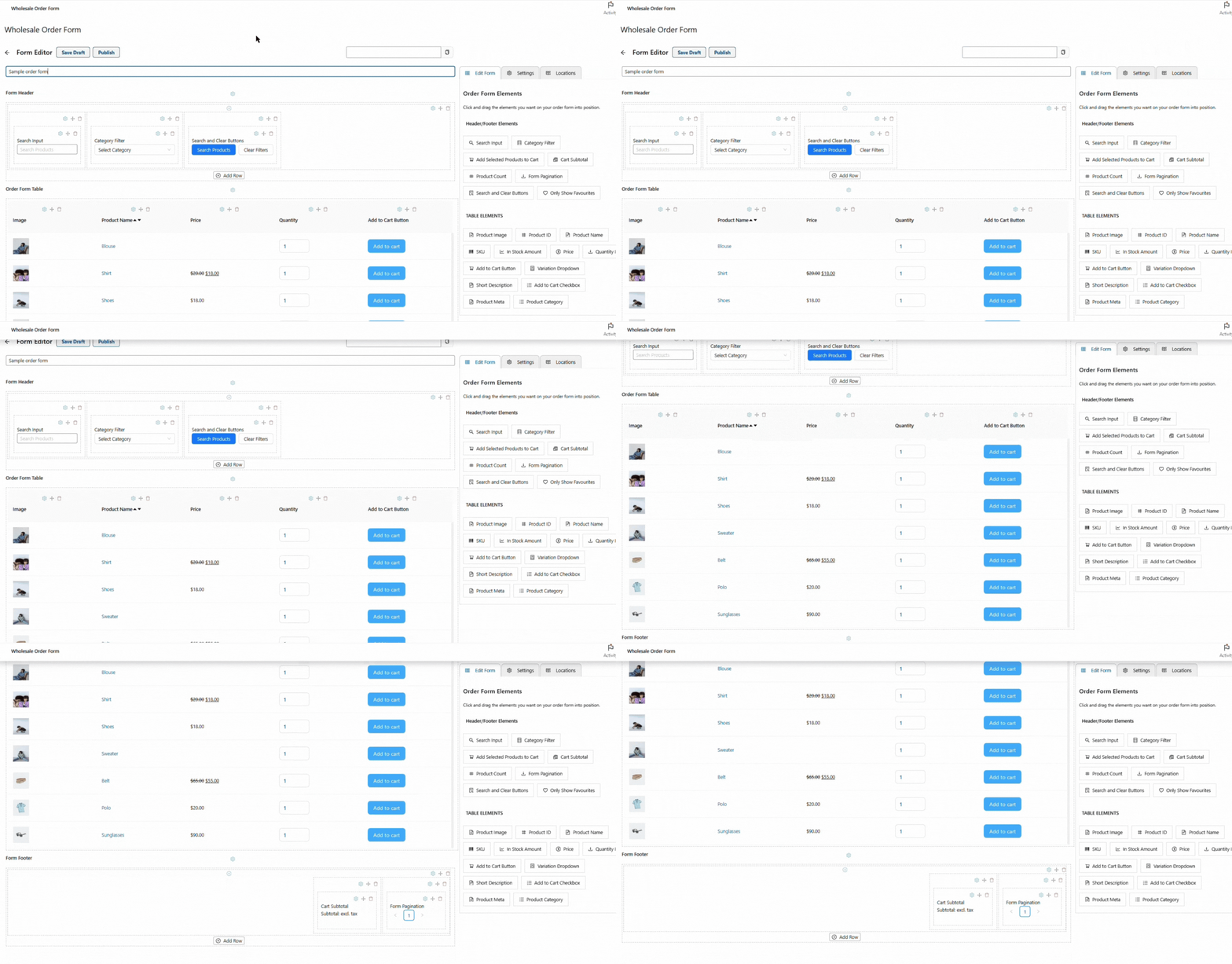
Configure the form for B2B efficiency. Set up columns for product image (small), product name, SKU, wholesale price, quantity input, and add to cart. Enable search by product name and SKU, since wholesale buyers know what they want. Add a category dropdown filter for quick navigation, and set default sorting to alphabetical or by category.
Step 4: Configure product visibility
Control what each tier can see in your wholesale portal. Hide wholesale-only products from retail customers entirely, show different product selections per wholesale tier, and create wholesale-only categories if needed.
Wholesale Prices Premium handles visibility at the product and category level. For a private wholesale-only store, restrict all products to wholesale roles. For a hybrid store, tag specific products as wholesale-visible. This layered visibility is what turns a basic private store into a true wholesale portal experience in WooCommerce.
Step 5: Set up payment and shipping
Payment gateway mapping
Wholesale Suite lets you map payment gateways by role. Wholesale customers might see “Invoice Payment” and “Bank Transfer,” while retail customers see credit card and PayPal. This prevents wholesale buyers from using inappropriate payment methods and reinforces the professional feel of your wholesale portal.
NET terms
For qualifying tiers, set up Wholesale Payments with NET 30/60/90 terms. At checkout, qualifying wholesale buyers can pay now or use their assigned terms.
Shipping rates
Configure wholesale-specific shipping rates if your B2B pricing differs (e.g., flat-rate shipping for pallets, free shipping above certain thresholds).
Step 6: Create wholesale-only pages
Round out the wholesale portal with dedicated pages. Build a wholesale landing page that provides an overview of the portal, highlights featured categories, and includes quick links to the order form and account. Create a wholesale FAQ page answering common B2B questions about ordering, payment terms, shipping, and returns. Add an account dashboard where buyers manage their profile, view order history, and access invoices. Consider a resources page with downloadable catalogs, product sheets, or marketing materials for wholesale buyers.
Restrict these pages to wholesale roles using WordPress page visibility settings or a simple role-restriction plugin. Every page reinforces that the wholesale portal was built specifically for B2B buyers.
Step 7: Enable quote requests for negotiated pricing
Not every wholesale deal starts with a fixed price. Large-volume buyers, new accounts testing the waters, and customers with custom product requirements often need to request a quote before committing. Wholesale Quotes adds this capability directly inside your wholesale portal.
Buyers can click “Add to Quote” on your shop or product pages to create a quote request as they browse. Instead of sending you a list of items over email, the entire request starts with the right products and quantities already attached. Every quote includes a built-in messaging thread so negotiations, clarifications, and approvals stay tied to the correct request rather than scattered across email chains.
A potential buyer can request a quote, view your pricing, and then apply for a full wholesale account through Wholesale Lead Capture. This turns your wholesale portal into both a lead-generation tool and an ordering platform.
Customizing The Portal Experience By Tier
The best wholesale portals feel personalized. When a Gold-tier buyer logs in, they should see their specific pricing, products, and terms rather than a generic wholesale experience.
Tier-specific catalogs
Use product visibility to show different product ranges per tier. Gold buyers see your full catalog, including new and exclusive items, while Bronze buyers see the core range. This creates a natural incentive for buyers to move up to higher tiers.
Tier-specific minimums
Lower minimums for higher tiers reward loyal buyers and reduce friction for frequent, smaller orders. Configure these via Wholesale Prices Premium’s role-specific minimum-order settings.
Volume-based pricing that changes with tier
Within each tier, add quantity-based discounts that encourage larger orders. “Buy 100+ for an additional 5% off your Gold tier pricing.” These discounts are displayed directly on the order form, so buyers can see the price breakdown as they adjust quantities.
Upgrade path
Show lower-tier buyers what they unlock at the next level. “Upgrade to Silver tier for 10% better pricing and access to 200 additional products.” This motivates growth and gives buyers a tangible reason to increase their order volume.
Portal Design Tips For B2B
Prioritize speed over aesthetics
Wholesale buyers do not browse the way retail shoppers do. They search, order, and move on. A fast, functional order form converts better than a beautiful but slow product grid. Keep the wholesale portal clean, professional, and efficient.
Make search the centerpiece
The search bar should be prominent on every portal page. Wholesale buyers know what they want by name or SKU, so they should not have to scroll through 400 products to find it. The Wholesale Order Form’s built-in search is designed exactly for this.
Optimize for mobile
Field sales reps place orders on tablets, and buyers check pricing on phones. Your wholesale portal should work perfectly on smaller screens, especially the order form and checkout process.
Clear pricing display
Never make a wholesale buyer wonder, “Is this my price or the retail price?” Label wholesale pricing clearly and cross out the retail price for reference. Transparency builds trust and removes hesitation from the ordering process.
Link to reorder workflows
Your wholesale portal should support repeat ordering, not just first-time purchases. Connect it to your WooCommerce wholesale reorder workflows so buyers can quickly repurchase their usual items. Integrating SaveTo Wishlist lets buyers save named product lists they can reload and convert to cart whenever they need to restock.
Conclusion
A branded wholesale portal WooCommerce store transforms your B2B operation from “hidden products with different prices” to a professional buyer experience that drives retention and repeat orders. Your wholesale portal is not a nice-to-have feature. It is a retention tool that keeps buyers coming back and makes switching to a competitor feel like too much effort.
In this guide, we covered the key areas that make up a complete wholesale portal:
- What makes a wholesale portal different from a private store
- Why your wholesale portal experience matters
- Planning your wholesale portal
- Building the portal step-by-step
- Customizing the portal experience by tier
- Portal design tips for B2B
The stores that invest in their wholesale portal experience do not just get more orders. They get more repeat orders from buyers who genuinely prefer ordering through your system over the competition’s. Check out the Wholesale Suite bundle for everything you need to build your portal, or see our 30 growth hacks for wholesale sales for more strategies to grow your B2B revenue.
Frequently Asked Questions
Can I have a completely separate wholesale portal from my retail store?
Yes. You can run both on the same WordPress installation trhough Wholesale Suite. Wholesale products stay hidden from retail customers, retail products stay hidden from wholesale buyers, and separate navigation and pages serve each audience. No need for a separate WordPress install.
Do I need a separate WordPress installation for the wholesale portal?
No. Wholesale Suite handles role-based visibility, navigation, and content within a single WordPress and WooCommerce installation. This is much easier to maintain than running two separate sites, and it keeps all your product, order, and customer data in one place.
How do I handle wholesale customers who also buy retail?
Create a user role that combines both permissions. When they are logged in with their wholesale account, they see wholesale pricing. Alternatively, some stores maintain separate accounts for the same buyer. The first approach is simpler and avoids confusion.
Can I customize the wholesale portal differently for each tier?
Yes. Product visibility, pricing, minimum orders, payment terms, and page access can all be configured per role using Wholesale Prices Premium. Each tier gets a tailored experience within the same portal infrastructure.
What is the difference between a wholesale portal and a private store?
A private store hides products behind a login. A wholesale portal goes further: dedicated login pages, branded catalogs with fast ordering, role-specific pricing and product visibility, professional payment terms, and dedicated B2B pages. The WooCommerce private store setup is the starting point, and the wholesale portal is the complete experience built on that foundation.
How do I drive wholesale buyers to register for my portal?
Use Wholesale Lead Capture to create a professional registration page. Link to it from your main navigation, footer, and wholesale landing page. Follow our sign up form best practices to maximize conversion rates, and set up automated onboarding emails to guide new registrants toward their first order.



