
Black Friday 2026 lands on Friday, November 27, which gives you roughly four weeks from today to get your store, your offers and your marketing ready. That is enough time to run a strong sale, as long as you work from a plan instead of scrambling the week before.
This WooCommerce Black Friday playbook is that plan. It walks you through the whole season, from October planning to December follow-ups, in the order you will actually need it. Even if your store does not run on WooCommerce, most of the advice here carries over to any online shop.
Where a topic deserves a deeper dive, we point you to a more focused guide, so you can use this page as your home base and branch out as needed.
What Black Friday 2026 Looks Like For WooCommerce Stores
Black Friday started as a single shopping day after US Thanksgiving. Today it is a multi-week event that runs from early November deals all the way through Cyber Monday and beyond, and shoppers around the world expect it.
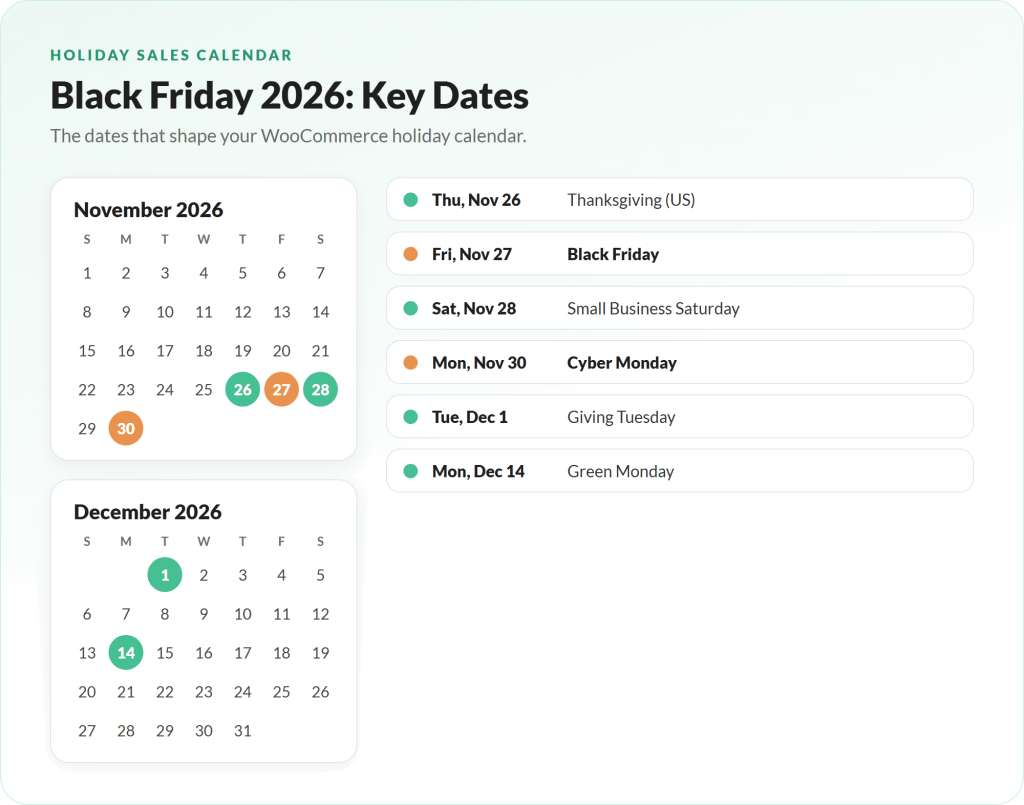
Here are the key dates to plan your WooCommerce Black Friday campaign around:
- Early deals: many retailers now start promotions in the first half of November, and plenty start the Monday before Thanksgiving (Nov 23).
- Thanksgiving: Thursday, November 26.
- Black Friday: Friday, November 27.
- Small Business Saturday: Saturday, November 28.
- Cyber Monday: Monday, November 30.
- Giving Tuesday: Tuesday, December 1.
- Green Monday: Monday, December 14, a strong date for last-minute holiday orders that still need to ship before Christmas.
The demand is real. Adobe forecasts that US shoppers will spend $275.1 billion online this holiday season, up 6.7% on last year, with Black Friday alone expected to reach $12.9 billion and Cyber Monday $15.1 billion. Those forecasts build on a record 2025, when Cyber Monday hit $14.25 billion in online spending and Black Friday reached $11.8 billion.
Shopper numbers are climbing too. The National Retail Federation counted a record 202.9 million shoppers over the 2025 Thanksgiving weekend, and online shoppers (134.9 million) outnumbered in-store shoppers for the five-day stretch.
One more thing worth keeping in mind: Black Friday owes its existence to Thanksgiving. Heavy promotion on Thanksgiving Day itself can feel tone-deaf to some customers, so many stores send a short “thank you” message that day and save the big push for Friday.
Your WooCommerce Black Friday Timeline: October To December
The biggest mistake store owners make is starting too late. Here is a simple timeline you can copy into your calendar.
Late October (now):
- Set goals and pick which sale days you will target.
- Decide on your offers and check the margin on each one.
- Start growing your email list.
- Audit your site speed, plugins and payment options.
November 1 to 20:
- Build and test your coupons, landing pages and email sequences.
- Prepare graphics and ad creative.
- Send teasers and “early access” invites to your list.
- Confirm stock levels and supplier lead times.
November 23 to 30 (sale week):
- Launch early deals, then your main Black Friday offer on Nov 27.
- Run Small Business Saturday and Cyber Monday messaging.
- Monitor site performance, orders and support every day.
December:
- Fulfill orders and keep any promises you made.
- Run a follow-up offer for non-buyers around Green Monday (Dec 14).
- Review the results while they are fresh.
If you want the detailed version of the final four weeks, our checklist on how to prepare for Black Friday breaks it down task by task.
Phase 1: Prepare Your Store And Your Data (October)
Black Friday preparation is almost as important as the day itself. These are the foundations to put in place first.
Know your target dates and goals
Black Friday is no longer one day, but that does not mean you have to target every date on the calendar. Pick the days you can execute well. A small team might focus on Black Friday and Cyber Monday only, while a bigger team can run early-access deals, a weekend offer and a Cyber Monday finale.
Then set a few clear goals: revenue, number of orders, average order value, new email subscribers or new wholesale accounts. Goals make every later decision easier.
Get your WooCommerce store ready for traffic
A slow or broken checkout will cost you more during a WooCommerce Black Friday sale than on any other day of the year. WooCommerce’s own support team found the same issues again and again when they reviewed more than 100 WooCommerce stores: unoptimized images, unused plugins and themes, and outdated software.
Site performance is now a top priority for merchants as well. In WooCommerce’s 2025 holiday survey, 33.4% of merchants ranked website performance optimization as their top prep priority, just ahead of increasing inventory.
At a minimum, before November:
- Run a speed test with Google PageSpeed Insights on your home, product, cart and checkout pages.
- Remove plugins you no longer use and update WordPress, WooCommerce, your theme and plugins (after a full backup).
- Ask your host how your plan handles traffic spikes.
- Test checkout on a phone. Adobe expects a record 63% of online spending during Cyber Week to happen on mobile devices.
- Review your payment options. Adobe forecasts more than $1 billion in buy now, pay later spending on Cyber Monday alone.
Set up tracking and ecommerce analytics
Collect as much data as you can around your WooCommerce Black Friday sale so you can run a proper post-mortem afterward. Two tools make this much easier.
Metorik. Metorik connects to your store and turns your order data into reports on which deals, products and categories performed best. It runs as a separate service rather than a plugin, so it does not add load to your store.

MonsterInsights for Google Analytics. MonsterInsights simplifies adding ecommerce tracking to Google Analytics, so you can see which landing pages and traffic sources actually drive sales. That matters on Black Friday, when you may be sending traffic from email, ads and social to several different sale pages at once. It also adds summary reports inside your WordPress dashboard. For more tool picks, browse our B2B Black Friday toolkit.

Build your list before Black Friday
Email is still one of the best ways to reach motivated buyers. In WooCommerce’s survey, email marketing was the most effective channel merchants reported for the holiday season, ahead of organic social.
Freshness matters. The longer someone sits on your list without buying, the lower their purchase intent tends to be, and the same goes for your social followers. That makes October and early November the perfect time to grow your list with people who are excited to buy. Two approaches work especially well.
Run a pre-Black Friday giveaway. A giveaway with a prize your ideal customers actually want can add a wave of new subscribers in the days before your sale. Because they joined recently, they are primed for your Black Friday announcement.
We suggest running it on your own website with the RafflePress plugin. It gives you a giveaway page with a form that captures email addresses and lets people earn extra entries by taking actions you choose, for example:
- Earn extra entries for referring a friend
- Earn an extra entry for following your social page
These viral actions help your giveaway spread, which means more entries and more email addresses in a short time.

Level up your opt-in boxes. Most stores have one popup offering a newsletter or a welcome discount, and some offer a one-time welcome coupon, which is a smart strategy. But one popup still lets most visitors leave without a trace. Think about how many people visit your store each day, and how few of them you can contact again once they close the tab.
Adding more touchpoints helps you “mop up” the visitors a single popup misses. Some of our favorite opt-in formats for ecommerce are:
- An exit-intent offer
- A slide-in offer at the bottom right of the page
- A spin-to-win gamification opt-in
- A countdown timer bar above your header
- A full-screen takeover offer
- A classic lightbox popup that appears after a set scroll depth, time on site or second page view
We use OptinMonster on our own sites for exactly this, with end-of-post boxes, slide-ins and exit-intent campaigns. Its template library is huge, so it is quick to launch Black Friday-specific campaigns without starting from scratch.

Phase 2: Decide On Your WooCommerce Black Friday Offers
Many stores throw together a lackluster discount a few days before the sale and wonder why it falls flat. Decide on your offers now, and build them while you still have time to test.
Remember that the goal is a deal, not just a discount. Adobe expects discounts of up to 30% off listed prices during Cyber Week, so shoppers will compare. Your offer should feel generous while still leaving you a healthy margin. For more inspiration, see our list of Black Friday sale ideas.
1. Product bundles
Bundles combine two or more products into a set, usually at a discount. Because you combine the costs and revenues of several items, the margin on a bundle can be higher than on a single product. For the customer, it is a simple way to get everything they need in one go.
Bundles are popular with merchants for good reason. In WooCommerce’s survey, product bundles and buy-more-save-more offers were the most common primary promotion strategy.
We recommend the WooCommerce Product Bundles extension for this. It keeps inventory tracked at the individual product level, so selling a bundle does not throw off your stock counts.
2. BOGO (buy one, get one) deals
BOGO deals often make more financial sense than a flat percentage off. Here is a quick comparison using a $100 pair of jeans that costs you $30:
Standard 30% off coupon
- 1 pair of jeans sells for $70 after the discount
- Minus $30 cost
- $40 profit
Buy 2, get 1 free
- 3 pairs of jeans at $100 = $300
- Minus $90 cost ($30 each)
- Minus $100 for the free pair
- $110 profit
That is a much better result per order. WooCommerce does not support BOGO coupons out of the box, but Advanced Coupons does, including in its free version. Our guide to adding Advanced Coupons to your WooCommerce store walks you through building a BOGO deal step by step.
3. Shipping offers
Free or discounted shipping removes friction from the buying decision. You can run it in a few ways:
- Free shipping over a set spend: customers must reach a spending threshold before free shipping applies, which encourages them to add one more item.
- Free shipping on a specific product: a great way to push a hero product.
- Discounted shipping methods: with Advanced Coupons Premium you can discount specific shipping methods, which works well for cheaper express shipping late in the season or a shipping perk for repeat customers.
Whatever you choose, make the offer obvious on product pages, in the cart and in your emails.
4. Wholesale deals
Many stores forget to tailor their offers to different customer groups. If you sell wholesale, create a separate deal for your B2B buyers, and launch it three to four weeks before Black Friday so your retailers can stock up and run the promotion in their own stores.
With WooCommerce Wholesale Prices Premium, you can set a wholesale sale price for each wholesale role and schedule it to start and end on specific dates, so your wholesale promotion runs on autopilot. Our guide to building a Black Friday wholesale strategy covers early-buy pricing, order windows and payment terms in depth.
5. Automatic coupon deals
Whatever offer you choose, consider making it apply automatically. When a deal applies itself as soon as the customer qualifies, there is no code to forget and fewer abandoned carts.
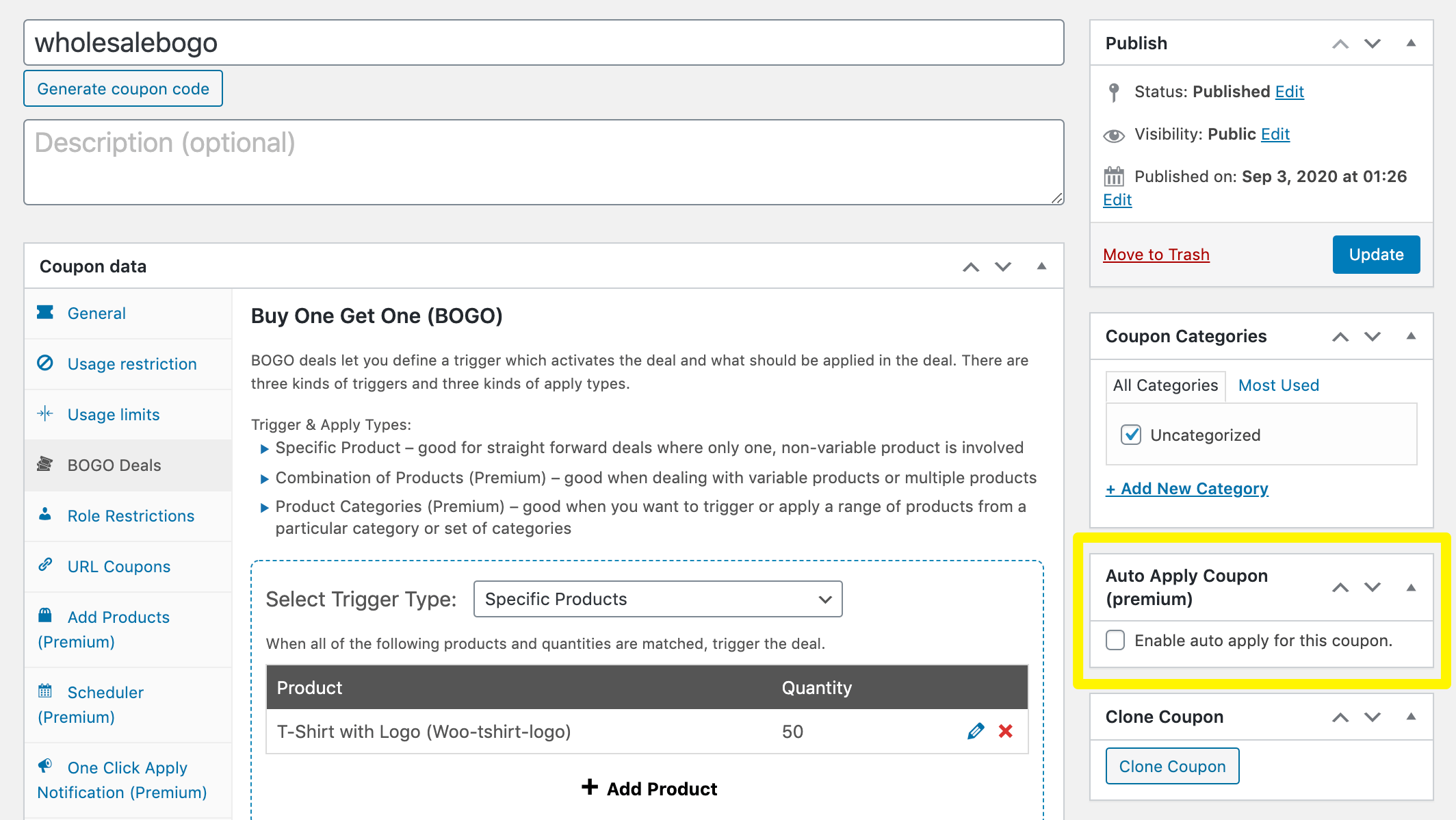
Advanced Coupons Premium includes auto-apply coupons that work with cart conditions. When the conditions you set are true, the coupon applies itself. For example, a wholesale-only BOGO coupon (one free t-shirt for every 50 ordered) could check two conditions:
- The customer has a wholesale role
- The cart contains at least 50 of the t-shirt product
If both are true, the deal applies automatically. It is a neat example of combining cart conditions, BOGO and auto-apply into one smooth offer.
Phase 3: Market And Promote Your Sale (November)
Once your WooCommerce Black Friday offers are built, it is time to get them in front of the right people.
Choose your advertising channels
Review your paid advertising through a Black Friday lens. Strong options include:
- Google Ads (Search and Shopping)
- Meta ads (Facebook and Instagram)
- TikTok ads
- LinkedIn ads (especially for B2B and wholesale)
- Influencer and creator partnerships
Pick one or two primary channels, then test the same campaign on another network if it performs. Ad costs rise sharply in late November, so lock in your creative and budgets early.
Prepare consistent campaign graphics
Big brands make every asset in a campaign look like it belongs together. That consistency makes your sale look professional rather than thrown together. Pick a simple visual theme, such as bold black and white, neon or something tied to your products, then use it across your banners, emails, social posts and ads.
A clear theme also makes it much easier to find matching stock photos and templates. Using an online design tool with ready-made Black Friday templates can save you hours and reduce what you spend on custom design work.
Use urgency and scarcity
Two levers drive action during a sale:
- Urgency: how long someone has to act, such as “ends Monday at midnight.”
- Scarcity: a real limit on the offer, such as limited stock or a cap on redemptions.
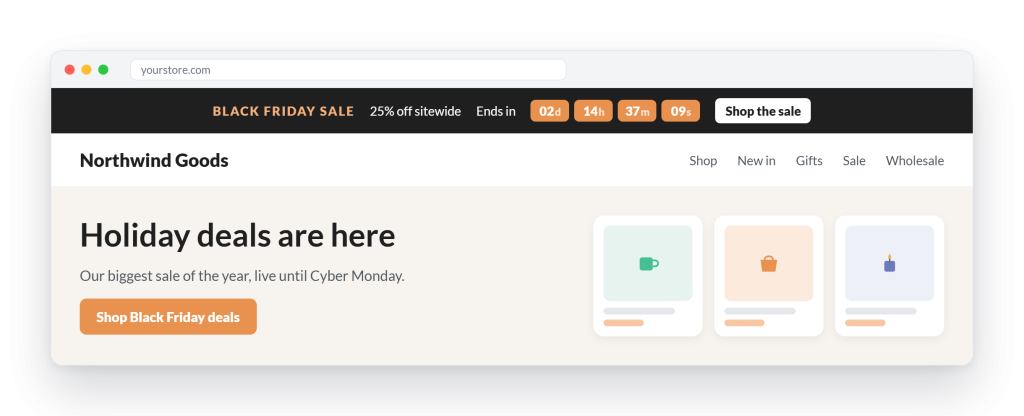
A countdown bar above your header is one of the simplest ways to add urgency. Keep it honest, though. Fake countdowns and invented stock limits damage trust fast.
Expand the dates (it is more than one day)
Extending your WooCommerce Black Friday sale before and after the big day widens your window to earn. You can simply call the whole period your “Black Friday sale,” which saves time on new creative. Alternatively, give each stage its own theme, like early access, Black Friday, Small Business Saturday and Cyber Monday, so you always have something new to email about.
Make your products easy for AI assistants to recommend
More shoppers now ask AI tools for gift ideas and product comparisons. Adobe expects traffic from AI tools to US retail sites to rise 130% this holiday season, with Black Friday traffic from those tools up 95%. Salesforce reported that AI and agents influenced 20% of global orders during Cyber Week 2025.
You do not need a special tool to benefit. Clear product titles, complete descriptions, accurate prices and stock status, and honest reviews help both search engines and AI assistants understand what you sell.
Phase 4: Run Black Friday And Cyber Monday Weekend (Nov 26 To 30)
The work does not stop when your WooCommerce Black Friday sale goes live. A little structure over the weekend protects your revenue and your sanity.
- Monitor the site. Check page speed, checkout and payment gateways several times a day. Have your host’s support contact handy.
- Watch stock levels. Pause ads for products that are about to sell out, and swap in alternatives.
- Staff support. Set up saved replies for common questions about shipping times, returns and coupon codes, and decide who covers which shifts.
- Pace your emails. A typical schedule is a thank-you on Thanksgiving, launch on Friday morning, a weekend reminder, a Cyber Monday email and a “last chance” message on Monday evening.
- Exclude recent buyers. Remove customers who already bought from the remaining promotional emails, or send them a thank-you instead.
Phase 5: After The Sale (December)
Once the rush is over, a few final tasks set you up for a stronger year.
Fulfill promises and build trust
If you ran a giveaway or pledged part of your proceeds to charity, follow through quickly and tell your list you did it. Giving Tuesday (Dec 1) is a natural moment to share your donation.
Plan a follow-up offer
Some subscribers did not buy during your WooCommerce Black Friday sale but were close. A simple shipping offer or small discount around Green Monday (Dec 14) can win them over before the holiday shipping cutoffs. Just leave out customers who already purchased so they do not feel bombarded.
Add value to new customers
Map out how you will look after your new buyers over the coming months, through product education, helpful content or loyalty rewards. Black Friday customers who have a great experience are far more likely to come back at full price.
For non-buyers, consider cleaning your list in January. People who joined during the excitement but have not opened an email in three months are unlikely to buy, and you are paying to keep them.
Run a post-mortem
Finally, and most importantly, review your WooCommerce Black Friday campaign while the details are fresh. What went well? What underperformed? Which offers, channels and products drove the most profit, not just the most revenue? Write it down so next year’s plan starts from real data.
Conclusion
Black Friday is the busiest stretch of the year for most online stores, and 2026 looks set to break records again. A WooCommerce Black Friday sale that runs smoothly is rarely an accident. It comes from picking your dates early, preparing your store for heavy traffic, building offers that protect your margin and promoting them consistently.
With Black Friday on November 27 and Cyber Monday on November 30, there is still time to put this playbook into action. Start with your goals and site checks this week, build your offers and emails in early November, and keep a close eye on your store during sale week. When the dust settles, a proper review will make next year’s WooCommerce Black Friday campaign even stronger.
Here’s what we covered in this article:
- What Black Friday 2026 looks like for WooCommerce stores
- Your WooCommerce Black Friday timeline: October to December
- Phase 1: Prepare your store and your data (October)
- Phase 2: Decide on your WooCommerce Black Friday offers
- Phase 3: Market and promote your sale (November)
- Phase 4: Run Black Friday and Cyber Monday weekend (Nov 26 to 30)
- Phase 5: After the sale (December)