

Black Friday falls on Friday, November 27, 2026, and Cyber Monday follows on November 30. That leaves about four weeks to get your WooCommerce store ready, which is enough time if you spend it on the right tasks in the right order.
This guide is a practical checklist for that final stretch. Instead of big-picture strategy, it covers the hands-on work that keeps your store fast, stocked and staffed when orders spike. If you want the full season plan, from October list building to December follow-ups, start with our WooCommerce Black Friday playbook and come back here for the countdown.
Let’s look at why it pays to prepare for Black Friday now, then walk through five tips, week by week.
Why You Need To Prepare For Black Friday Now
The holiday rush keeps getting bigger. Adobe forecasts $275.1 billion in US online holiday spending for 2026, with Black Friday expected to bring in $12.9 billion and Cyber Monday a record $15.1 billion. A store that is slow, out of stock or understaffed during those days loses sales it cannot win back.
Plenty of merchants still leave it late. In WooCommerce’s 2025 holiday survey, 20.6% of merchants with a seasonal lift said they do no preparation at all, and the biggest group (36.4%) plans only one to four weeks ahead. Meanwhile, 73% said the holiday season makes up more than 20% of their annual revenue.
In other words, the final month matters. The stores that prepare for Black Friday in a structured way give themselves a real edge over the ones that wing it.
Your Four-Week Black Friday Countdown
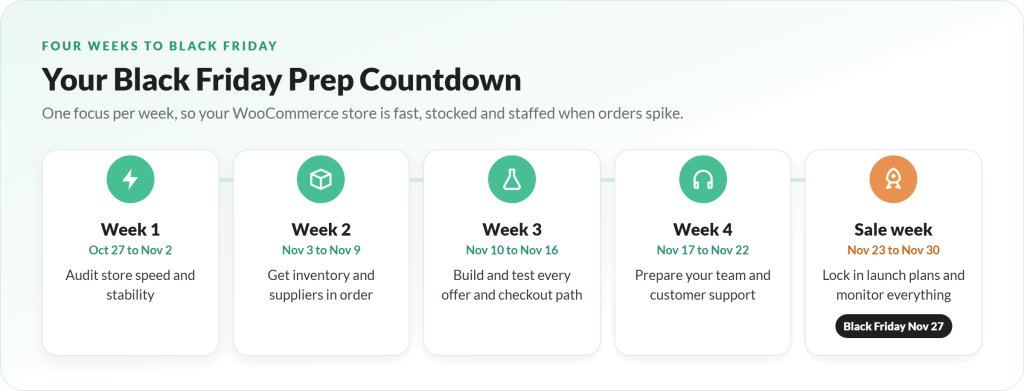
Here is the schedule this guide follows. Adjust the dates to fit your team, but try to keep the order.
- Week 1 (Oct 27 to Nov 2): audit your store’s speed and stability.
- Week 2 (Nov 3 to 9): get inventory and suppliers in order.
- Week 3 (Nov 10 to 16): build and test every offer and checkout path.
- Week 4 (Nov 17 to 22): prepare your team and customer support.
- Sale week (Nov 23 to 30): lock in your launch plan and monitor everything.
How To Prepare For Black Friday: 5 Tips For Success
Work through these in order. Each tip builds on the one before it, so by sale week you are monitoring a store you already trust.
1. Audit your store’s speed and stability (week 1)
Start with the foundation. If your site slows down or crashes under load, nothing else on this list matters.
Site speed is now the top priority for many merchants. WooCommerce’s survey found 33.4% of merchants ranked website performance optimization as their number one holiday prep task, up from 13% the year before. When WooCommerce’s support team reviewed more than 100 stores before Black Friday, the same problems kept appearing: unoptimized images, unused plugins and themes, and outdated software.
Your week 1 checklist:
- Back up your site before you change anything.
- Update WordPress, WooCommerce, your theme and plugins, then test key pages.
- Remove plugins and themes you no longer use.
- Compress large images on your home, category and product pages.
- Run speed tests with Google PageSpeed Insights on your home page, a product page, the cart and checkout.
- Talk to your host. Ask how your plan handles traffic spikes and whether you should upgrade for November.
Finally, pick a “code freeze” date, ideally around November 16. After that, avoid installing new plugins or making big design changes until the sale is over. Late changes are one of the most common causes of Black Friday breakdowns.
2. Get your inventory and suppliers in order (week 2)
Running out of a best seller on Black Friday is painful. Overstocking a product nobody wants is almost as bad. Week 2 is about finding the balance.
Inventory is the second most common prep priority in WooCommerce’s survey (32.6% of merchants ranked it first), and for good reason. To prepare for Black Friday stock levels:
- Pull last year’s data. Look at which products sold best during Black Friday and Cyber Monday, and by how much they beat a normal week.
- Forecast with your offers in mind. A deep discount or a bundle can multiply demand for specific items.
- Check supplier lead times now. If a reorder takes three weeks, you need to place it this week.
- Set low-stock alerts in WooCommerce so you know before a product sells out.
- Decide on your backorder policy. Either disable backorders on sale items or clearly show the expected ship date.
If you also sell wholesale, review your order rules before buyers start placing bulk orders. In WooCommerce Wholesale Prices Premium, you can set minimum order requirements by quantity or subtotal, with different thresholds for each wholesale role. Make sure those thresholds still make sense for any holiday deals you plan to run.
3. Build and test every offer and checkout path (week 3)
With the foundation and stock sorted, it is time to build your offers and test them the way a customer would. Most Black Friday problems are small things nobody tested: a coupon that does not apply, a shipping rule that breaks, or a payment method that fails on mobile.
Create your coupons, sale prices and landing pages, then test each one:
- Coupons and sale prices: confirm they apply to the right products, start and end at the right time, and do not stack in ways you did not intend.
- Customer types: place test orders as a guest, as a logged-in retail customer and, if you sell wholesale, as a test wholesale customer to check that wholesale prices show correctly.
- Payment methods: test cards, digital wallets and buy now, pay later options. Adobe expects more than $1 billion in buy now, pay later spending on Cyber Monday 2026.
- Mobile checkout: Salesforce found that mobile devices drove 70% of online orders during Cyber Week 2025. Complete at least one full purchase on a phone.
- Emails: trigger order confirmation, shipping and abandoned cart emails and check every link.
- Shipping: check rates, free shipping thresholds and holiday delivery cutoffs.
If you want to go beyond straight discounts, you could also sell WooCommerce gift cards for last-minute gifting or invite new buyers into a WooCommerce loyalty program so they come back after the sale. Test those flows too.
Keep a simple spreadsheet of each test, who ran it and whether it passed. It takes an hour and can save your biggest sales day of the year.
4. Prepare your team and customer support (week 4)
More orders mean more questions. If customers cannot get a quick answer about shipping or returns, many will abandon their cart or open a dispute later.
Use week 4 to prepare for Black Friday on the people side:
- Plan shifts. Decide who covers support, fulfillment and site monitoring on each day from Thanksgiving to Cyber Monday.
- Write saved replies for the questions you get most: delivery times, returns, coupon problems, order changes and stock availability.
- Update your FAQ and policy pages with holiday shipping cutoffs and any extended return window.
- Brief your fulfillment team on expected volume and packing priorities.
- Set up an escalation path. Everyone should know who to contact if the site goes down or a payment gateway fails, including your host’s support details.
If you use temporary staff or family members to help pack orders, give them a short training session now, not on Black Friday morning.
5. Lock in your launch plan and monitor everything (sale week)
By sale week, your store, stock and team should be ready. The final step to prepare for Black Friday is the launch itself: go live smoothly and keep watch.
- Schedule your emails and social posts ahead of time: early access, Black Friday launch, a weekend reminder, Cyber Monday and a final “last chance” message. An email automation tool like Drip lets you build the whole sequence in advance.
- Add urgency on site. A countdown bar or exit-intent offer built with OptinMonster tells visitors exactly when the deal ends.
- Check the site several times a day for speed, checkout errors and failed payments.
- Watch stock levels and pause ads for anything close to selling out.
- Review results daily. If one offer is clearly outperforming, move more ad budget and email space toward it.
- Have a backup plan. Know what you will do if the site slows down, a gateway fails or a hero product sells out early.
Remember to give yourself and your team a short break between the Black Friday rush and Cyber Monday. Tired people make costly mistakes.
Prepare For Black Friday As A Wholesale Supplier
If you run a wholesale or hybrid store, your Black Friday starts earlier than everyone else’s. Your retail customers need stock on their shelves before the rush, so their orders peak in late October and early November.
A few extra steps help you prepare for Black Friday on the B2B side:
- Tell wholesale customers your order cutoff dates so they can plan their final pre-holiday orders.
- Run any wholesale promotion early. With Wholesale Prices Premium, you can schedule a wholesale sale price for each wholesale role so it starts and ends automatically.
- Make reordering fast. A one-page order form with SKU search lets regular buyers restock in minutes instead of browsing product by product.
For a full B2B game plan, including early-buy pricing, order windows and payment terms, read our guide to a Black Friday wholesale strategy. You can also browse our B2B Black Friday toolkit for tools that make the season easier to manage.
Conclusion
Black Friday on November 27 and Cyber Monday on November 30 are only a few weeks away, but that is still enough time to get your store in shape. When you prepare for Black Friday step by step, you avoid the last-minute scramble that causes slow pages, broken coupons and overwhelmed support inboxes.
Start by making your store fast and stable, then get your inventory and suppliers aligned. Build and test every offer the way a customer would, prepare your team for the extra volume, and go into sale week with a launch plan and a backup plan. If you sell wholesale, start even earlier so your retailers have stock before the rush. Follow this countdown and you will spend Black Friday watching orders come in instead of fighting fires.
Here’s what we covered in this article:
- Why you need to prepare for Black Friday now
- Your four-week Black Friday countdown
- How to prepare for Black Friday: 5 tips for success
- Prepare for Black Friday as a wholesale supplier