WooCommerce spam orders hurt wholesale stores more than retail stores because wholesale orders carry a higher value. One fake order ties up more inventory, wastes more of your approval time, and triggers bigger failed-payment fees.
If you run a wholesale operation on WooCommerce, you already know your orders aren’t small. A single B2B order can move a pallet, not a parcel. So when WooCommerce spam orders land in that pipeline, they don’t just clutter a screen the way they would on a retail store. They reserve real stock and leave it in your manual approval queue before you catch it. The cost of a junk order scales with order size, and wholesale orders are large.
Why Wholesale Orders Cost More When They Go Bad
A bad wholesale order costs more than a bad retail order because the per-order value is higher, so every downstream consequence multiplies. The more stock is held, the more credit is extended, and the more fees are incurred when the payment fails.
Picture the two stores side by side. A retail spam order might reserve one $30 item and waste a minute of your time. A wholesale version of that same junk order reserves 200 units, trips your low-stock alerts, and pushes a real buyer to a backorder while you sort out the mess. This is why WooCommerce spam orders read as a minor nuisance in retail but land as a real cost in B2B.
Then there’s the money. North American retail and ecommerce businesses pay about $3.00 in total costs for every $1 lost to fraud, according to the LexisNexis True Cost of Fraud Study. That multiplier covers chargeback fees, lost goods, and labor, and it applies to the order value. A higher-order value means a higher absolute cost, which puts wholesale at the painful end of that curve.
The Hidden Costs B2B Sellers Feel First
Wholesale stores feel three costs before retailers do: tied-up inventory, wasted approval time, and inflated payment fees. Each one scales with order size, and wholesale order sizes are large by design.
Inventory holds come first. Many wholesale setups reserve stock the moment an order is placed, even before payment clears. On a B2B order, that reservation can lock up a meaningful slice of your warehouse. Clear the spam too slowly and a paying customer sees the wrong stock count.
Approval time comes second. Plenty of wholesale stores gate orders behind manual review, because you’re checking trade status, credit terms, and minimums. WooCommerce spam orders drop straight into that human queue, and your team spends real minutes deciding whether a fake account is legitimate. Retail stores that auto-fulfill never pay this tax.
Failed-payment fees come third. When a large order fails or gets charged back, the fees often scale with the amount. A reversed wholesale payment can cost more in gateway and chargeback fees alone than the markup on a small retail sale. If your store relies on a smooth, trusted ordering flow, our guidance on B2B order management with WooCommerce is a good place to start.
For context on how common the underlying problem is, automated bad-bot traffic made up 32% of all website traffic in 2023, per Imperva’s 2024 Bad Bot Report. A lot of that noise hits checkout forms, and wholesale checkouts are not exempt.
Why Standard Spam Filters Miss The Worst Offenders
Standard spam filters catch automated bots, but they miss the repeat human offenders who do the most damage to a wholesale store. A bot floods you with noise. A known bad account quietly burns your margin order after order, and those are the WooCommerce spam orders that hurt most.
Bots are real and worth blocking. A checkout CAPTCHA and basic rate limiting stop most automated submissions, and you should run both. In wholesale, though, the worst offender is often a person, not a script. It’s the “buyer” who keeps placing large orders under slight name variations after a chargeback, or the competitor probing your trade pricing, or the account you’ve already refused once that keeps coming back.
For help spotting these accounts early, see our guide on building a wholesale customer profile.
Cart abandonment shows how fragile the legitimate flow already is. The average documented abandonment rate sits at 70.22%, based on Baymard Institute’s cart abandonment research. When most carts already fall away, you can’t afford to let WooCommerce spam orders distort the few that complete. You want a clean signal from real buyers, not noise from accounts you’ve already flagged as trouble.
That last group is the gap. No CAPTCHA stops a human who solves the CAPTCHA. No risk score reliably flags a buyer who looks ordinary on paper but has charged back three times. For the offenders you’ve already named, you need a tool that simply refuses them.
Block The Repeat Offenders Behind WooCommerce Spam Orders
When a specific person or account keeps placing bad orders, the clean fix is a manual block list that refuses them by name and email. A purpose-built tool for blocking WooCommerce spam orders from named offenders does exactly this, and Checkout Guard is built for the job.
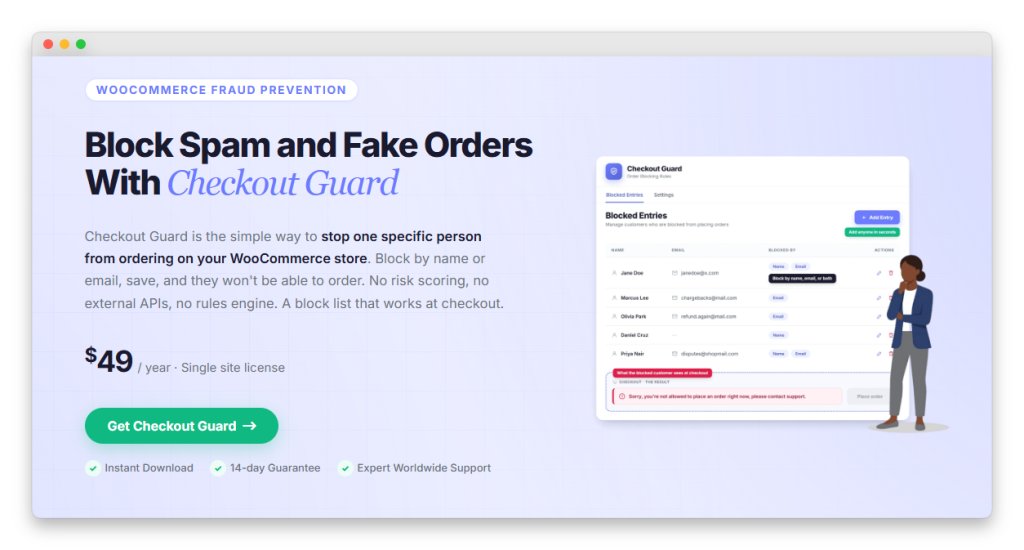
Checkout Guard is a deterministic block list from Visser Labs, our sister brand. When an order’s billing name or email exactly matches an entry on your list, Checkout Guard blocks it at checkout. On Block (Store API) checkout, the order is deleted, and the cart is emptied. On classic checkout, it’s stopped at validation before an order is even created. Either way the shopper never completes the purchase, so your wholesale flow is covered on both checkout types. Setting it up takes three quick steps.
Step 1: Add the offender to your block list
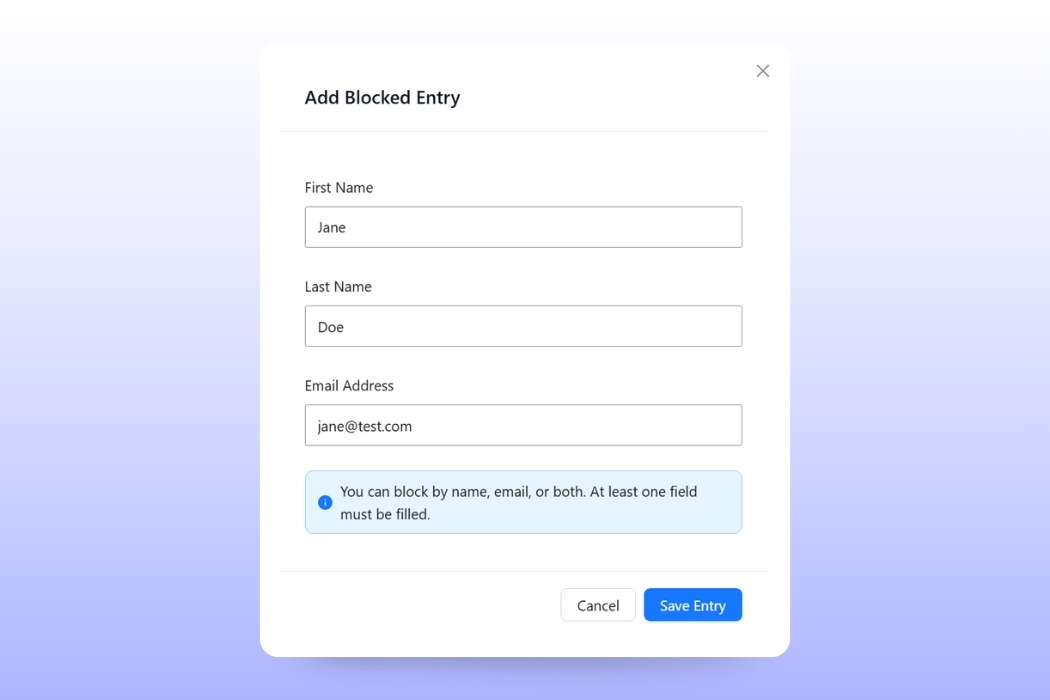
Go to Checkout Guard > Blocked Entries and click Add Entry. Fill in the First Name, Last Name, and/or Email Address of the account you’re refusing, then click Save Entry. You can block by name, email, or both, so long as one field is filled.
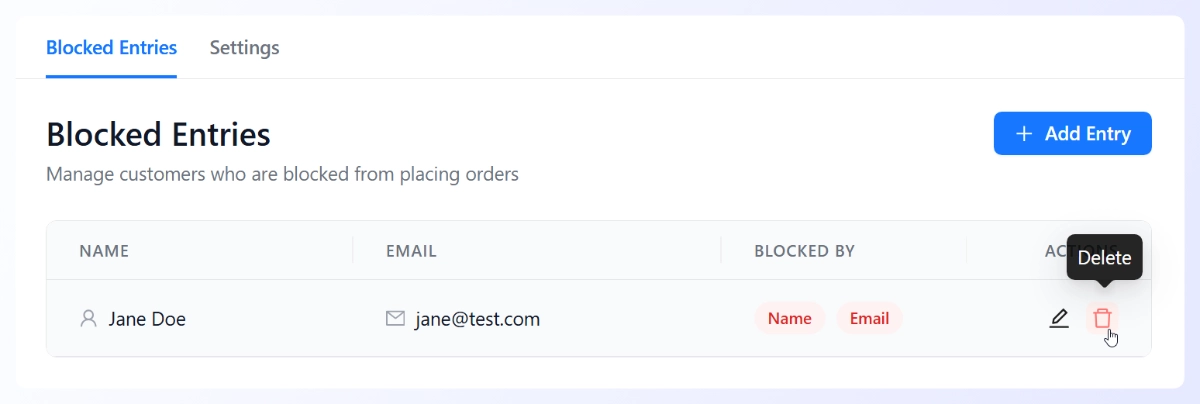
Step 2: Confirm the entry on your blocked list
Your new entry appears on the Blocked Entries tab, showing exactly what each account is blocked by. You can edit or remove anyone at any time, so your list stays current as offenders come and go.
Step 3: Write the message blocked buyers see
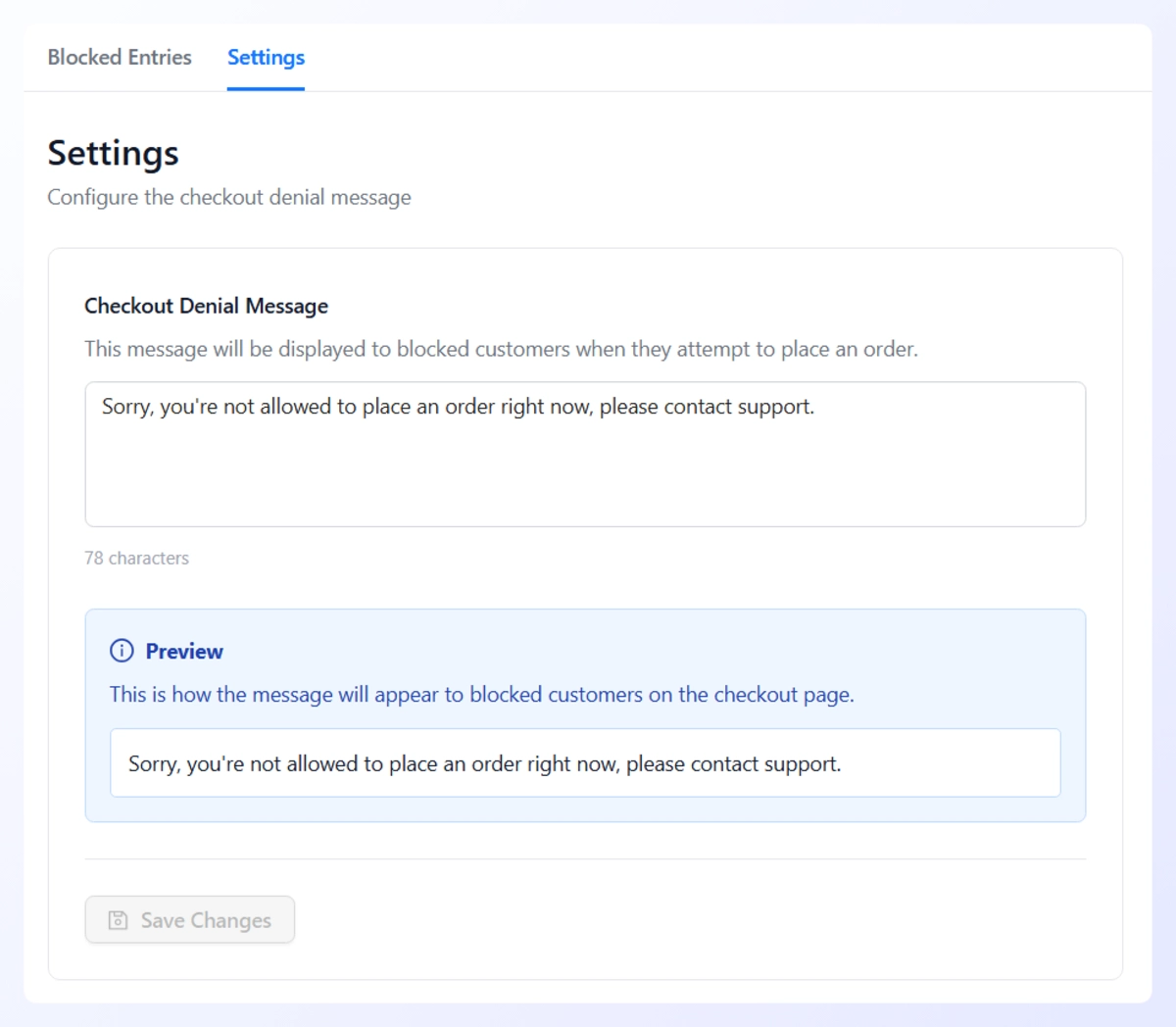
Open the Settings tab, enter your Checkout Denial Message, then click Save Changes. This is what a blocked account sees when their order is refused at checkout, so keep it calm and point them to your trade team.
What makes it a good fit for B2B is the precision. Checkout Guard doesn’t score orders, read locations, or try to guess who’s suspicious. It blocks the exact people you put on the list and leaves every other account untouched, which means zero false positives on the trade buyers you’ve worked to win.
When your real problem is a short list of named repeat offenders rather than anonymous fraud at scale, that exactness is the point. CAPTCHA and rate limiting handle the automated noise. The block list handles the humans who clear those filters and keep ordering anyway.
Take Back Control Of Your Order Pipeline
WooCommerce spam orders aren’t a flat cost. They scale with order value, and wholesale order values are high, which is why B2B stores feel the damage first and hardest. The fix is to match each source of spam to the right defense rather than treating every junk order the same way.
Bots and named human offenders are two different problems that call for two different tools. Your CAPTCHA and rate limiting close the door on the automated noise, and a manual block list closes it on the people you have already identified. Run them together, and the pipeline that reaches your approval queue starts to reflect real buyers again, which protects both your inventory counts and the trade relationships that pay your bills.
Once your CAPTCHA and rate-limiting handle the bots, the accounts still costing you margin are the ones you can name. That’s where a manual block list earns its keep against WooCommerce spam orders. Add the offenders you’ve already identified to Checkout Guard and protect the inventory your real wholesale customers are waiting on.
Here’s what we covered in this article:
- Why wholesale orders cost more when they go bad
- The hidden costs B2B sellers feel first
- Why standard spam filters miss the worst offenders
- Block the repeat offenders behind WooCommerce spam orders
Frequently Asked Questions
Why do WooCommerce spam orders hurt wholesale stores more than retail?
WooCommerce spam orders hurt wholesale stores more because wholesale orders carry higher values, so every consequence is larger. A fake B2B order reserves more inventory, sits longer in your manual approval queue, and triggers bigger failed-payment or chargeback fees than a small retail order would. The same junk order that’s a minor annoyance for a retailer can lock up real stock and cost a wholesaler a genuine reorder.
Can I stop bots from placing spam orders on my wholesale store?
Yes, and you should. A checkout CAPTCHA blocks most automated submissions, and rate limiting at your host or firewall slows rapid-fire bursts. Those two layers handle the bulk of automated spam. What they can’t stop is a real human who solves the CAPTCHA and keeps ordering, which is the offender that does the most damage in B2B.
What is Checkout Guard and how does it help wholesale sellers?
Checkout Guard is a manual block list plugin from Visser Labs. You add the billing name and/or email of an offender you’ve already identified, and any matching order is blocked at checkout, with the cart emptied and a custom denial message shown. It’s deterministic, so it only ever stops the exact accounts you list. That makes it a precise fit for wholesale stores fighting a few known repeat offenders.
Will blocking spam orders affect my legitimate trade buyers?
Not if you use the right tool. A deterministic block list only stops the specific names and emails you add, so accounts that aren’t on the list are never touched. An invisible CAPTCHA rarely interrupts a genuine buyer, and rate limiting only triggers on abnormal bursts. False positives mostly come from automated risk-scoring tools that guess, which is a different category of product.
How quickly should I act on WooCommerce spam orders in a wholesale store?
Fast, because of the inventory hold. Many wholesale setups reserve stock the moment an order is placed, so a large fake order can show real products as low or out of stock until you cancel it. Clearing it quickly protects your stock counts for paying buyers. A block list then stops the repeat offenders from creating that hold again.