Picture a distributor running WholesaleX with three wholesale roles, a few hundred products priced per role, and quantity tiers on the bestsellers. They’ve decided to migrate from WholesaleX to Wholesale Suite. Installing the new plugins is quick. The real work is getting every one of those prices into the right field.
There’s no one-click tool for this direction, so a CSV file does the heavy lifting. This guide maps each piece of WholesaleX data to the Wholesale Suite field or setting that receives it, column by column, so you can migrate from WholesaleX without guessing where anything goes.
It covers WholesaleX specifics only. For the general process of auditing, exporting, reassigning customers and cutting over, follow our step-by-step guide to switching WooCommerce wholesale plugins alongside this one.
Is There A One-Click Way To Migrate From WholesaleX?
No. WholesaleX offers a separate add-on called the WholesaleX Migration Tool, but its WordPress.org listing says it moves data from Wholesale Suite and B2BKing into WholesaleX. Nothing runs the other way, so to migrate from WholesaleX, export your data and import it with WooCommerce’s built-in product importer or WP All Import.
Wholesale Suite’s documented import path uses those same two tools, which makes the CSV the bridge between the plugins. The upside is control. You review every price in the sheet before it goes live, and nothing moves that you didn’t put there.
Where WholesaleX Keeps Your Wholesale Data
WholesaleX stores wholesale data in several places: on products, in dynamic rules, in role settings, and on user accounts. Knowing which is which tells you what a product CSV can carry and what you’ll rebuild in settings when you migrate from WholesaleX. Based on WholesaleX’s own documentation, here’s where each piece lives:
- Role prices on products: WholesaleX’s product import and export work with a Base Price and a Sale Price for each role.
- Product price tiers: Tiers sit on the product, and each one has a Discount Type, a B2B Users Price, and a Min Quantity.
- Category discounts: WholesaleX supports category-level discounts set per category rather than per product row.
- Dynamic rules: Store-wide discount rules aimed at all users, specific users, or specific roles, with optional date and limit conditions. Dynamic rules also handle restrictions such as product visibility.
- Roles, forms and users: The user roles list, the registration form fields and the customer accounts themselves.
WholesaleX’s documentation lists four CSV exports: User Data, Product Data, Dynamic Rules and User Roles. The Product Data export includes an “Export custom meta?” checkbox, so tick it. Export all four and keep them unedited as reference files.
That documentation doesn’t list the export’s column headers. Open your Product Data export and identify each role’s price columns by their values rather than guessing a key name.
WholesaleX To Wholesale Suite Field Map
Wholesale Suite splits the work across focused plugins. The free Wholesale Prices plugin adds one Wholesale Customer role with per-product wholesale prices and a private store option. Wholesale Prices Premium adds unlimited roles, quantity-based tiers, wholesale sale prices, category and global percentage discounts, role-based visibility, and tax, shipping and payment rules per role. Lead Capture handles registration, Order Form gives buyers a one-page ordering form, and Wholesale Quotes handles quote requests.
If you’re still weighing the two plugins, our Wholesale Suite vs WholesaleX comparison covers that decision. The map below assumes you’ve decided to migrate from WholesaleX and shows where each piece of data lands.
| WholesaleX data (per WholesaleX docs) | Wholesale Suite destination | How it moves |
|---|---|---|
| User roles | Wholesale roles in Wholesale > Roles (1 role free, unlimited with Premium) | Recreate by hand; the role key becomes the column prefix |
| Role Base Price on a product or variation | {role}_wholesale_price | CSV import |
| Role Sale Price | {role}_wholesale_sale_price (Premium) | CSV import; schedule in the product editor if needed |
| Product price tiers (Pro) | Quantity-based rules (Premium) | wwpp_post_meta_enable_quantity_discount_rule + wwpp_post_meta_quantity_discount_rule_mapping |
| Category tier pricing | Category % discount + category quantity tiers (Premium) | Rebuild in settings |
| Global and dynamic pricing rules | Global % per role, category %, cart subtotal discounts (Premium) | Rebuild in settings |
| Payment and shipping per role | Payment gateway and shipping method mapping (Premium) | Rebuild in settings |
| Tax exemption | Per-role tax exemption (Premium) | Rebuild in settings |
| Automatic role migration | Wholesale Role Automation | Rebuild the rules |
| Registration form fields | Wholesale Lead Capture form | Recreate the fields |
| Bulk order form (Pro) | Wholesale Order Form | Set up the form |
| Request a quote and conversation (Pro) | Wholesale Quotes with built-in messaging | Set up quotes |
| Wallet, subaccounts, BOGO rules, separate B2B stock | No direct equivalent | Plan before switching |
Features with no direct equivalent
Four WholesaleX features have no direct Wholesale Suite counterpart: the wallet, subaccounts, buy X get Y rules and B2B stock management. List any you use now and decide how you’ll handle each before you migrate from WholesaleX, so nothing surprises your buyers after launch. For buy-one-get-one offers, Advanced Coupons, a sister plugin from the same team, can create BOGO coupons.
Turning A WholesaleX Export Into A Wholesale Suite Import
The import is a single-product CSV that includes role prices, sale prices, and quantity tiers. Wholesale Suite stores them as standard product meta, so you can follow our guide to importing wholesale prices by CSV with the transforms below. WooCommerce’s product CSV importer and exporter matches existing products by ID or SKU, so keep one of those columns in every row.
Create the roles first
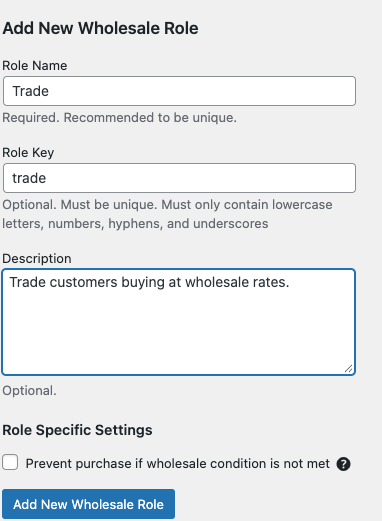
Create a matching role for each WholesaleX role in Wholesale > Roles, as shown in how to add wholesale roles. In WordPress, a role is a named set of capabilities, as the official roles and capabilities documentation explains. Wholesale Suite can’t assign its wholesale capabilities to a role another plugin created, so these must be new roles.
Each role key (for example, trade) becomes the prefix of its price columns. Assign one wholesale role per customer, since Wholesale Suite expects each customer to hold only one.
Map prices and sale prices
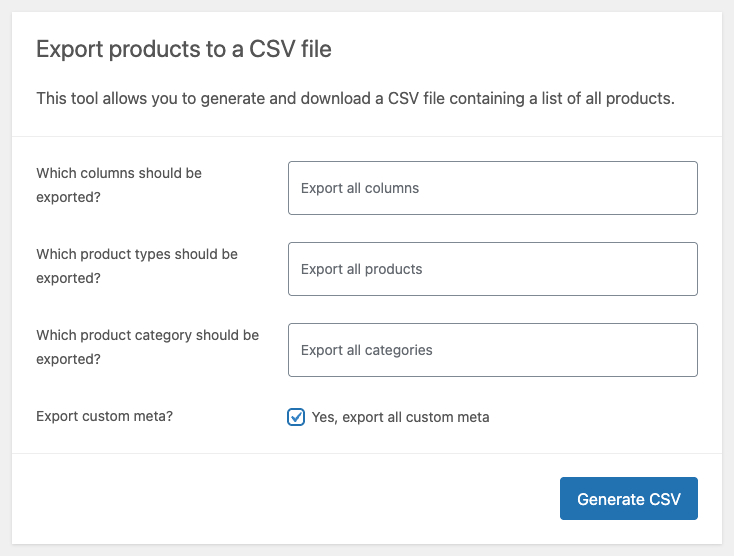
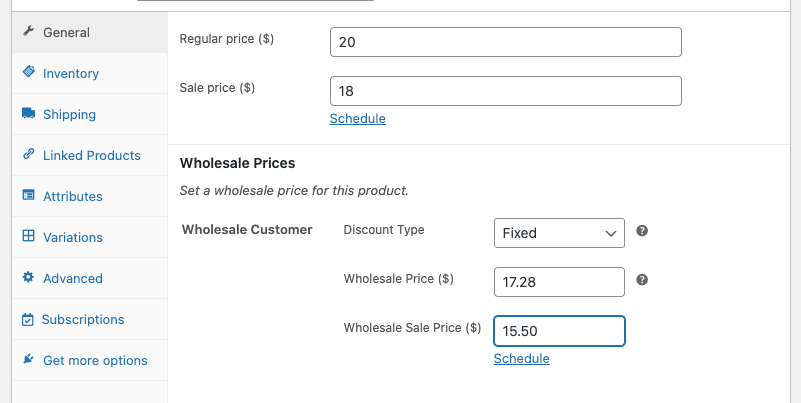
Set a wholesale price on one product, then export it to get the exact column headers:
- Go to Products > All Products and click Export.
- Tick “Export custom meta?”, then click Generate CSV.
- Find the columns headed like
Meta: trade_wholesale_priceandMeta: trade_wholesale_sale_price. - Paste each WholesaleX role Base Price into
{role}_wholesale_priceand each Sale Price into{role}_wholesale_sale_price.
Wholesale sale prices need Wholesale Prices Premium, as shown in how to set a wholesale sale price. Every product also needs a regular price because WooCommerce treats a product with no regular price as not sellable, and it won’t show a wholesale price.
If a WholesaleX price uses a percentage or amount discount rather than a fixed price, calculate the final price in your sheet and import that number. The importer reads static values only, so replace any spreadsheet formulas with plain numbers before you save the file.
Convert price tiers
WholesaleX tiers store only a minimum quantity. Wholesale Suite rules need a start and an end quantity, so each tier’s end_qty is the next tier’s minimum minus one. The last tier’s end_qty stays blank, which means no upper limit.
Here’s what this looks like in practice (example data):
| WholesaleX tier (role “Trade”) | Wholesale Suite rule |
|---|---|
| Min qty 10 at $70 | start_qty 10, end_qty 19, fixed-price, 70 |
| Min qty 20 at $60 | start_qty 20, end_qty blank, fixed-price, 60 |
Set wwpp_post_meta_enable_quantity_discount_rule to yes. Then put this in the wwpp_post_meta_quantity_discount_rule_mapping cell (example data):
[{"wholesale_role":"trade","start_qty":"10","end_qty":"19","price_type":"fixed-price","wholesale_price":"70"},{"wholesale_role":"trade","start_qty":"20","end_qty":"","price_type":"fixed-price","wholesale_price":"60"}]
Wholesale Prices Premium can also express quantity prices as a percentage. When you migrate from WholesaleX by CSV, though, converting each tier to a fixed price in the sheet keeps the numbers easy to check.
Import and rebuild visibility
Import the edited file with WooCommerce’s product importer and tick “Update existing products.” WP All Import also works with its WooCommerce Add-On Pro: map the columns under Custom Fields > See Detected Fields. One import replaces editing each product by hand.
Then go to Wholesale > Settings > Help and click Re-Initialize Product Visibility Meta. This tool requires Wholesale Prices Premium and only fills in missing or empty visibility data, so your settings stay the same.
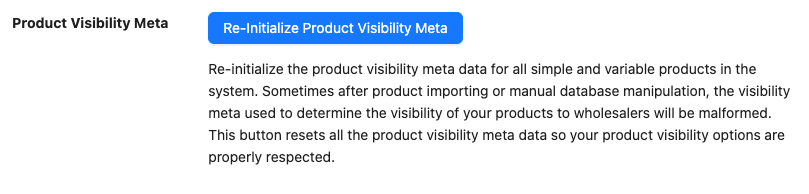
What We’ve Seen: A mistake we’ve seen repeatedly after imports: Prices are right, but products vanish for wholesale customers. Some importers skip the normal product save, so the visibility flags never get written. Running the tool to rebuild product visibility after importing fixes it without touching your settings.
Rebuilding The Rules That Don’t Live On Products
A product CSV can’t carry store-wide rules, so you’ll recreate these in Wholesale Suite settings after you migrate from WholesaleX. Each WholesaleX rule or feature maps to one of these:
- Global and category pricing: Premium’s global percentage discount per role, category percentage discounts, and quantity-based discounts at the category or global level.
- Payment and shipping by role: Payment gateway mapping and shipping method mapping for each role.
- Tax exemption: Tax exemption per wholesale role in Premium.
- Cart value discounts: Premium’s cart subtotal discounts, which add a further discount once an order passes thresholds you set.
- Automatic role changes: Wholesale Role Automation in Premium upgrades or downgrades customers based on total spent or order count.
- Registration form: A Wholesale Lead Capture form with text, text area, number, email, URL, select, radio, and checkbox fields, plus manual or automatic approval. Lead Capture has no date field type, so recreate any date questions as text fields.
- Private store: The free Wholesale Prices plugin can hide prices and add-to-cart buttons until a customer logs in.
- Role-based product visibility: Premium restricts products and whole categories to chosen wholesale roles.
- Bulk order form: Wholesale Order Form, a one-page ordering form for your catalog.
- Quote requests and conversations: Wholesale Quotes, with quote messages and email notifications.
Pricing precedence matters once these rules are in place. A product’s own wholesale price wins first, then a category price, then a per-user override, then the global discount, as the wholesale pricing guide explains. If a rule seems ignored after the move, check whether the product has its own wholesale price.
Start Your Move From WholesaleX To Wholesale Suite
The CSV is a one-time job. Once you migrate from WholesaleX, your wholesale prices live in standard WooCommerce product meta, so the WooCommerce exporter can pull them back out any time you want to bulk edit.
- Check the answer first: Read Is There A One-Click Way To Migrate From WholesaleX? and plan for a CSV move.
- Export your data: Use Where WholesaleX Keeps Your Wholesale Data to pull all four WholesaleX exports.
- Map each field: Match columns with the WholesaleX To Wholesale Suite Field Map.
- Build the import: Follow Turning A WholesaleX Export Into A Wholesale Suite Import, then rebuild visibility.
- Recreate store-wide rules: Work through Rebuilding The Rules That Don’t Live On Products.
Ready to migrate from WholesaleX? See Wholesale Suite plans and pricing: the All Access Bundle includes 5 plugins for $299/year (introductory price, renews at full price), backed by a 14-day money-back guarantee.
Frequently Asked Questions
Can I migrate from WholesaleX to Wholesale Suite automatically?
No. WholesaleX’s migration tool only imports data into WholesaleX, from Wholesale Suite or B2BKing. To move the other way, export your WholesaleX product data, reshape the role price and tier columns into Wholesale Suite’s meta columns, and import with WooCommerce’s product importer or WP All Import. You rebuild store-wide rules in settings.
Will my WholesaleX customers keep their wholesale pricing?
Yes, once each customer holds the matching Wholesale Suite role. Prices attach to the role, so a customer still on a WholesaleX role sees retail prices. A customer can hold only one wholesale role at a time. Our switching guide, linked in the introduction, covers moving customers across in batches.
Can I keep my WholesaleX roles?
No. Wholesale Suite can’t give wholesale capabilities to a role created by another plugin, so those roles get no price fields. Create each role again in Wholesale > Roles, then move customers into it. Pick role keys you’re happy with, because each key becomes the prefix of that role’s price columns.
Do I need Wholesale Prices Premium to migrate?
It depends on your setup. The free plugin covers one wholesale role with fixed or percentage prices per product. Multiple roles, wholesale sale prices, quantity tiers, category and global discounts, and the Re-Initialize Product Visibility Meta tool need Wholesale Prices Premium. Most WholesaleX Pro stores will need it.
What happens to WholesaleX features Wholesale Suite doesn’t have?
The wallet, company subaccounts, BOGO rules and separate B2B stock have no direct Wholesale Suite equivalent. List the ones your store uses and decide how you’ll handle each before switching. Everything else in the field map above has a named home.