
Picture a coffee supplier on a Monday morning. A distributor wants a better rate, three quotes are waiting, and a new café needs moving into the right wholesale tier. That’s three different settings screens before the first coffee. Now picture asking Claude one question through WooCommerce MCP instead: “Which quotes are waiting for approval?”
WooCommerce MCP connects an AI assistant to your store so it can look things up and, if you allow it, make changes. Most of what you’ll read about it covers products and orders, though. Wholesale work runs on different rules: role prices, quantity discounts, minimum orders, order forms and quote approvals.
This guide covers what an assistant can do in a Wholesale Suite store today, how to connect one, and where it stops, based on the documented AI abilities in our own plugins.
What WooCommerce MCP Means For A Wholesale Store
WooCommerce MCP connects an AI assistant like Claude or ChatGPT to actions inside your store. Wholesale Suite adds wholesale actions, called abilities, so the assistant can check wholesale prices, change pricing rules, build order forms, and handle quotes.
MCP stands for Model Context Protocol. Think of it as a power socket. Your assistant plugs in, and the abilities are the appliances it can switch on. Some only read data, like “look up a wholesale price.” Others change things, like “set a quantity discount.”
Across four plugins, Wholesale Suite registers 47 abilities. Of those, 17 only read your store data and 30 make changes.
Wholesale admin suits this kind of help. Most of it is small, rule-based work you can describe in one sentence: give this role 15% off, set a $250 minimum for distributors, approve that quote. AI wholesale tools turn that sentence into the right setting, without the trip through five screens.
WooCommerce has its own MCP support for products and orders, per WooCommerce’s MCP developer documentation (currently a developer preview). Wholesale Suite covers the wholesale side. This is different from our Wholesale Suite AI system integration with StoreAgent, a shopper-facing chatbot, and from StoreAgent’s AI writing tools for wholesale. Here, you’re the one talking to the assistant.
What You Need Before You Connect
You need a recent WordPress or WooCommerce version, the free WooCommerce Wholesale Prices plugin, a connector and an MCP-capable assistant:
- WordPress 6.9+ or WooCommerce 10.9+: Either one provides the Abilities API that the AI abilities are built on.
- WooCommerce Wholesale Prices 2.3.0+ (free): This turns on AI abilities for every Wholesale Suite plugin and adds 3 of its own.
- Optional paid plugins: WooCommerce Wholesale Prices Premium 2.1.3+ adds 15 abilities, WooCommerce Wholesale Order Form 3.1.2+ adds 8, and WooCommerce Wholesale Quotes 1.0.3+ adds 21.
- A connector: StoreAgent 1.1.9+ is the easiest route, or you can use an MCP adapter plugin.
- An MCP-capable assistant: Claude, ChatGPT and Cursor all qualify.
- The right account: An Administrator or Shop Manager login. The assistant acts as that user.
Get your wholesale data in order first
An assistant follows your setup exactly, so tidy it before you connect:
- Clear role names: “Distributor” and “Café Tier 2” are easy to ask about. “Wholesale Role 3” isn’t. Our guide to WooCommerce customer roles for wholesale covers how to plan them.
- Rules at the right level: Decide whether each discount belongs to a role, a category, or a single product. Mixing levels makes answers harder to read.
- A tested result: Log in as a test wholesale customer and confirm prices look right before an assistant starts changing them.
How To Connect Claude Or ChatGPT To Your Wholesale Store
Connecting takes four steps, summarised below. Our full AI abilities setup guide has every detail and the troubleshooting list.
Open the AI / MCP tab
Go to Wholesale > Settings, click the Wholesale Prices tab, then the AI / MCP sub-tab. It carries a New badge.
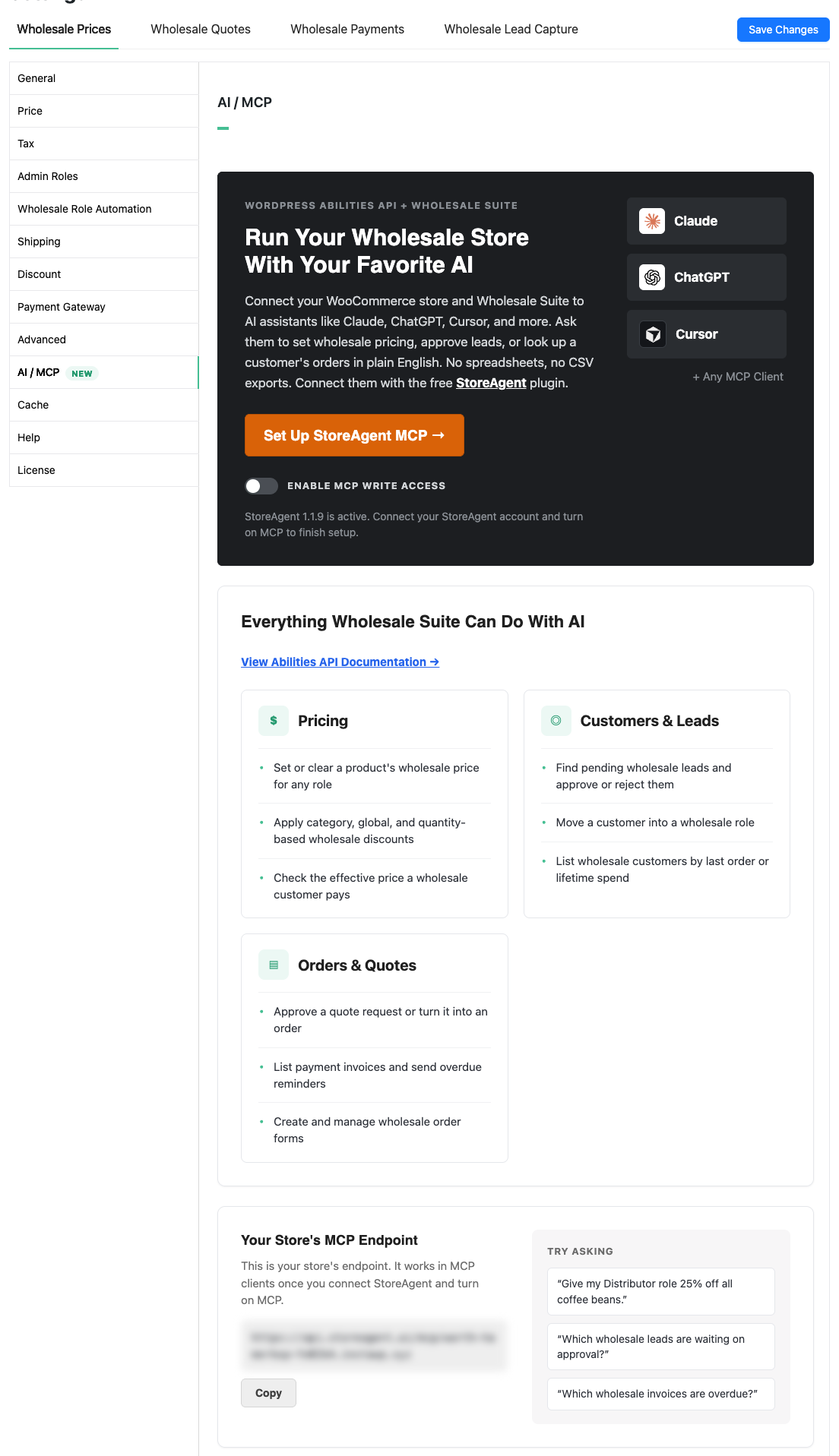
Connect StoreAgent
The tab shows a button that changes with StoreAgent’s status. Click it and follow the prompts until it reads Manage StoreAgent Connection. For the StoreAgent side, see StoreAgent’s MCP connection guide.
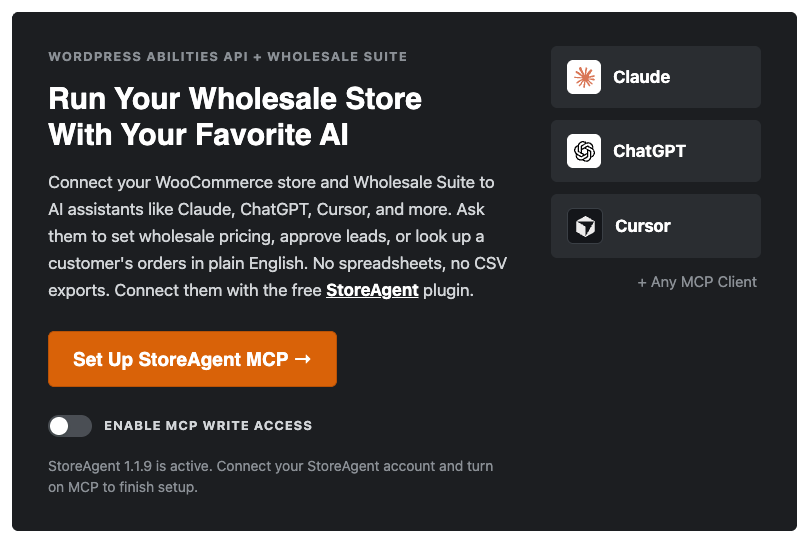
Paste your endpoint into your assistant
Scroll to the Your Store’s MCP Endpoint card and click Copy. Paste that URL into your assistant’s MCP or connector settings, then approve the connection when StoreAgent asks. Then choose read-only or read and write access.
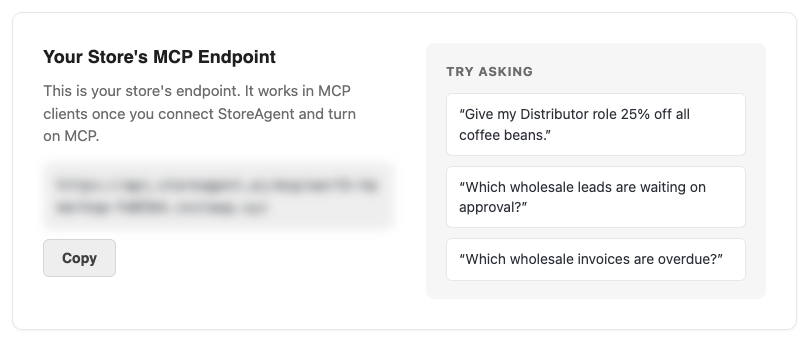
Decide on write access later
Out of the box, the assistant can only read wholesale data. Leave it that way until you’re comfortable with its answers. Switching writes on takes two settings, both explained under Keeping Control.
Using an MCP adapter plugin instead of StoreAgent also works. In that case, follow the adapter’s own steps, because the tab’s write switch only applies to StoreAgent.
Wholesale Tasks You Can Run By Conversation
Once connected, you ask in plain English and the assistant picks the matching ability. What’s available depends on which plugins you run.
| What you want to do | Example request | Plugin needed | Reads or changes data | Who can approve it |
|---|---|---|---|---|
| Check a wholesale price | “What’s the wholesale price of the Classic Hoodie for the Wholesale Customer role?” | Wholesale Prices (free) | Reads | Shop Manager or Administrator |
| Find your best wholesale customers | “Who are my top 10 wholesale customers by lifetime spend?” | Wholesale Prices (free) | Reads | Shop Manager or Administrator |
| Set a minimum order | “Set a minimum order of $250 for the Distributor role” | Wholesale Prices Premium | Changes | Administrator only |
| Copy an order form | “Create a draft copy of my Bulk Coffee order form” | Wholesale Order Form | Changes | Shop Manager or Administrator |
| Clear the quote queue | “Which quotes are waiting for approval?” | Wholesale Quotes | Reads | Shop Manager or Administrator |
Checking prices and customers
The free plugin covers the two lookups you’ll use most. Get wholesale price shows the price saved on a product for a role. List wholesale customers returns each wholesale customer with their last order date and lifetime spend, so “who are my top 10 wholesale customers?” gets an answer without a CSV export.
Premium adds Get effective price, which works out what a specific customer pays after product, category, and role rules, plus role and pricing-rule overviews.
Changing pricing rules
With the free plugin, the assistant can set or clear a role’s price on a product. Premium unlocks the bigger rule changes, all Administrator-only:
- Discounts: global role discounts, category discounts, percentage quantity tiers, and cart subtotal discounts.
- Order rules: minimum order quantity or subtotal per role.
- Access and checkout: product visibility by role, tax-exempt roles, and which shipping methods and payment gateways each role sees.
- Roles and users: create a wholesale role, or move a user into one.
Building and editing order forms
WooCommerce Wholesale Order Form adds 8 abilities. Your assistant can list, read, create, update, delete, or duplicate forms, hand you a form’s shortcode, and pull combined order form analytics for a date range.
Working through quotes
WooCommerce Wholesale Quotes brings the largest set: 21 abilities. Your assistant can list quotes by status or customer, approve, decline, or cancel them, and convert an approved quote into an order. Bulk status changes cover up to 50 quotes at once, and it can message a customer on a quote or pull quote stats.
Keeping Control: Start Read-Only, Then Allow Changes
Start with read-only access. Two separate settings must both allow writes before an assistant can change anything: the Enable MCP write access switch on the AI / MCP tab, and the access level you chose when you approved the connection.
Write access changes live store data, including prices, discounts, roles, order forms and quotes. Some changes, like deleting a quote or an order form, can’t be undone.
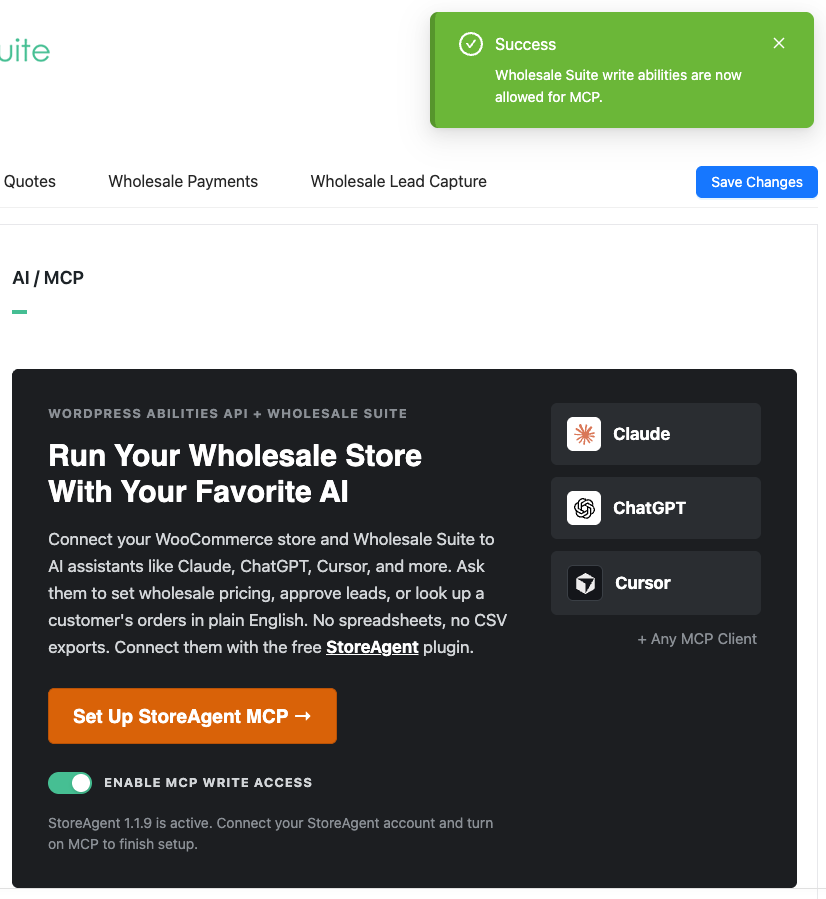
A few more guardrails are built in:
- The assistant acts as whoever approved it. If a Shop Manager approved the connection, the assistant can read Premium pricing but can’t change it. Premium rule changes need an Administrator-approved connection. If several people run the store, give staff their own accounts instead of sharing admin access.
- Risky actions ask first. Abilities that overwrite or remove data are marked destructive, which tells the assistant to check with you before it runs them. How it asks depends on your assistant, so review its settings.
- Changes get logged. On WordPress 7.1 or newer, every ability call is recorded under WooCommerce > Status > Logs.
What we’ve seen: One thing that catches store owners out is asking the assistant to move a customer into a wholesale role. That ability replaces every role the user has, including Shop Manager or Editor, so check the user first. Quote edits work the same way. Updating a quote replaces its whole item list, so name every item you want to keep.
What The Assistant Can’t Do Yet
Some wholesale tasks still belong in the admin screens:
- No lead or invoice tasks: Wholesale Lead Capture and Wholesale Payments don’t add AI abilities yet. Approve new wholesale applicants and manage invoices in the dashboard.
- Effective price isn’t the checkout price: Get effective price skips cart quantity discounts, cart subtotal discounts and scheduled wholesale sale prices. The customer can pay less at checkout.
- Order form analytics are combined: Totals cover all forms together and can’t be split by form.
- Usage limits apply: StoreAgent plans limit AI actions, and the assistant stops when you reach the limit.
For bulk price changes you want to eyeball line by line, the settings screens are still the better tool.
Start Managing Your Wholesale Store With AI
Your assistant handles lookups and small rule changes, and you keep approvals. Read-only access gives you answers on day one, and write access can wait until you trust what you’re seeing. Run it that way, and you can safely try WooCommerce MCP on a live wholesale store.
- Learn what WooCommerce MCP means for your wholesale store
- Check the requirements and tidy your roles before connecting
- Connect Claude or ChatGPT through the AI / MCP tab
- Try the wholesale tasks you can run by conversation
- Start read-only, then allow changes
Ready to try WooCommerce MCP on your wholesale store? Start free with WooCommerce Wholesale Prices, or unlock all four ability sets with the Wholesale Suite bundle.
Frequently Asked Questions
Is there an MCP for WordPress and WooCommerce?
Yes. WordPress provides an Abilities API and an MCP adapter, and WooCommerce has MCP support for products and orders, currently in developer preview. Wholesale Suite builds on the same Abilities API. Once WooCommerce Wholesale Prices 2.3.0 or newer is active, your assistant can reach wholesale abilities through StoreAgent or an MCP adapter plugin.
Can ChatGPT or Claude change my wholesale prices without asking?
Only if you let it. Read-only is the default, and writes need both the Enable MCP write access switch and a read-and-write connection. Abilities that overwrite or remove data are marked destructive, which tells the assistant to ask before running them. Your assistant decides how it asks, so check its settings.
Do I need StoreAgent to use MCP with Wholesale Suite?
No. StoreAgent is the easiest route, and the AI / MCP tab is built for it. You can also connect through an MCP adapter plugin. With an adapter, the Enable MCP write access switch has no effect, and the adapter decides what your assistant can do.
Can my wholesale customers use these AI abilities?
In a limited way. A wholesale customer can read their own role’s wholesale price. Any logged-in customer can also list and read their own quotes, including messages, history and the public link. Everything else requires a Shop Manager or Administrator.
Which Wholesale Suite plugins work with AI assistants?
Four plugins add abilities today. WooCommerce Wholesale Prices (free) adds 3 and switches the feature on. Premium adds 15, Order Form adds 8 and Quotes adds 21. Wholesale Lead Capture and Wholesale Payments don’t add abilities yet.