Picture a parts supplier on B2BKing with a VIP group, a Trade group, and tier tables on every fast-moving SKU. They’ve decided to move to Wholesale Suite, and their first worry about the B2BKing migration is typing hundreds of group prices back in by hand.
You won’t have to. B2BKing saves group prices and tiers as product data in a documented format, so a B2BKing migration can bring them across in one CSV import. The real work is translating B2BKing’s column names and tier strings into the ones Wholesale Suite reads.
This guide walks through that translation column by column. For the general process that applies to any plugin switch, keep our guide to switching WooCommerce wholesale plugins safely open alongside it.
Can You Migrate From B2BKing To Wholesale Suite Automatically?
No. There’s no one-click migrator from B2BKing to Wholesale Suite, so a B2BKing migration to Wholesale Suite is a CSV job. Export B2BKing’s price data, rename and convert the columns, then import it through WooCommerce’s product importer or WP All Import.
You may come across the WholesaleX Migration Tool on WordPress.org while researching this. Its listing says it moves user roles, wholesale pricing, and dynamic rules from B2BKing into WholesaleX, which is a different plugin. If Wholesale Suite is your destination, the export, convert, and import route below applies.
Where B2BKing Stores Your Prices And Rules
B2BKing saves group prices and tiers as post metadata, the key-value pairs WordPress attaches to each product, keyed by each customer group’s ID. Knowing those keys makes a bulk B2BKing migration possible because every value you need already sits in a predictable column.
According to B2BKing’s documentation, each group has a numeric ID, and its prices are saved like this:
- Regular group price:
b2bking_regular_product_price_group_{ID} - Sale group price:
b2bking_sale_product_price_group_{ID} - Tiered prices:
b2bking_product_pricetiers_group_{ID}, written asquantity:price;pairs. For example,10:70;20:60;means 70 per piece from 10 pieces and 60 per piece from 20. B2C tiers useb2bking_product_pricetiers_group_b2cinstead of a group ID.
There are two ways to get these values out. B2BKing’s own price tool (B2BKing > Tools > Import / Export) downloads a CSV with a product ID or SKU column, then regular, sale and tier columns for B2C, followed by the same three columns for each group. Its WordPress.org listing places that CSV tool under Premium features. On the free core, WooCommerce’s product exporter with “Export custom meta” ticked includes the same product meta keys.
Customer-specific prices need a separate look. B2BKing’s customer price lists store negotiated prices as product meta keyed by user ID, such as b2bking_regular_price_user_{ID}, and older setups may use fixed price dynamic rules instead. Wholesale Suite has no per-customer fixed product price, so plan those buyers into dedicated roles, as covered further down.
Everything else lives outside the product rows. Dynamic rules, registration fields, customer group assignments, conversations, quotes and purchase lists are things you rebuild by hand during the B2BKing migration. Before you deactivate B2BKing, note each customer’s group from its Customers page or their user profile.
B2BKing To Wholesale Suite Field Map
Every B2BKing pricing feature lands in one of five Wholesale Suite plugins. The free Wholesale Prices plugin gives you one wholesale role with per-product wholesale prices. Wholesale Prices Premium adds unlimited roles, wholesale sale prices, quantity tiers, category and global percentages, per-customer overrides, product visibility, tax, shipping and payment mapping, and minimum orders.
Lead Capture, Order Form, Wholesale Quotes and Wholesale Payments cover registration, one-page ordering, quotes and invoiced payment plans. For a feature-by-feature verdict, read our Wholesale Suite vs B2BKing comparison. The table below only shows where your data goes during a B2BKing migration.
| B2BKing (per its docs and listing) | Wholesale Suite destination | How it moves |
|---|---|---|
| Customer group (with ID) | Wholesale role, created in Wholesale > Roles (1 free, unlimited with Premium) | Recreate; group ID becomes role key |
b2bking_regular_product_price_group_{ID} | {role}_wholesale_price | CSV import |
b2bking_sale_product_price_group_{ID} | {role}_wholesale_sale_price (Premium) | CSV import |
b2bking_product_pricetiers_group_{ID} | wwpp_post_meta_quantity_discount_rule_mapping plus enable flag (Premium) | Convert, then import |
| Percentage discount dynamic rules | Global % per role or category % (Premium) | Rebuild |
| Payment and shipping per group | Per-role gateway and shipping mapping (Premium) | Rebuild |
| Tax exemptions | Per-role tax exemption (Premium) | Rebuild |
| Minimum order rules | Per-role minimum quantity and/or subtotal (Premium) | Rebuild |
| Customer-specific pricing | Per-customer overrides on the user profile (Premium) | Rebuild per customer |
| Customer group rules (auto-promote) | Wholesale Role Automation (Premium) | Rebuild |
| Registration custom fields | Wholesale Lead Capture form | Recreate (date fields become text) |
| Order form | Wholesale Order Form | Set up |
| Quote requests and conversations | Wholesale Quotes messaging | Set up |
| Invoice payment gateway | Wholesale Payments plans with Stripe invoices | Set up |
Features with no direct equivalent
A few B2BKing Premium features have no matching Wholesale Suite setting. Plan for these before you start the B2BKing migration:
- Subaccounts and company order approval: no built-in equivalent.
- Purchase lists: no built-in equivalent.
- Offers sent as branded PDFs: no plugin-generated PDF; quotes run through Wholesale Quotes instead.
- Maximum order rules: Wholesale Suite sets minimums only.
- Separate B2B and B2C stock: no built-in equivalent.
- VIES VAT validation: no built-in equivalent.
- Purchase order gateway: no built-in equivalent; Wholesale Payments covers invoiced terms.
Converting B2BKing Group Prices And Tiers For Import
The hands-on part of a B2BKing migration comes down to four spreadsheet jobs: map group IDs to role keys, rename price columns, rewrite tier strings, then import. Our guide to importing wholesale prices by CSV covers the import side in more detail.
Turn group IDs into role keys
Create one Wholesale Suite role for each B2BKing group under Wholesale > Roles. The free plugin includes a single role, the default Wholesale Customer role with the keywholesale_customer, so two or more groups need Premium. When you add wholesale roles, the Role Key is optional and, if you leave it blank, it’s generated from the name. If you set it yourself, use only lowercase letters, numbers, hyphens, and underscores.
Write down each group ID next to its new role key. That small table becomes your column-rename key for the whole B2BKing migration.
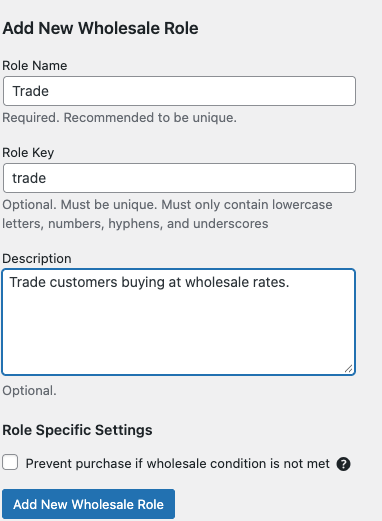
Here’s what this looks like in practice (example data):
| B2BKing group | Group ID | Wholesale Suite role key | Price column becomes |
|---|---|---|---|
| VIP | 27 | vip_wholesale | vip_wholesale_wholesale_price |
| Trade | 222 | trade | trade_wholesale_price |
Rename the price columns
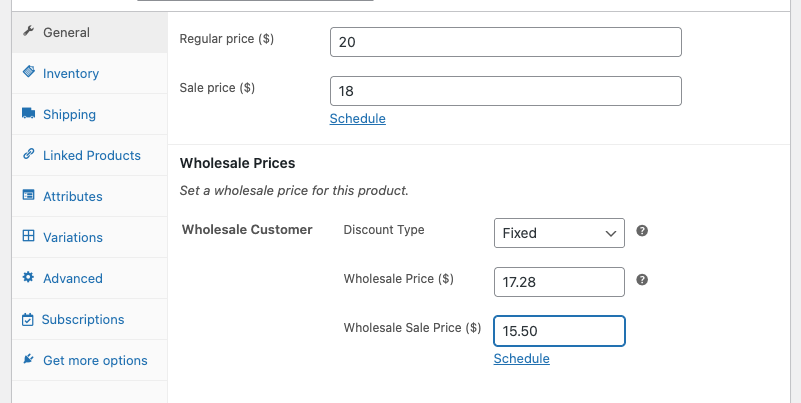
Set a wholesale price on one product in Wholesale Suite, then go to Products > All Products, click Export, and tick “Export custom meta” before generating the CSV. That file shows the exact headers WooCommerce expects, labeled Meta: plus the key. WooCommerce’s product CSV importer and exporter documentation explains the full column schema if you need it.
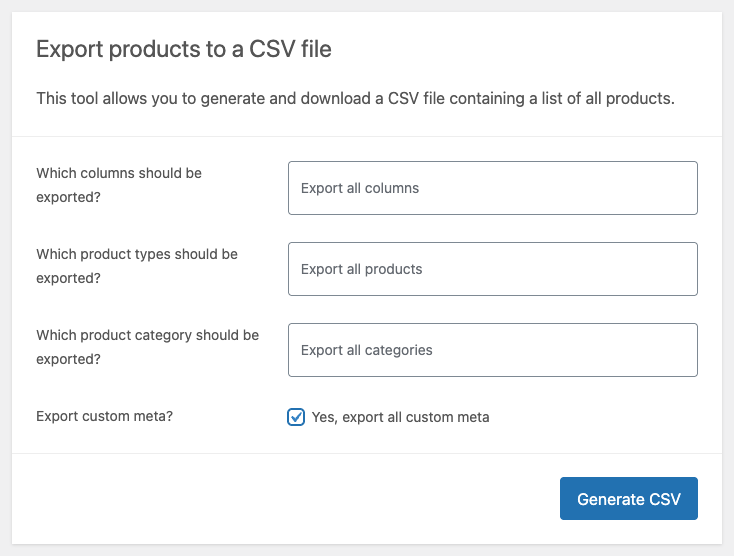
Now rename the B2BKing columns using your key. b2bking_regular_product_price_group_222 becomes trade_wholesale_price. Give your sample product a wholesale sale price too, then use the sale price column from that export as the new name for b2bking_sale_product_price_group_222. Premium saves the sale price per role and lets you schedule it.
Keep every price as a plain number. The importer reads static values, so strip out currency symbols and replace any spreadsheet formulas with their results before you save the file.
Convert tier strings into quantity rules
This is the one real transform in a B2BKing migration. B2BKing lists only the minimum quantity for each tier, while Wholesale Suite stores a start and an end quantity on every row.
Split each string at the semicolons. Each row ends one below the next row’s minimum, and the last row’s end quantity stays blank. Then set wwpp_post_meta_enable_quantity_discount_rule to yes and write the rows as JSON into wwpp_post_meta_quantity_discount_rule_mapping.
Here’s what this looks like in practice (example data). b2bking_product_pricetiers_group_222 holds 10:70;20:60;, which becomes:
[{"wholesale_role":"trade","start_qty":"10","end_qty":"19","price_type":"fixed-price","wholesale_price":"70"},{"wholesale_role":"trade","start_qty":"20","end_qty":"","price_type":"fixed-price","wholesale_price":"60"}]
If VIP and Trade both have tiers on the same product, put both roles’ rows in one array. Each row carries its own wholesale_role value, so a single mapping column holds every role’s tiers for that product.
Stores that turned on B2BKing’s “Enter % Instead of Prices” setting have percentages in those tier strings rather than prices. Work out the fixed price for each tier in your sheet before you build the JSON, so the values match the fixed-price type.
What We’ve Seen: One thing we commonly see in tier conversions: the last tier gets an end quantity copied from the row above, so the biggest buyers fall back to the base wholesale price. Leave the final tier’s end quantity blank. Blank means no upper limit.
Import and rebuild visibility
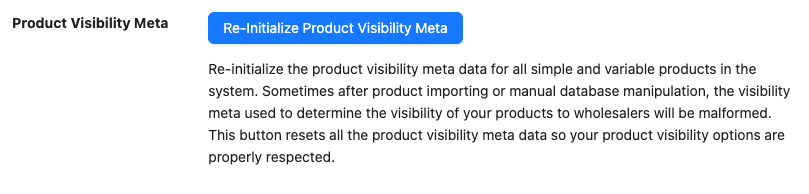
Run the file through WooCommerce’s product importer with “Update existing products” ticked, which matches rows to your catalog by product ID or SKU. Alternatively, use WP All Import with its WooCommerce Add-On Pro and map the fields under Custom Fields > See Detected Fields. When the import finishes, go to Wholesale > Settings > Help and click Re-Initialize Product Visibility Meta.
Imports can bypass the normal product save that writes Wholesale Suite’s visibility data. This tool lets you rebuild product visibility after importing without touching your prices or settings. If you plan to re-run imports, Premium 2.1.1 or later can trigger the same routine after every WP All Import run with a shortcode snippet.
Rebuilding B2BKing Rules In Wholesale Suite
B2BKing rules sit outside the product rows, so this part of the B2BKing migration happens once, in Wholesale Prices Premium settings and the add-ons:
- Percentage discount rules: set a global percentage per role, or a percentage per category.
- Tiered price rules: recreate rule-based tiers as general quantity-based discounts for each role.
- Payment and shipping per group: map payment gateways and shipping methods to each role.
- Tax exemptions: enable tax exemptions for roles that have them.
- Minimum order rules: set a minimum quantity and/or subtotal per role.
- Cart discounts: add cart subtotal discounts per role, as a percentage or a fixed amount, starting at the subtotal you choose.
- Customer-specific prices: use per-customer wholesale overrides in the user profile for percentage discounts, alternate quantity discounts, minimums, tax, shipping, or payment gateways. The per-customer percentage only applies to products without a direct wholesale price, and your import sets direct role prices. For customers with negotiated fixed prices, a dedicated role is a better fit.
- Customer group rules: use wholesale role automation to promote or demote buyers by total spent or order count.
- Registration fields: rebuild them in Wholesale Lead Capture, which supports Text, Text Area, Number, Email, URL, Select, Radio, and Checkbox fields, with manual or automatic approval. Map date fields to Text.
- Order form: set up Wholesale Order Form for one-page catalog ordering.
- Quotes and conversations: Wholesale Quotes covers quote requests, messages between buyer and admin, approvals, and converting quotes into orders.
- Invoice gateway: Wholesale Payments offers payment plans such as Net 30, 60 or 90, powered by Stripe Invoices.
Finish Your B2BKing Migration To Wholesale Suite
The group-ID-to-role-key sheet you built does more than drive one import. It’s a written record of how your wholesale pricing is structured, group by group and tier by tier. Keep it with your store notes, and the next price review starts from a clear map instead of a guess.
- Confirm the move is a CSV import
- Find your B2BKing price meta keys
- Map every feature to its destination
- Convert prices and tiers, then import
- Rebuild your rules once in Premium
Ready to start your B2BKing migration? See Wholesale Suite plans and pricing: the All Access Bundle includes all five plugins for $299/year at introductory pricing (renewals are at full price), with a 14-day money-back guarantee.
Frequently Asked Questions
Is there a B2BKing to Wholesale Suite migration plugin?
No. The move is a CSV import, not a one-click transfer. Export the B2BKing price columns, rename them, and import them with WooCommerce’s importer or WP All Import.
Do I need B2BKing Premium to export my prices?
Not necessarily. B2BKing’s price list CSV tool is a Premium feature, per its WordPress.org listing. WooCommerce’s own product exporter, with “Export custom meta?” ticked, exports the same group price and tier meta keys from the free core.
What happens to my B2BKing groups and customers?
Each group becomes a new Wholesale Suite role that you create yourself. A customer holds one wholesale role at a time, just as each B2BKing user sits in one group. Our step-by-step switching guide covers moving customers onto their new roles.
Can Wholesale Suite give one customer special pricing like B2BKing?
Yes, through per-customer overrides in Wholesale Prices Premium. On the user profile you can set a percentage discount, quantity rules, minimum order, tax exemption, shipping and payment gateways for that customer. For a fixed price list unique to one buyer, give them a dedicated role.
Do I need Premium to migrate from B2BKing?
Only if you run more than one group or use tiers. The free Wholesale Prices plugin gives you one wholesale role with per-product fixed or percentage prices. Two or more groups, sale prices, and quantity tiers all need Wholesale Prices Premium.