
Your store shows Wholesale Price: in front of the discounted rate. If that wording does not suit your customers, you can change it to anything you like, such as Reseller Price, Trade Cost or VIP Rate. This article covers the setting that changes it everywhere, a snippet that gives each wholesale role its own label, and the separate string used for quantity increments.
Change the label for everyone
The field ships in the free WooCommerce Wholesale Prices plugin, so you do not need Wholesale Prices Premium for this part.
- Go to Wholesale > Settings in your WordPress admin.
- Open the Wholesale Prices tab, then the Price sub-tab.
- Under Price Options, type your wording into Wholesale Price Text.
- Click Save Changes.
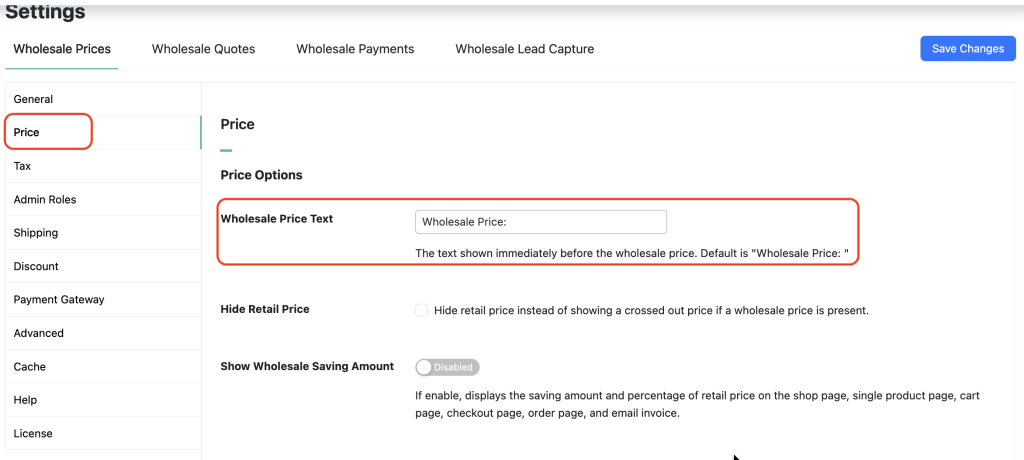
The new label appears on your product listings straight away. For the free plugin on its own, that is all you need. If you want the free-version walkthrough with the filter alternative, see how to change the wholesale price text in the free version.
Give each wholesale role its own label
The setting applies one label to every customer. To show a different label per wholesale role, filter the text with wwp_filter_wholesale_price_title_text. Add this to a child theme, a site-specific plugin, or a code snippets plugin.
add_filter( 'wwp_filter_wholesale_price_title_text', 'override_wholesale_text', 10, 1 );

function override_wholesale_text( $wholesaletext ) {

    if ( ! class_exists( 'WWP_Wholesale_Roles' ) ) {
        return $wholesaletext;
    }

    $wwp_wholesale_roles = WWP_Wholesale_Roles::getInstance();
    $wholesale_role      = $wwp_wholesale_roles->getUserWholesaleRole();

    // Replace the role keys below with your own.
    if ( ! empty( $wholesale_role ) && in_array( 'wholesale_customer', $wholesale_role, true ) ) {
        return 'Wholesale Price:';
    }

    if ( ! empty( $wholesale_role ) && in_array( 'wholesale_vip', $wholesale_role, true ) ) {
        return 'VIP Price:';
    }

    return $wholesaletext;
}
The final return $wholesaletext; matters. Without it, a customer in any role you did not list sees an empty label instead of the default.
Change the quantity increment text
Wholesale Prices Premium prints an increment note under the price when a product uses a quantity increment, for example Increments of 6. There is no setting for this wording. The string is translatable, so you change it the same way you change any other plugin string.
Translate Increments of %1$s in the WooCommerce Wholesale Prices Premium text domain. Keep the %1$s placeholder in your replacement, because it holds the increment number.
Frequently asked questions
Where do I change the wholesale price text in WooCommerce settings?
Go to Wholesale > Settings > Wholesale Prices > Price and find Wholesale Price Text under Price Options. Type your wording, such as “Reseller Price”, then click Save Changes. The new text appears wherever wholesale pricing is shown.
Do I need the Premium plugin for this?
No. The Wholesale Price Text field ships in the free Wholesale Prices plugin. Premium adds the per-role pricing that makes the role-specific labels above worth setting up.
Does the label change work with variable products?
Yes. The wording applies to every product type, including variable and grouped products. You do not need to set it per product.
Can different wholesale roles show a different label?
Yes, with the filter above. Standard buyers can see “Wholesale Price” while a VIP role sees “VIP Price”. Keep the fallback return so other roles still get the default.
Does the label appear in the cart and checkout too?
The setting controls the label shown with the price on product pages and listings. Cart and checkout templates format prices separately, and a theme or page builder can override them, so check each step of the flow after you save.
Why is my new wholesale price text not showing?
Clear your page cache and any CDN, then reload while logged in as a wholesale customer. If the old label persists, confirm the value saved under Wholesale > Settings > Wholesale Prices > Price, and check whether a snippet is filtering the text somewhere else.
Need help?
If you have a question or run into any issues, we’re here to help.
- Premium users: Open a support ticket
- Free users: Visit our community forum

