

If you sell to both wholesale and retail customers through WooCommerce, this guide covers the key wholesale metrics you should track, how to pull wholesale-specific data with Wholesale Suite and WooCommerce Analytics, and what to do with those numbers once you have them. By the end, you will know how to build a WooCommerce wholesale sales report you can actually act on.
Why You Need Separate Wholesale Sales Reporting
Wholesale and retail are fundamentally different businesses, even when they run through the same WooCommerce store. Wholesale customers buy in larger quantities at lower margins. Retail customers buy smaller quantities at higher margins. The order patterns, customer behaviors, and profit drivers look nothing alike.
When you lump the two together in your reports, you lose visibility into both channels. A spike in retail orders can mask a drop in wholesale revenue. Blended average order value might hide the fact that wholesale customers are ordering less often. Without a dedicated WooCommerce wholesale sales report, you are essentially flying blind on one of your most important revenue channels.
According to Forrester, US B2B ecommerce is projected to reach $3 trillion by 2027. That is an enormous channel, and the store owners who win in wholesale are the ones who can actually see what is happening in their wholesale data.
Separate reporting also helps you catch operational issues early. If your wholesale order count drops while revenue stays flat, you may be losing smaller accounts while a single large customer picks up the slack. That kind of concentration risk stays invisible in blended reports. When your wholesale AOV falls, it might mean buyers are splitting orders to hit minimum thresholds differently, or that your pricing tiers need adjustment.
Key Wholesale Metrics To Track
Before you start pulling reports, you need to know what to measure. These wholesale-specific metrics give you a clear picture of your B2B channel’s health, and together they form the backbone of any useful WooCommerce wholesale sales report. For a deeper look at the numbers that matter for B2B stores, see this guide on B2B metrics that matter.
Total wholesale revenue vs retail revenue
This is the most fundamental split. You need to know what percentage of your total revenue comes from wholesale versus retail. Tracking this over time reveals whether your wholesale channel is growing, flat, or shrinking relative to the rest of your business. A common starting point is to calculate wholesale as a percentage of total monthly revenue, then compare month over month and year over year.
Average wholesale order value
Your wholesale average order value (AOV) tells you how much a typical wholesale customer spends per order. B2B buyers increasingly behave like retail shoppers online. According to McKinsey, roughly two-thirds of corporate buyers now actively prefer digital or remote interactions across the buying journey, which raises the stakes for understanding how much each order is worth. If your wholesale AOV trends down, it could signal pricing issues, product mix changes, or customers splitting orders.
Wholesale orders per month
Order volume shows how active your wholesale channel is. A drop in monthly wholesale orders, even when revenue holds steady, might mean you are losing smaller wholesale customers while a few large accounts carry the total. That is a concentration risk worth knowing about. Pay attention to seasonal patterns too, since many wholesale businesses have natural ordering cycles that help you plan inventory and cash flow.
Top wholesale customers by revenue
Knowing which wholesale customers drive the most revenue helps you prioritize relationships and spot warning signs early. It also reveals concentration risk. If one customer accounts for 40% of your wholesale revenue, that is critical information for business planning, because losing that single account would be a major hit. Identifying your top five to ten wholesale customers by revenue gives you a clear list of relationships to nurture and protect.
Top wholesale products
Which products are your wholesale customers actually buying? This often differs sharply from your retail best-sellers. Tracking top wholesale products by revenue and volume helps you make smarter inventory, pricing, and promotion decisions for your B2B channel. You might discover that a product with modest retail sales is your top wholesale earner, which changes how you think about stock levels and supplier negotiations for that item.
Wholesale customer acquisition rate (new vs returning)
Are you bringing in new wholesale customers, or leaning entirely on existing accounts? A healthy wholesale channel has a mix of both. Track how many new wholesale customer onboarding completions you see each month alongside returning customer orders. If you go several months with zero new wholesale sign-ups, it might be time to revisit your registration flow, your wholesale landing pages, or how you promote your wholesale program.
Wholesale margin per product/category
Revenue is only half the picture. You also need to know your actual margins on wholesale sales, broken down by product or category. A product that generates high wholesale revenue at thin margins might be worth less than a lower-volume product with stronger margins. Review margins at the category level first, then drill into individual products where the numbers look off. This is where many store owners realize their wholesale pricing needs adjustment.
Here is what this looks like in practice (example data):
- Total wholesale revenue: $42,000 this month | $38,500 last month | +9.1% change
- Average wholesale order value: $840 this month | $770 last month | +9.1% change
- Wholesale orders: 50 this month | 50 last month | no change
- Top wholesale customer: ABC Retailers ($8,400 this month)
- Wholesale customer acquisition: 3 new customers, 47 returning
How To Track Wholesale Sales With Wholesale Suite
Wholesale Prices Premium includes wholesale sales reporting that lets you track revenue and order activity for your wholesale customers. This gives you the wholesale-specific data that WooCommerce’s default reporting does not surface on its own, and it becomes the foundation of your WooCommerce wholesale sales report.
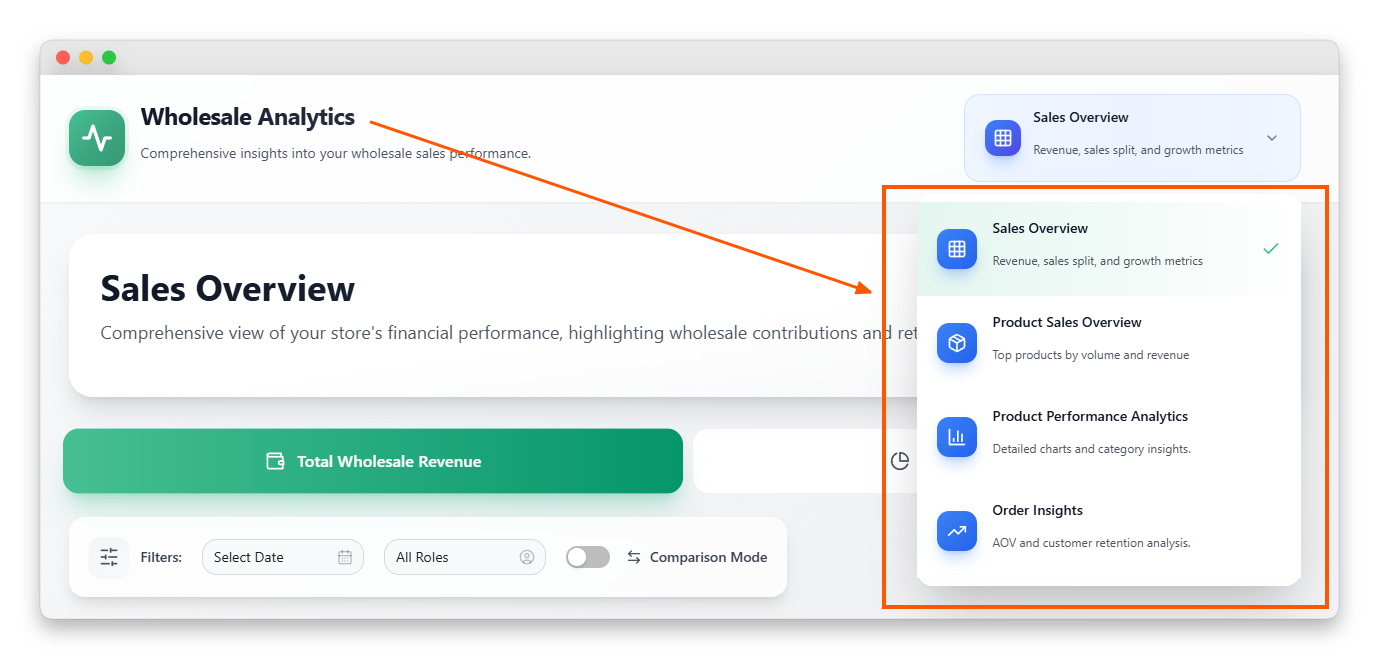
With Wholesale Prices Premium, you can view wholesale orders and revenue filtered specifically to customers assigned wholesale roles. Because Wholesale Suite already manages wholesale pricing, customer roles, and order rules inside WooCommerce, the data for wholesale transactions is captured in your store’s order history automatically. The reporting features simply surface that data without manual filtering.
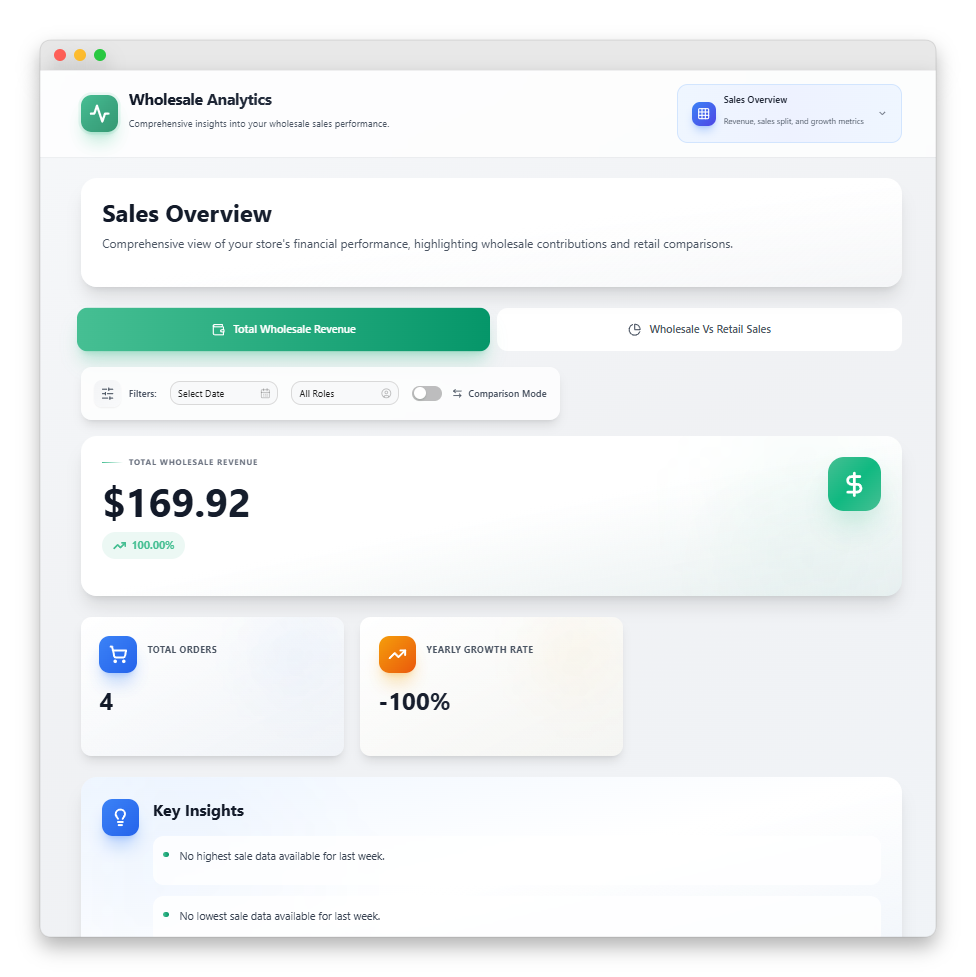
This means you can spot wholesale revenue trends, see which wholesale customers are ordering, and track wholesale order activity over time. The data is pulled directly from your WooCommerce orders, so your WooCommerce wholesale sales report reflects actual transactions processed through your store.
Because Wholesale Suite already separates wholesale and retail customers through its role system, the reporting builds on data you are already generating. Every time a wholesale customer places an order using their wholesale pricing, that transaction is tied to their wholesale role. The reporting lets you view and analyze those orders as a group, rather than hunting through your entire order list to figure out which sales were wholesale.
For most store owners, this wholesale-specific view is the missing piece. WooCommerce tracks every order, but it does not natively distinguish between a $50 retail order and a $5,000 wholesale order placed by a customer with wholesale pricing. Wholesale Prices Premium bridges that gap by tying your reporting to the wholesale roles and pricing structures you have already configured.
For further details, you may read: New Feature! Wholesale Reports Analytics Dashboard For Your WooCommerce Store.
Using WooCommerce Analytics For Wholesale Insights
WooCommerce includes a built-in Analytics dashboard that provides a solid foundation for understanding your store’s performance. You will find it under WooCommerce > Analytics in your WordPress admin. The Analytics section includes views for Revenue, Orders, Products, Categories, Coupons, and Customers.
For wholesale insights, the key is filtering your data by customer type. Wholesale Suite creates specific WordPress user roles for your wholesale customers, such as “Wholesale Customer” or any custom wholesale roles you have configured. You can use those roles to segment your WooCommerce data and shape it into a WooCommerce wholesale sales report.
The Orders report lets you review order history and filter by date range. By cross-referencing with customer roles, you can identify which orders came from wholesale customers versus retail. The Customers report shows customer-level data, including total spend and order count, which helps you pinpoint your top wholesale accounts.
One practical approach is to export your WooCommerce order data as a CSV file
WooCommerce Analytics includes export functionality for most report types. Once you have the raw data in a spreadsheet, you can filter by customer role, build pivot tables, and create the exact wholesale versus retail breakdowns your WooCommerce wholesale sales report needs.
This export approach is especially useful for tracking metrics like wholesale margin per product. You can combine order data with your cost information in a spreadsheet to calculate real margins that WooCommerce’s built-in reports do not show directly.
Building a monthly review routine
The most effective way to use your wholesale reporting is to build a consistent review cadence. Set a recurring time, whether that is the first Monday of each month or every other Friday, to pull your key wholesale metrics and compare them to the previous period.
Start each review with the big picture: total wholesale revenue and its share of overall revenue. Then look at your average order value and order count. If revenue is up but order count is flat, your existing customers are spending more. When order count rises but revenue stays flat, you might be gaining lower-value accounts.
Finally, check your top customers list and your new-versus-returning split. Changes in these numbers often signal shifts in your wholesale channel’s health before they show up in the revenue totals. Documenting each review in a simple spreadsheet turns a one-time WooCommerce wholesale sales report into the trend data you need to make smart decisions about pricing, inventory, and outreach.
Advanced Reporting Options
If you need deeper analytics than WooCommerce Analytics and Wholesale Prices Premium provide natively, a few additional options are worth considering.
Metorik is an analytics platform built specifically for WooCommerce, and it is listed as an official integration on the Wholesale Suite integrations page. It offers more granular reporting, including segmentation, automated reports, and customer insights that go beyond WooCommerce’s built-in analytics. Because it connects directly to your WooCommerce data, it can pull in the wholesale customer role information that Wholesale Suite creates, giving you another way to segment and analyze your wholesale sales.
The right approach depends on your wholesale volume and complexity. A store with ten wholesale customers and straightforward pricing might do fine with WooCommerce Analytics exports and a monthly spreadsheet review. A store with hundreds of wholesale accounts, tiered pricing, and multiple product categories might benefit from a dedicated tool like Metorik alongside Wholesale Suite’s reporting.
Whichever path you choose…
Consistency is what matters. A simple WooCommerce wholesale sales report reviewed every month beats a complex analytics setup that nobody checks. Start with the basics, build the habit of reviewing your wholesale data regularly, and layer in more sophisticated tools as your wholesale operation grows.
Start Tracking Your WooCommerce Wholesale Sales Report Today
Running a wholesale channel without dedicated reporting is like driving without a dashboard. You might be moving forward, but you have no idea how fast, how efficiently, or whether something is about to break. The good news is that setting up proper wholesale tracking does not require expensive BI tools or custom development.
With the right combination of WooCommerce Analytics and Wholesale Suite, you can build a clear WooCommerce wholesale sales report that shows exactly how your wholesale business is performing and where to improve it. Start simple, review consistently, and let the trends guide your decisions on pricing, inventory, and customer relationships. Over time, that habit of checking your wholesale numbers becomes one of the most valuable routines in your business.
Here’s what we covered in this article:
- Why you need separate wholesale sales reporting
- Key wholesale metrics to track
- How to track wholesale sales with Wholesale Suite
- Using WooCommerce Analytics for wholesale insights
- Advanced reporting options
Ready to get visibility into your wholesale channel? Wholesale Suite bundle gives you wholesale pricing, order management, and sales reporting in one package, so you can finally see how your wholesale business is really performing.
Frequently Asked Questions
Can I track wholesale sales separately from retail in WooCommerce?
Yes. Wholesale Suite assigns specific user roles to your wholesale customers, which lets you filter and segment your WooCommerce order data by customer type. Wholesale Prices Premium includes wholesale sales reporting, and you can also use WooCommerce’s built-in Analytics to filter by wholesale customer roles to build a WooCommerce wholesale sales report.
What is a good average wholesale order value?
This varies widely by industry and product type. Wholesale orders should generally be substantially larger than retail orders, since wholesale customers buy in bulk at discounted pricing. Track your own wholesale AOV over time and focus on whether it is trending up, down, or flat rather than benchmarking against a universal number.
How often should I review wholesale sales reports?
At minimum, review your wholesale metrics monthly. If wholesale makes up a significant portion of your revenue (30% or more), weekly reviews are better. The key numbers to check each time are total wholesale revenue, average order value, order count, and any changes in your top customer list.
Does Wholesale Suite work with other WooCommerce reporting tools?
Yes. Because Wholesale Suite works within WooCommerce’s native order and customer framework, any reporting tool that reads WooCommerce data can access wholesale order information. Metorik is listed as an official integration on the Wholesale Suite integrations page, and standard WooCommerce data export tools also work with wholesale order data.
Can I export my WooCommerce wholesale sales report data?
Yes. WooCommerce Analytics includes CSV export for orders, customers, and revenue reports, and you can filter that export by wholesale customer roles in a spreadsheet. Wholesale Prices Premium’s reporting works with your existing WooCommerce order data, so any WooCommerce-compatible export method will include the wholesale transactions behind your WooCommerce wholesale sales report.