Trade shows remain one of the most effective ways to find new wholesale customers. You get face-to-face time with buyers, show off your products in person, and you build relationships that turn into long-term accounts. This wholesale trade show checklist covers everything you need to do before, during, and after an event so your Wholesale Suite-powered WooCommerce store is ready to convert the leads you capture.
Think of the wholesale trade show checklist below as the bridge between a great booth and a full pipeline of new accounts. If you want to grow your B2B customer base between events too, our guide on distributor marketing strategies for wholesale businesses is a useful companion read.
Before The Trade Show: Store Preparation Checklist
The work you do before the event determines how smoothly everything goes during and after it. These are the six things to have in place before you set foot on the trade show floor. Treat this part of your wholesale trade show checklist as non-negotiable, because everything that follows depends on it.
Set up your wholesale registration form
Your registration form is the single most important item on your wholesale trade show checklist. Without it, you are back to collecting business cards and entering contacts by hand later.
Wholesale Lead Capture lets you create a custom wholesale registration form on your WooCommerce store. Visitors fill out their business details, select the products or categories they are interested in, and submit an application for a wholesale account. You decide whether applications are approved automatically or routed through manual review.
Set this up well before the event so you have time to test it, customize the fields, and confirm the confirmation emails are working correctly.
Create a QR code linking to your registration page
Once your registration form is live, grab its URL and turn it into a QR code using any free QR code generator (QR Code Generator, QR Code Monkey, and similar tools all work well). Print this QR code on everything: booth signage, business cards, product tags, brochures, and handouts.
When a buyer at your booth shows interest, they scan the code on their phone and are taken directly to your wholesale registration page. No typing URLs, no “I’ll sign up later” that never happens. According to Statista, roughly 89 million smartphone users in the United States scanned a QR code in 2022, a figure projected to surpass 100 million by 2025. Your buyers are already in the habit of scanning codes.
Prepare wholesale pricing tiers for different customer types
At a trade show, you will meet a wide range of buyers: independent retailers, regional distributors, chain stores, and specialty shops. Each group has its own purchasing volumes and pricing expectations.
Before the event, set up your wholesale pricing tiers using Wholesale Prices Premium. Create a separate wholesale role for each customer type you expect to encounter. For example, you might build a “Retail Partner” role with one discount level and a “Distributor” role with deeper discounts for larger volumes.
Having these roles pre-configured means you can assign new leads to the right tier immediately after the show, rather than scrambling to set up pricing while leads go cold.
Set up your order form for quick demos at the booth
Nothing sells your wholesale program like showing a buyer how easy it is to order from you. Wholesale Order Form gives you a single-page, AJAX-powered ordering experience built for bulk purchasing.
Keep a tablet or laptop at your booth loaded with the order form. If you haven’t built one yet, the WooCommerce setup checklist for your order form tracks the two steps that get it live on your site before the show. When a buyer asks about your ordering process, walk them through it in 30 seconds: search for products, view wholesale pricing, adjust quantities, and add to cart. It is a live demo that proves you have built a professional wholesale operation, not a retail store with a “contact us for pricing” page.
Test your store on mobile
Here is a step that too many store owners skip. Research from Think with Google found that about half of all B2B search queries are made on smartphones. Trade show buyers will check your store on their phones, either at your booth or back in their hotel room that evening.
Before the event, pull up your store on multiple mobile devices and verify that:
- The wholesale registration form loads correctly and every field is usable
- The order form displays properly and the search and filter functions work
- Wholesale pricing shows up accurately for logged-in wholesale customers
- The checkout process runs without any layout issues
Fix anything that looks broken on mobile before the show, not after.
Prepare printed wholesale price sheets or line sheets
Digital tools are great, but a trade show is still a physical environment. Buyers expect to walk away with something they can review later. Even small printing errors can affect how professional your business appears, so it’s worth carefully reviewing every detail before sending materials to print. The same careful approach can help you avoid calendar printing mistakes when preparing your trade show materials and other business documents. Prepare printed wholesale price sheets or line sheets that include product photos, SKU numbers, minimum order quantities, and wholesale pricing.
These printed materials complement your digital setup nicely. Include your registration page QR code on every printed piece so buyers can move from paper to digital sign-up with a single scan.
For a deeper look at what belongs in your line sheets and how to format them, see our wholesale line sheet guide.
During The Trade Show: Capturing Leads
Your preparation is done. The next part of your wholesale trade show checklist is execution on the floor, and the goal for every conversation is the same: get interested buyers into your system before they walk away.
Direct visitors to your online registration form
Set up a tablet at your booth with your wholesale registration page open and ready. When a buyer expresses interest, hand them the tablet. Alternatively, point to the QR code on your signage and let them register on their own phone.
The goal is to get leads into your system while they are standing in front of you and interested, not after the show when their attention has moved on. According to the Center for Exhibition Industry Research (CEIR), 81% of trade show attendees have buying authority, which means the people at your booth are genuine decision-makers. Capture their information while you have their attention.
Use custom fields to capture trade show-specific information
This is where Lead Capture’s custom fields earn their keep. Before the event, add custom fields to your registration form that record trade show-specific data:
- Products of interest (dropdown or checkboxes)
- Estimated monthly order volume (text field)
- Booth notes (text area for your team to add context about the conversation)
- How did you hear about us? (with “Trade Show” as an option)
This information becomes gold when you follow up after the event. Rather than sending a generic “thanks for visiting our booth” email, you can reference the exact products they asked about and the volume they mentioned.
Demo your wholesale ordering experience
When a buyer asks “how does ordering work?” you want to show them, not just tell them. Pull up Wholesale Order Form on your booth device and walk them through the process:
- Search or filter to find products
- See wholesale pricing displayed clearly
- Set quantities for multiple products on one page
- Add everything to cart in a single click
A live demo does more than explain how ordering works. It proves you have invested in making the wholesale buying experience professional and efficient, and buyers remember that.
After The Trade Show: Converting Leads To Customers
The real work starts when you get home. This is the stage where most store owners lose momentum, and it is exactly where your pre-show preparation pays off. A wholesale trade show checklist that stops at the booth leaves money on the table, so the steps below matter just as much as the prep.
Process pending wholesale applications quickly
Speed matters here. The leads you collected are also visiting other booths and talking to other suppliers. The faster you review and approve their wholesale applications, the more likely they are to place a first order with you.
Lead Capture’s admin approval queue shows every pending application in one place. You can review business details, check the custom field data captured at the show, and approve or reject each application with a click. Aim to do this within 48 hours of the event ending, as interest fades a little more with each passing day.
Send welcome emails with login details and ordering instructions
Once you approve a wholesale application, Lead Capture automatically sends a welcome email with the customer’s login credentials. Customize this email template before the show so it includes:
- Login details and a direct link to your store
- A brief overview of how to navigate wholesale pricing
- A link to the order form for easy first ordering
- Your contact information for questions
Your welcome email is the first impression after the in-person meeting, so make it count. Give new wholesale customers everything they need to place a first order without friction. For a complete walkthrough, see our wholesale customer onboarding checklist.
Follow up with personalized pricing based on booth conversations
Remember those custom fields you added to the registration form? Now is the time to use them. Review the “products of interest” and “estimated monthly order volume” data for each lead, then follow up with messaging tailored to what they told you.
If a buyer mentions ordering 500 units per month, assign them to the wholesale role and apply the appropriate volume-based pricing. If they were interested in specific categories, send them a curated list with pricing attached. Personalized follow-up built on real conversation data converts far better than a generic “thanks for stopping by” note.
Track first orders from trade show leads
After two to four weeks, check how many of your trade show leads have placed a first order. This is your trade show ROI metric, and it tells you whether the event was worth the investment.
Look at how many leads registered, how many you approved, and how many converted into actual orders. Keep this data on hand for future decisions about which events to attend and how to sharpen your process. You can also keep the pipeline flowing between shows with online lead generation; our guide on attracting wholesale leads using SEO covers how.
The Complete Wholesale Trade Show Checklist
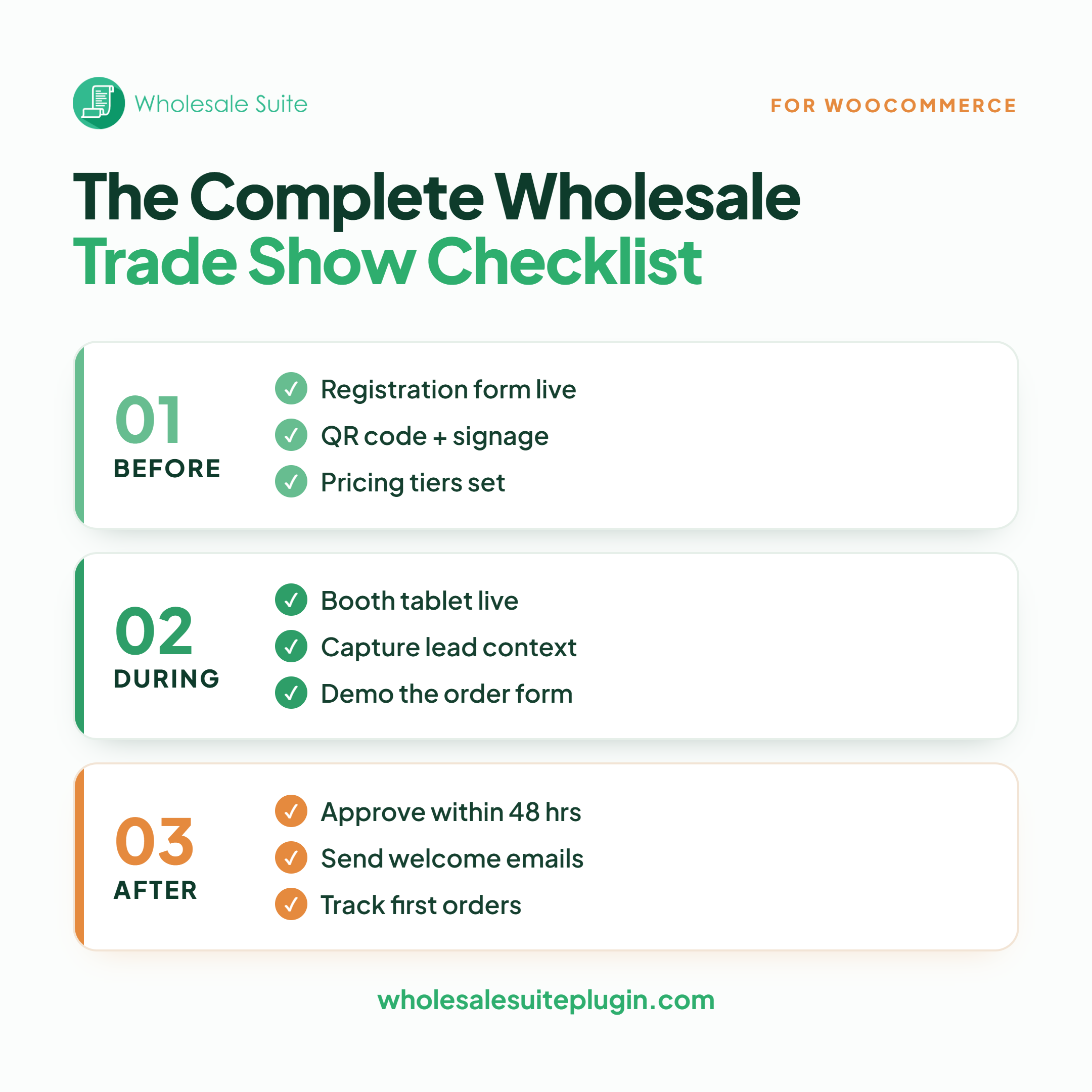
Here is every action item from this wholesale trade show checklist in one scannable list. Check off each one as you go.
Before the trade show
- Set up your wholesale registration form using Wholesale Lead Capture
- Add custom fields for trade show-specific data (products of interest, estimated volume, booth notes)
- Create a QR code linking to your registration page
- Print the QR code on booth signage, business cards, brochures, and product tags
- Set up wholesale pricing tiers for the customer types you expect to meet
- Configure your Wholesale Order Form for live demos
- Test your entire store on mobile devices (registration, ordering, pricing, checkout)
- Prepare printed wholesale price sheets or line sheets with QR codes included
During the trade show
- Set up a tablet at your booth with the registration page loaded
- Display QR code signage prominently
- Direct interested buyers to register on the spot
- Use custom fields to capture conversation context for each lead
- Demo the wholesale ordering experience to serious buyers
After the trade show
- Process all pending wholesale applications within 48 hours
- Verify welcome emails are sending with login details and ordering instructions
- Review custom field data and assign leads to appropriate pricing tiers
- Send personalized follow-ups referencing specific products and volumes discussed
- Track first orders from trade show leads over the following two to four weeks
- Evaluate trade show ROI and document lessons for next time
Print this wholesale trade show checklist, share it with your booth team, and tick off each item so nothing slips through the cracks.
Make Your Next Trade Show Count
Trade shows are a significant investment of time and money. The booth, the travel, the printed materials, and the staff hours all add up fast, and none of it pays off if the leads you capture have nowhere to land. That is the whole point of working through a wholesale trade show checklist before you go: the booth gets people interested, but your WooCommerce store is what turns that interest into wholesale accounts.
Here’s what we covered in this article:
- Before the trade show: store preparation checklist
- During the trade show: capturing leads
- After the trade show: converting leads to customers
- The complete wholesale trade show checklist
Wholesale Suite bundle gives you Lead Capture for registration, Order Form for demos and ordering, and Wholesale Prices Premium for tiered pricing, which together cover every digital step in this wholesale trade show checklist. Get everything set up before your next event so you are ready to make it count.
Frequently Asked Questions
What should be on a wholesale trade show checklist for a WooCommerce store?
A complete wholesale trade show checklist covers three phases. Before the event, set up your registration form, QR codes, pricing tiers, and a demo-ready order form, and test everything on mobile. During the event, capture leads with a booth tablet, QR signage, and custom fields. After the event, approve applications quickly, send welcome emails, assign pricing tiers, and track first orders.
How do I set up wholesale registration for trade show visitors?
Install Wholesale Lead Capture on your WooCommerce store and create a custom registration form. Add fields relevant to trade show contacts, such as “products of interest” and “estimated order volume.” The form creates a dedicated registration page with its own URL that you can share through a QR code or direct link at the event.
What’s the fastest way to onboard wholesale leads after a trade show?
Use Lead Capture’s admin approval queue to review and approve pending applications in one place. Once approved, the plugin automatically sends welcome emails with login credentials. Customize the email template before the event so it includes ordering instructions and a link to your wholesale order form, and aim to process every application within 48 hours of the event.
Can I capture different information for trade show leads vs regular wholesale applicants?
Yes. Lead Capture’s custom fields are flexible, so you can add trade show-specific fields like booth notes, products of interest, and estimated monthly volume. You can also create a separate registration form specifically for trade show events, with its own URL and QR code.
How do I create a QR code for my wholesale registration page?
Copy the URL of your Wholesale Lead Capture registration page and paste it into any free QR code generator, such as QR Code Generator or QR Code Monkey. Download the generated image and print it on your booth signage, business cards, and handouts. Lead Capture does not include a built-in QR generator, but creating one takes less than a minute with a free tool.
How many trade show leads typically convert to customers?
Conversion rates vary widely by industry, and there is no single reliable benchmark that applies to every business. What is well documented is that trade show leads tend to cost far less to close than field sales calls, according to CEIR research, which is part of why the channel stays popular with B2B sellers. The biggest levers on your own conversion rate are follow-up speed and personalization, which is exactly why preparing your WooCommerce store before the event matters so much.